20
Feature S2 - Obstruction Sensitivity
This feature determines the amount of force exerted by the operator (and gate) on an obstruction before the operator stops or
reverses. The less sensitive the setting (S1 and S2), the more force the gate will exert on the obstruction before the operator
stops and reverses. The more sensitive the setting (S4 and S5), the less force the operator will exert against the obstruction
before stopping and reversing.
NOTE: The factory setting is set for the most sensitive (S5) setting, because this is the safest setting. However, the less
sensitive settings (S1 and S2) may be necessary for heavy gates and gates with significant wind resistance. Determine what
force it takes to stop the gate at each of the five settings, then decide which of the settings works best for your installation.
Programming Buttons
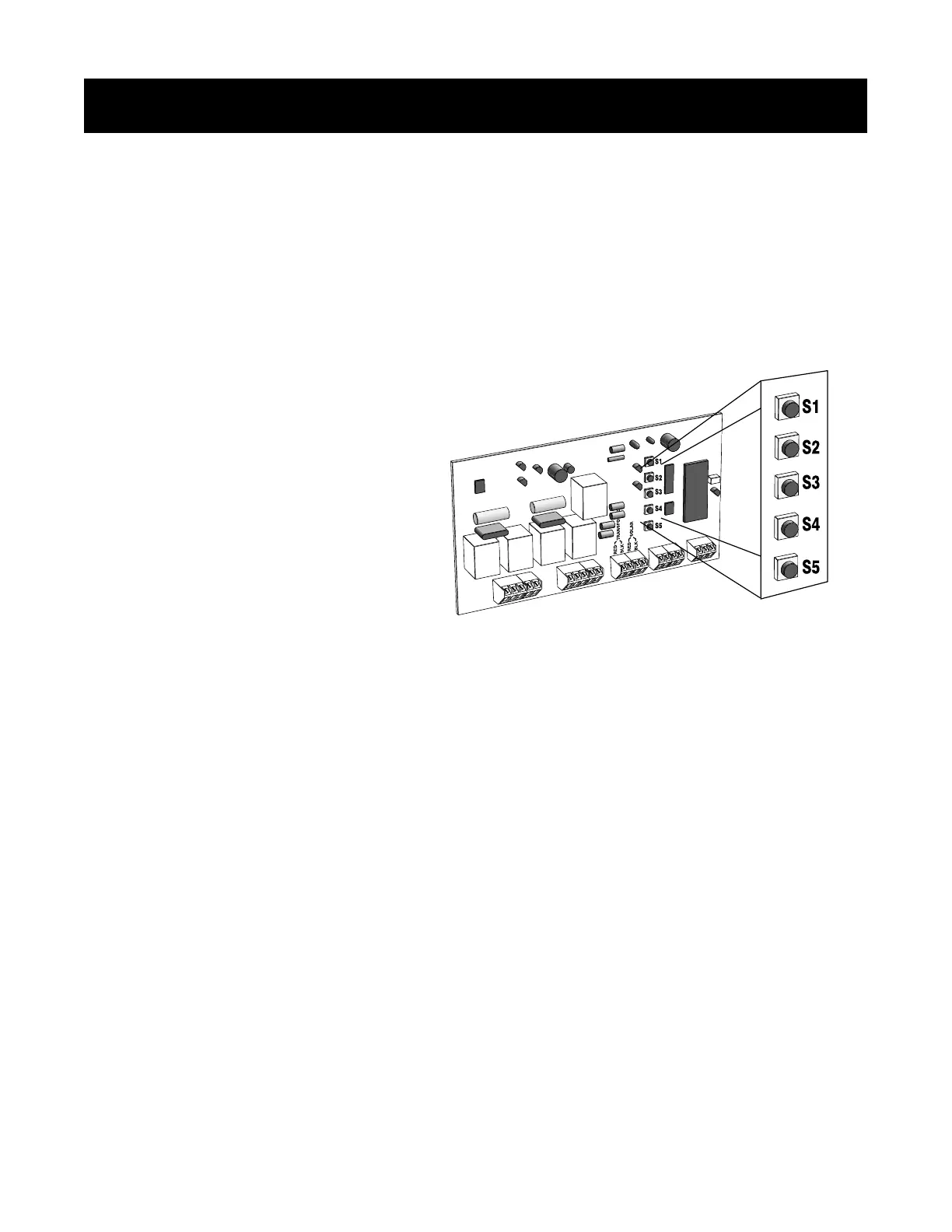
There are 5 programming buttons on the control board,
labeled S1-S5. These programming buttons serve a dual
purpose:
(1) to select one of the 5 features
(2) to select different settings for each
of these 5 features
Please read these instructions completely before attempting to program the gate operator.
Features and Settings
Before you begin programming, learn about the five features and each of their settings.
Feature S1 - Type of Installation
The factory setting is for a single operator, pull-to-open (open-in), installation on a single gate.
If you are installing a dual operator, pull-to-open system, you MUST select the Dual Gate Pull-to-Open setting (S3). See
additional instructions on Dual Gate Programming on page 30.
For push-to-open (open-out) installations you MUST select either Single Gate Push-to-Open setting (S2) or Dual Gate Push-
to-Open setting (S4). See additional instructions on Push-to-Open on page 31.
All GTO/PRO operators are pre-programmed with the same factory settings for the following features:
Type Of Installation: Single gate, pull-to-open;
Obstruction Sensitivity: Most sensitive;
Auto Close: Closes automatically 60 seconds after opening;
Gate Sequence: Single gate opens by itself;
If these settings are correct for your installation, you do not need to do any programming. It will only be necessary to
program those particular features you want to change from the factory settings.
If no programming will be done, proceed to page 23, Step 28.
Programming the System
Step 27:
Remember it's always safest to use the MOST sensitive setting possible.
Do not use obstruction sensitivity to compensate for an improperly installed gate!



 To Next Page