19
Step 25:
Strip
1
/
2
" off the ends of the low voltage wire and attach ends to the transformer terminals;
red lead to (RED), black lead to (BLK).
A dab of household petroleum jelly on each terminal will help prevent corrosion.
We suggest terminating wire ends by installing crimp-on connectors (not provided) before
attaching to proper terminals.
Be certain wire ends do not touch each other!
Step 26:
Plug in the transformer.
We strongly recommend using a surge protector.
HINT: keeping a few mothballs in the control box will prevent insects from entering the control box and
damaging the PC board.
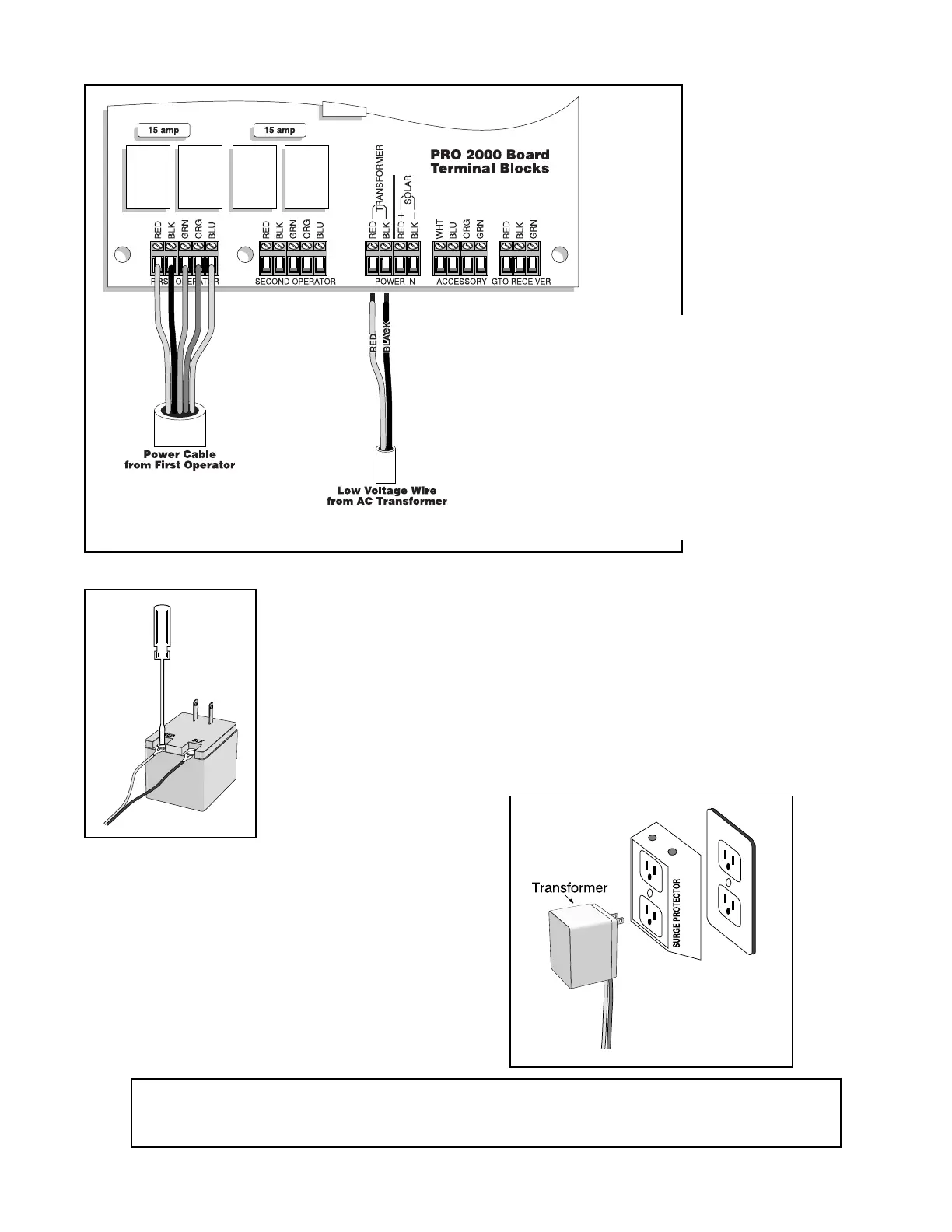
Step 24:
Strip 1/4" off the ends of the low voltage wire and twist
each wire end tightly. Attach these ends to the control
board at the terminal strip marked "TRANSFORMER".
Do not let the wire ends touch each other!
Insert the RED wire into the RED TRANSFORMER
terminal block and the BLACK wire to the BLACK
TRANSFORMER terminal block.
Tighten set screws against exposed end of wires. A dab
of household petroleum jelly on each terminal will help
prevent corrosion.



 To Next Page