24
Step 29:
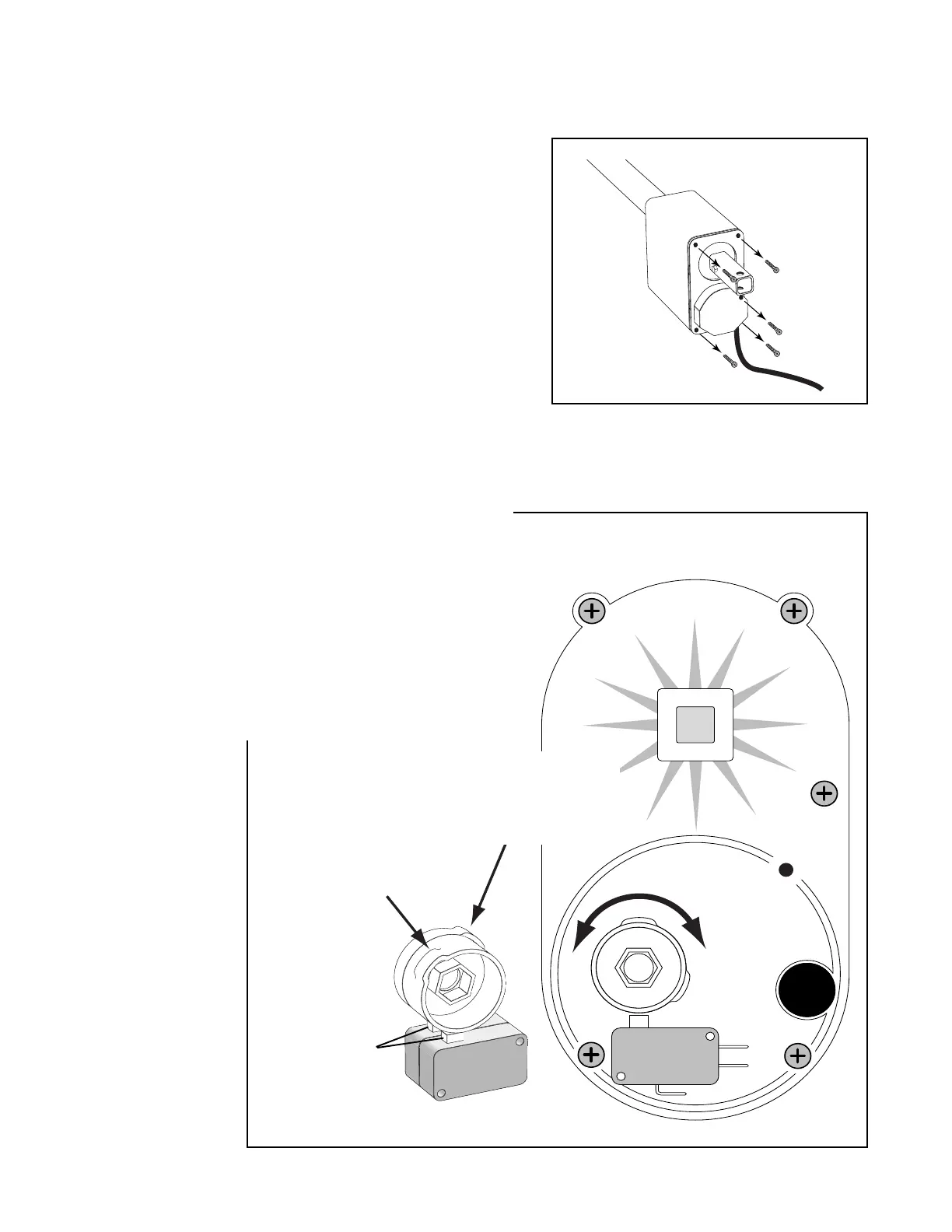
Remove the rear cover of the operator to gain access to the limit
switches and the limit switch cams.
Setting the Closed Position Limit Switch
Step 30:
For Pull-to-Open Installations:
The open position of the gate was determined when you installed
the GTO/PRO 2000 on the open gate (page 13, Step 12). The outer
switch cam is used to adjust the closed position of the gate. The ideal
closed position is when the closed position stop plate makes contact
with the fence post just as the operator motor shuts down. Turn the
cam until the desired setting is accomplished. Test adjustments by
using transmitter.
For Push-to-Open Installations:
The closed position of the gate was determined when you installed the
GTO/PRO 2000 on the closed gate (page 31). The outer switch cam is
used to adjust the open position of the gate. The ideal open position is
when the gate makes contact with the open position stop post just as
the operator motor shuts down. Turn the cam until the desired setting
is accomplished. Test adjustments by using transmitter.
NOTE: Some adjustment to the closed position can be made by
disconnecting the operator from the gate bracket and rotating the
push/pull tube to extend or shorten the operator length.
Fixed Inner
Limit Switch Cam
(DO NOT ADJUST)
Adjustable Outer
Limit Switch Cam
(closed position for pull-to-open and
open position for push-to-open)
Limit Switches
IMPORTANT: The inner switch cam assembly is
factory set. Do not attempt to adjust the inner switch
cam. This switch cam is not adjustable; attempting to
move it will cause damage to the operator.
CAUTION: Because
this operator is a
powerful device, it is
extremely important
to properly set the
limit switch. Keep the
transmitter at hand
during this operation
in case you need to
start or stop the
operator to prevent
harm to people or
your gate.



 To Next Page