36
Column Installation Information
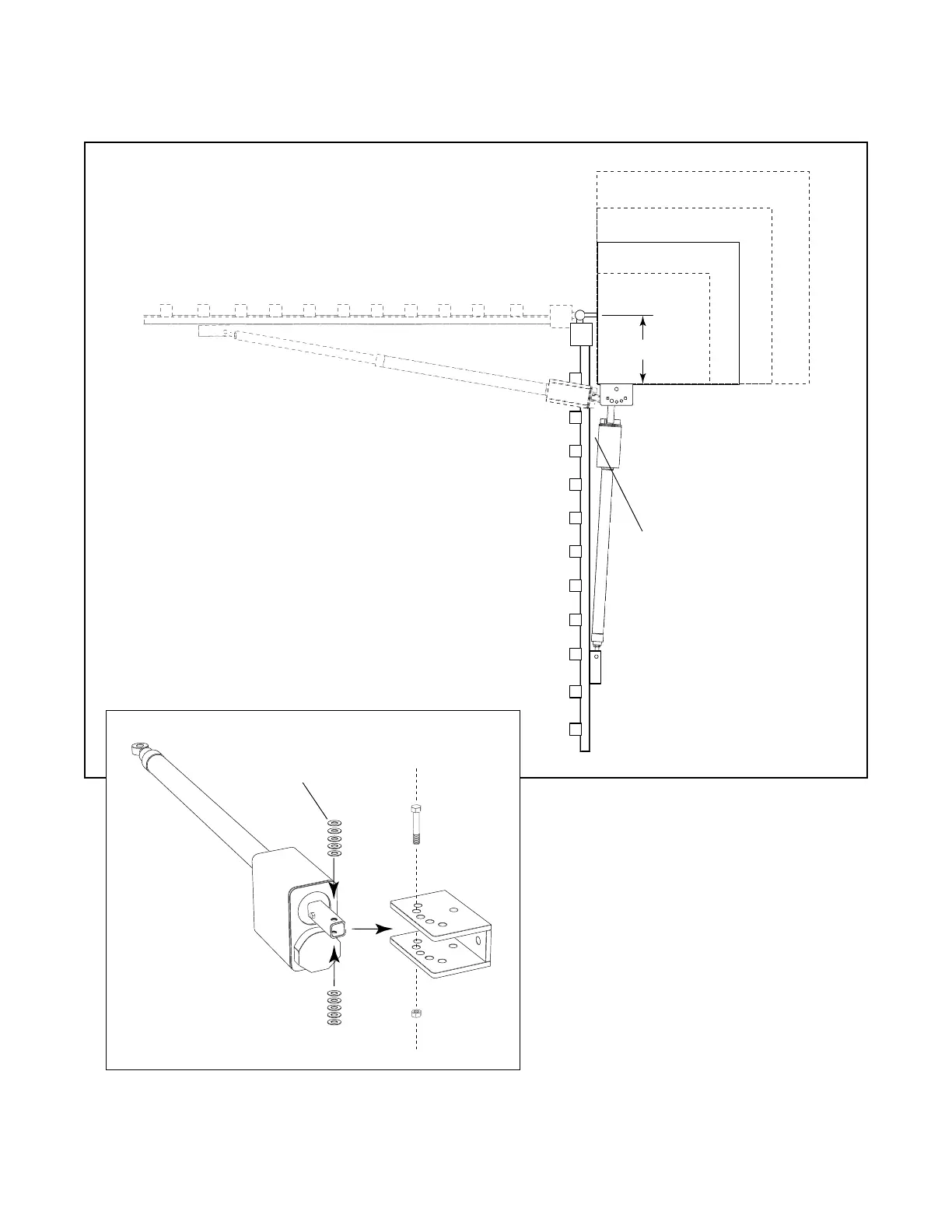
12" MAX
The GTO/PRO 2000 and GTO/PRO 2200 can be mounted on
any size column, but the gate hinge cannot be more than 12”
from the mounting surface of the gate bracket. The edge of
the gate bracket must be aligned with the edge of the column
face where the hinges are mounted. If these conditions cannot
be met, and you do not want to pocket the column, call
GTO’s Service Department for alternative solutions..
In column applications, the rear mount of the operator will be
attached directly to the gate bracket without the use of the
post pivot brackets. Use ten
1
/
2
” washers (provided) as
spacers between the rear mount and the gate bracket, 5 on top
and 5 on bottom (see illustration below). Align washers, rear
mount holes and gate bracket holes, then secure with
1
/
2
" x
3
3
/
4
" bolt and lock nut. When tightening the
1
/
2
" nut, leave
it just loose enough for the arm to swing freely.
Be sure there is clearance
in both the open and closed
position.
1
/
2
" washers



 To Next Page