Customer Help Line
TEL: 1300 886 649
16
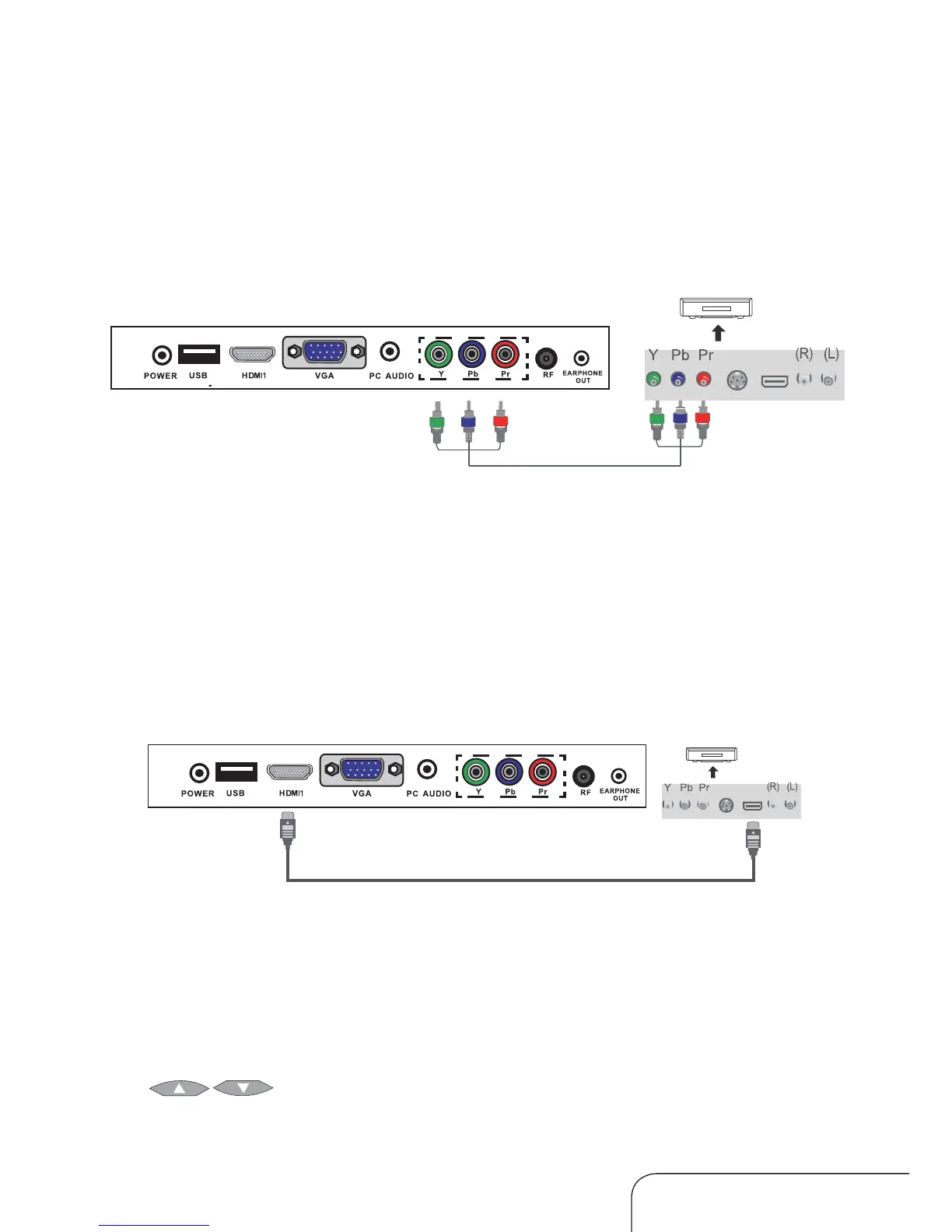
Connecting to the HDMI terminal
Connect an HDMI cable from the HDMI terminal of the DVD player to the
HDMI terminal of the LED LCD TV.
Connecting an external DVD player
Connecting to the Component terminal
Connection to the terminals of other equipment may differ depending on
the brand and model.
Playing a DVD from an external DVD player
1. Turn on the LED LCD TV.
2. Press the SOURCE button and use the up/down navigation keys
[
] to select the YPbPr option; then press OK to confirm or,
if the HDMI cable has been connected, select HDMI and then press OK.
3. Turn on your external DVD player, insert a DVD and press the PLAY button.
1. Connect a component cable from the LED LCD TV’s Y, Pb, Pr terminals to
the DVD’s Out terminals.
2. Connect an audio cable from the LED LCD TV’s Audio terminals (RL and
AV1) to the DVD’s Audio Out (left and right) terminals.
DVD
DVD
Component connection cable
HDMI connecting cable
Connecting your equipment to the TV (Cont.)



 To Next Page