Customer Help Line
TEL: 1300 886 649
17
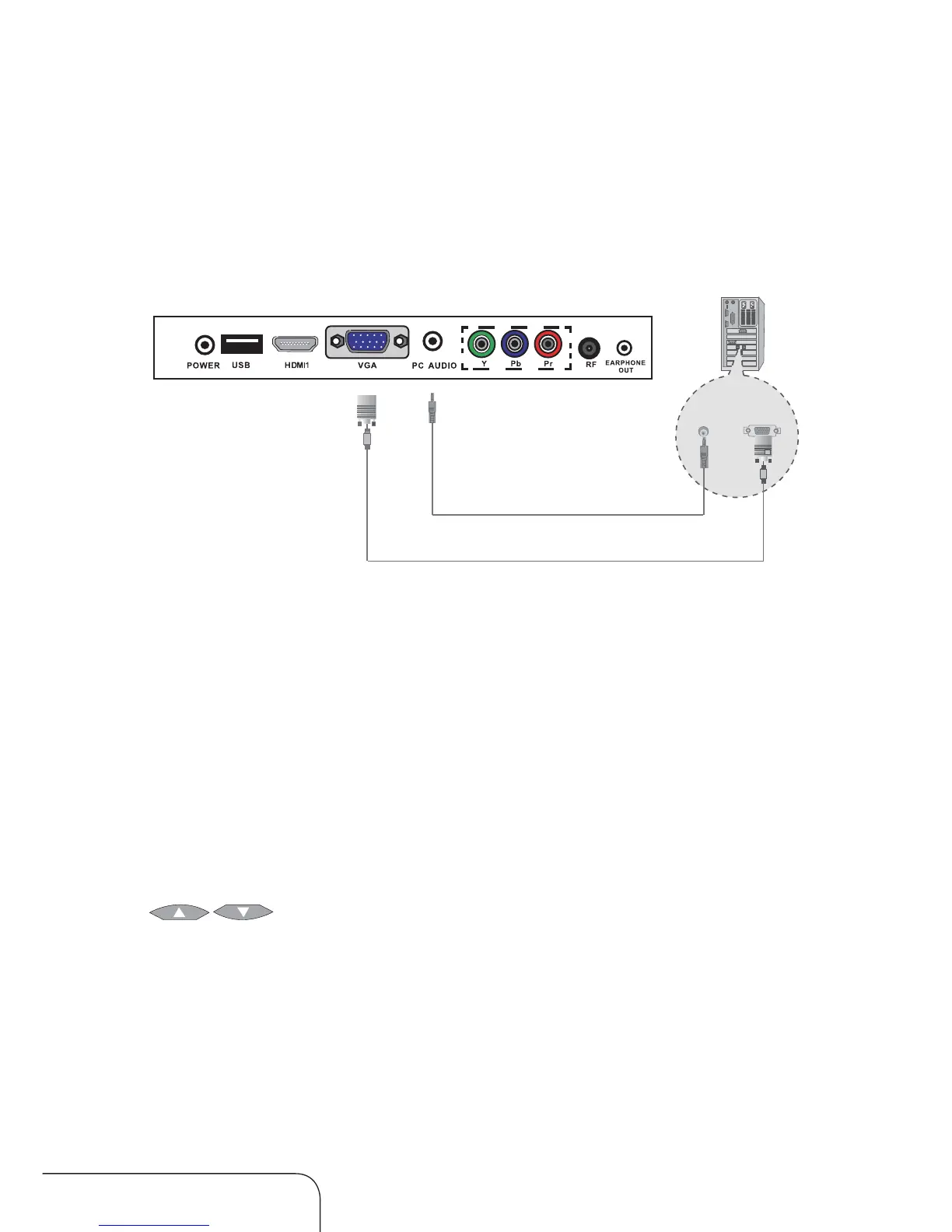
Connecting a PC
Connection to the terminals of other equipment may differ depending on
the brand and model.
NOTE: Please check your PC instruction manual for the correct settings.
1. Connect a D-Sub cable from the LED LCD TV’s PC Input terminal to the
PC’s RGB terminal.
2. Connect an audio cable from the LED LCD TV’s PC Audio terminal to the
PC’s Audio terminal.
NOTE: Only for PCs that have an audio terminal.
Using your LED LCD TV as a PC monitor
1. Turn on the LED LCD TV.
2. Press the SOURCE button and use the up/down navigation keys
[
] to select the VGA option; then press OK to confirm.
PC Audio Cable
PC
Analog RGB (D-Sub 15 pin) cable
Connecting your equipment to the TV (Cont.)



 To Next Page