Customer Help Line
TEL: 1300 886 649
10
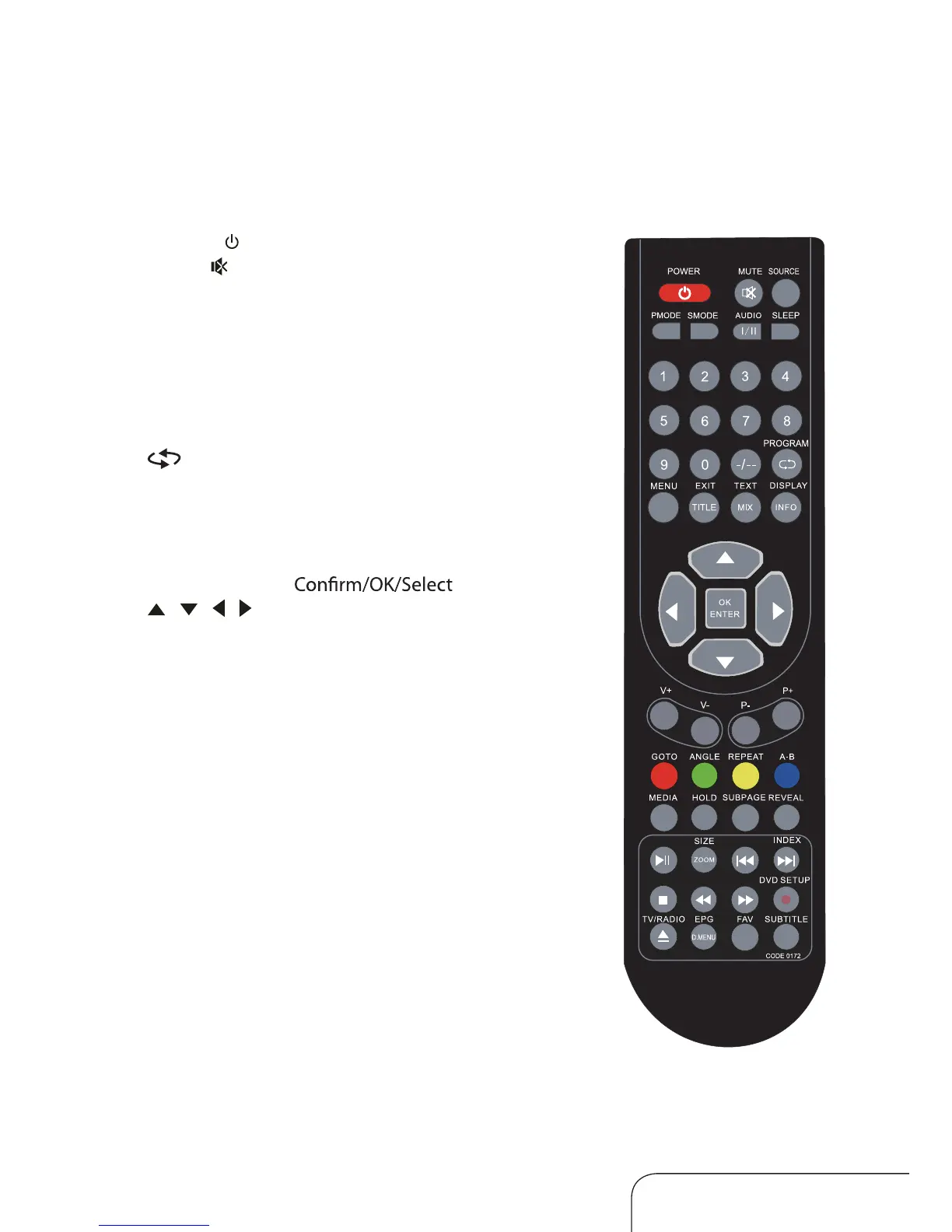
Remote control
The buttons
The buttons on the remote control and similarly marked ones on the main
unit perform similar functions.
POWER ( ) Power/standby
MUTE (
) Press to mute or restore the volume
SOURCE Inputsource
PMODE Picture mode
SMODE Sound mode
AUDIO I/II Select audio mode
SLEEP Sleep timer
0-9 Number (0, 1-9)
-/-- Multi digits (-/--)
Channel return
MENU Main menu
EXIT Exit menu(or exit OSD)
TEXT Switch to Teletext* mode
DISPLAY INFO Displa y program information
OK/ENTER
/ / / Navigation keys
V+/V- Volume control
P+/P- Channel select
*Teletext
Teletext or Austex t is no longer available, nor is there any
plan for a replacement teletext service in Australia. For
more information, please visit the websites of the Australian
channel providers. However, one teletext option,“closed
captions”, is still working on most Australian television
channels. This service allows you to activate subtitles while
watching normal television programs that pro
vide it.
To access “closed captions” while watching a program, press
the teletext button (TEXT/MIX) on the remote control, then
enter the numbers 801 on the remote control to activate
the subtitles. To exit the subtitles, press the TEXT/MIX
button again.



 To Next Page