HDE 04.10.2021 732.22.024
64
8.2 Operation with user key with deadbolt lock function
Prerequisites: User key with deadbolt lock function (permanent open)
A user key with the deadbolt lock function also has the “latchbolt lock operation”
locking authorisation (self-locking action)
8.1 Operation with a normal user key,
page 63
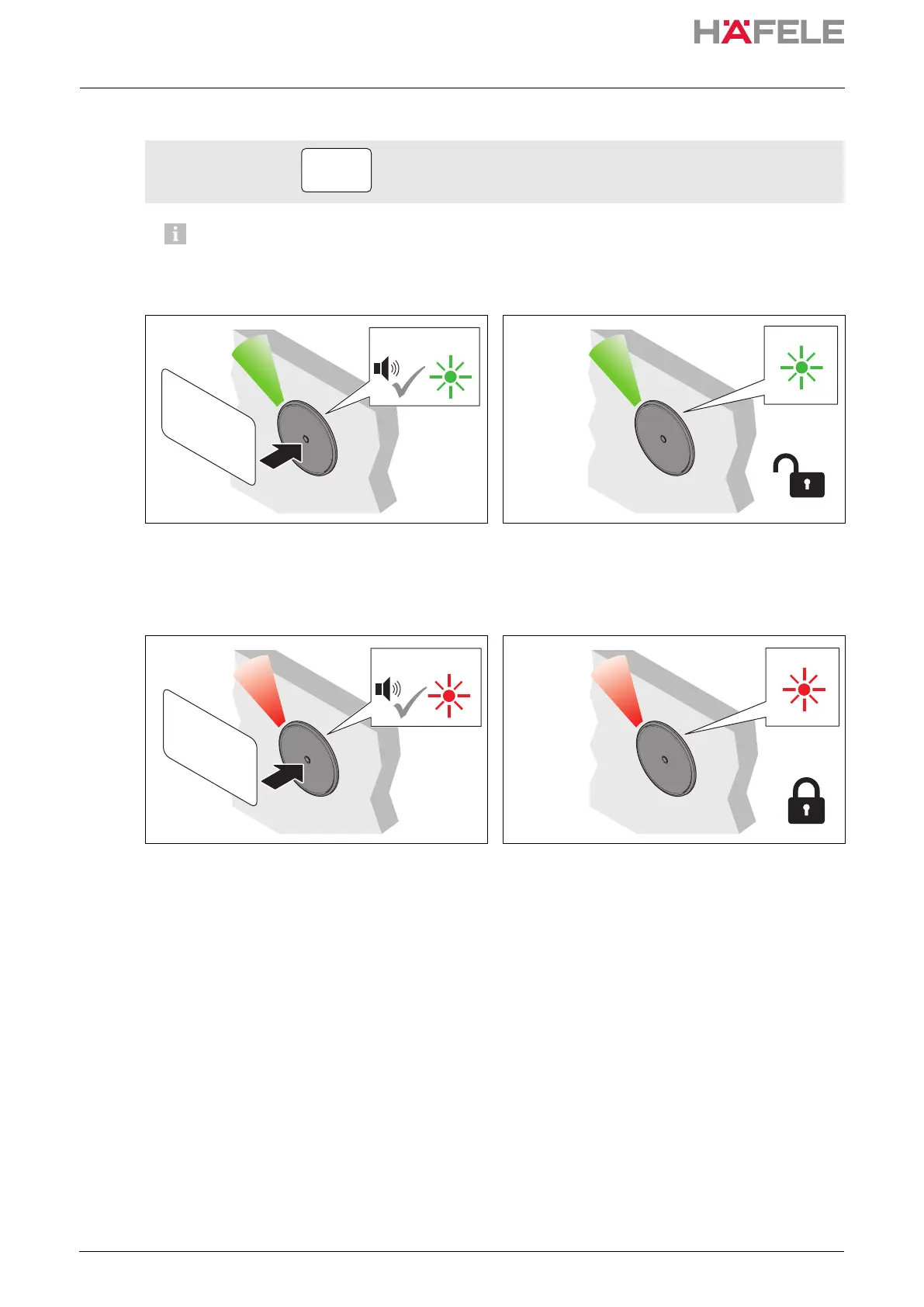
1. Hold the user key in front of the antenna for at
least 2 seconds.
Acoustic signal is heard. LED switches to
green. Acoustic signal is heard again.
LED briefly illuminates green.
2. Remove user key.
LED illuminates green permanently. All locks
are permanently open (“permanent open”).
3. Hold the user key in front of the antenna for at
least 2 seconds to close.
Acoustic signal is heard. LED continues to
illuminate green. Acoustic signal is heard
again. LED switches to red.
4. Remove user key.
LED illuminates red permanently. All locks
are locked.
ins-src-732.22.024.book Seite 64 Mittwoch, 13. Oktober 2021 1:58 13


 To Next Page