77
HDE 04.10.2021 732.22.024
12.1 Simple reset
A simple reset is required in the following cases:
• Loss of programming and erasing key (master keys).
After a simple reset, the allocated master keys are cleared and reallocation is required
(LED continuously flashing in green).
Continued use of the terminal is not possible until a restart with new master keys
(
5. Commissioning, page 55). The locking authorisations for the user keys are retained after
a simple reset.
Prerequisites:
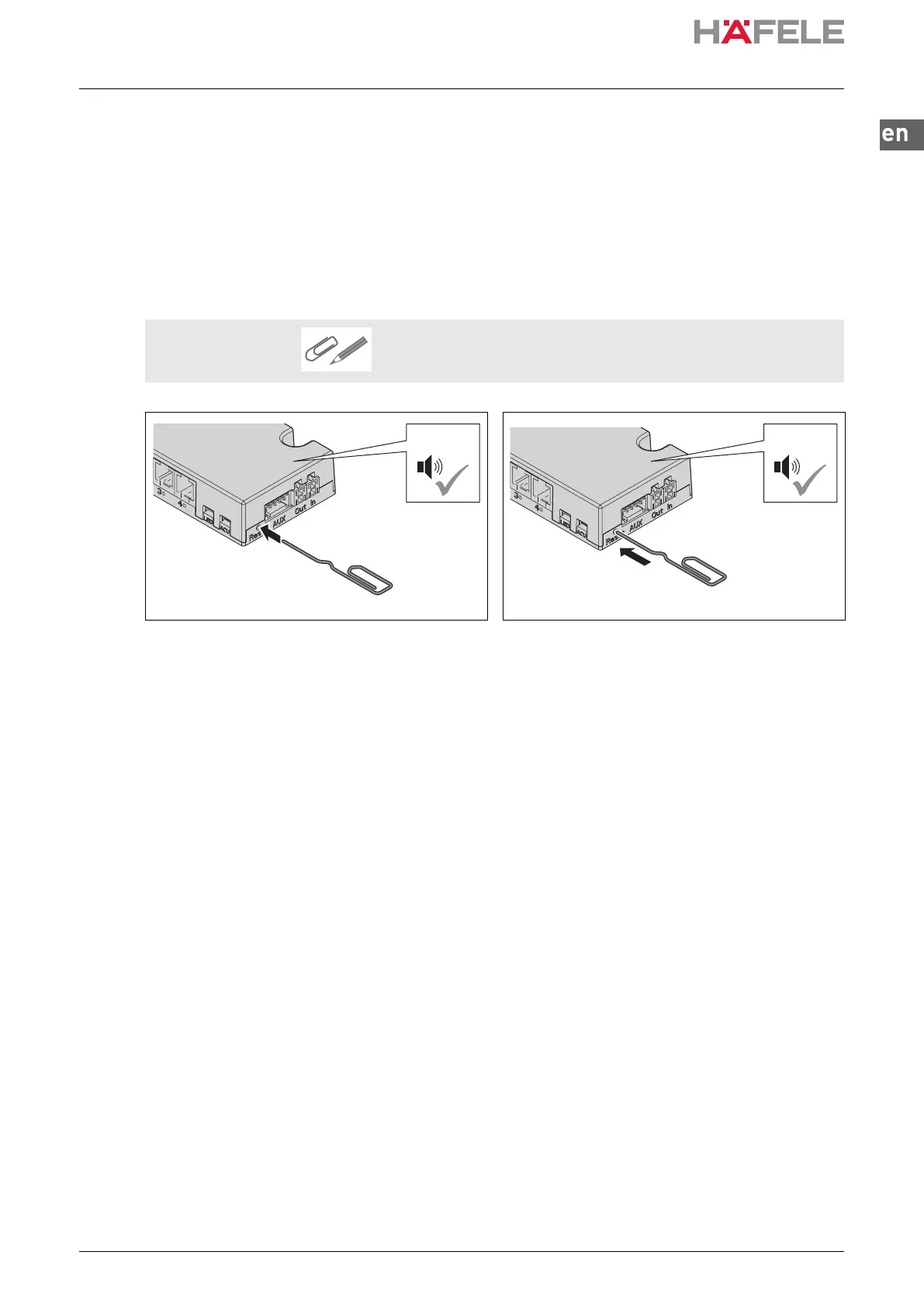
A tool to actuate the reset button, such as a thin pen/pencil or
opened out paper clip
1. Press the reset button.
A brief acoustic signal is heard.
2. Press and hold the reset button until a long
acoustic signal is heard.
The lock on parametrisation with the MDU
110 data transfer unit is disabled.
The LED flashes continuously in green.
3. Re-teaching master keys
(
5. Commissioning, page 55)
ins-src-732.22.024.book Seite 77 Mittwoch, 13. Oktober 2021 1:58 13


 To Next Page