RE 15409, Version 08.2022, Bosch Rexroth AB
Technical data | CMp 23/64
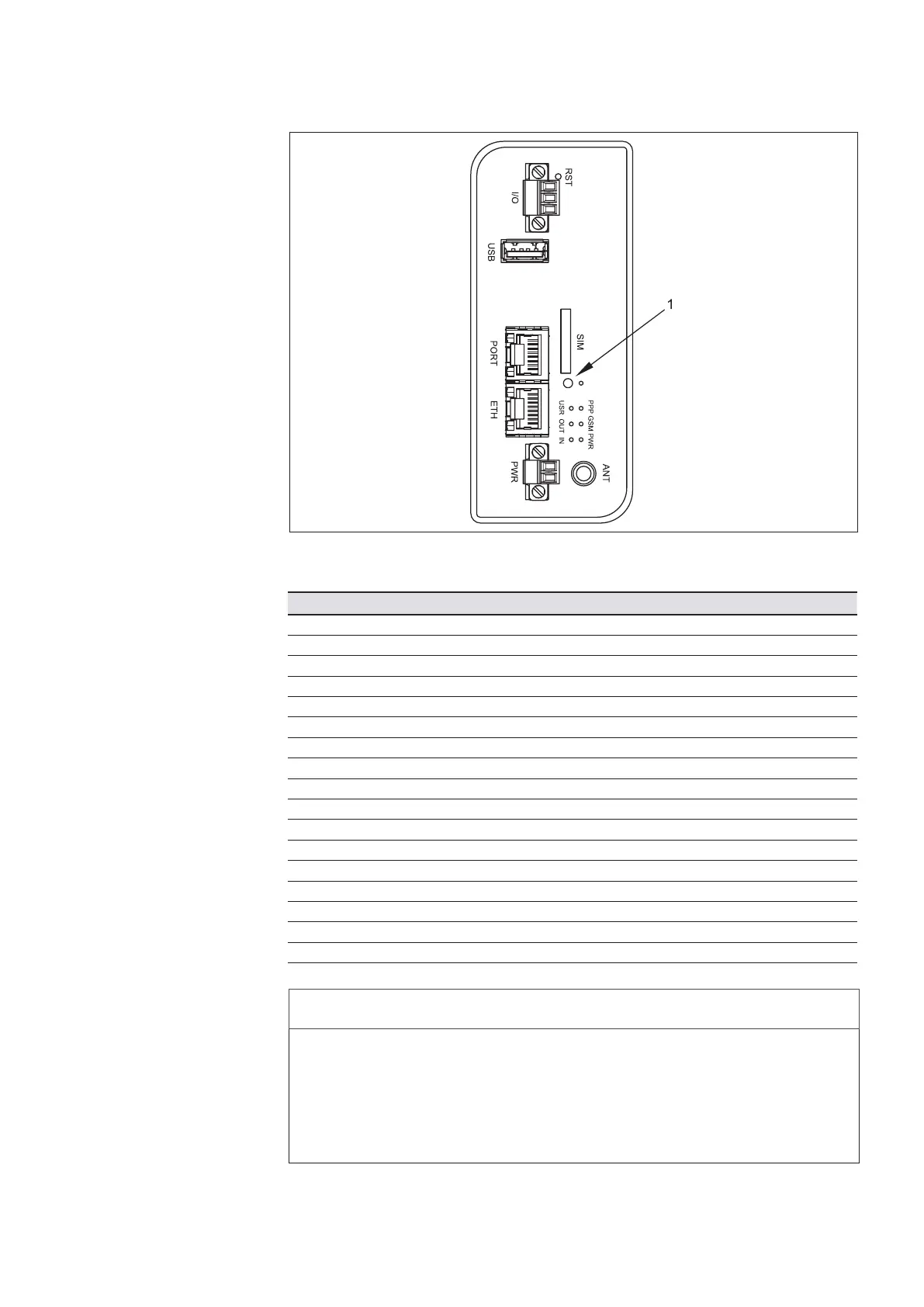
Table10:Front panel indicators
Description Indication Information
PPP PPP Green On Join PPP connection
GSM GSM Red ashing Communication in progress
PWR Power Green On Router is ready
Green ashing Router is starting up
USR Not used
OUT Not used
IN Not used
PORT Ethernet Green On Selected 100 Mbit/s
Green Off Selected 10 Mbit/s
Yellow On Network cable connected
Yellow ashing Data transmission
Yellow Off No network cable connected
ETH Ethernet Green On Selected 100 Mbit/s
Green Off Selected 10 Mbit/s
Yellow On Network cable connected
Yellow ashing Data transmission
Yellow Off No network cable connected
Fig. 12: GPRS router front panel
NOTICE
Improper insert of SIM card!
Product can be damaged!
f Ensure that the modem is disconnected from power supply!
f Press the small yellow button next to the SIM card holder, see call out 1 in Fig.
12. Insert the SIM card into the holder and slide in.
f Ensure that the SIM card is unlocked!
DD00078626



 To Next Page