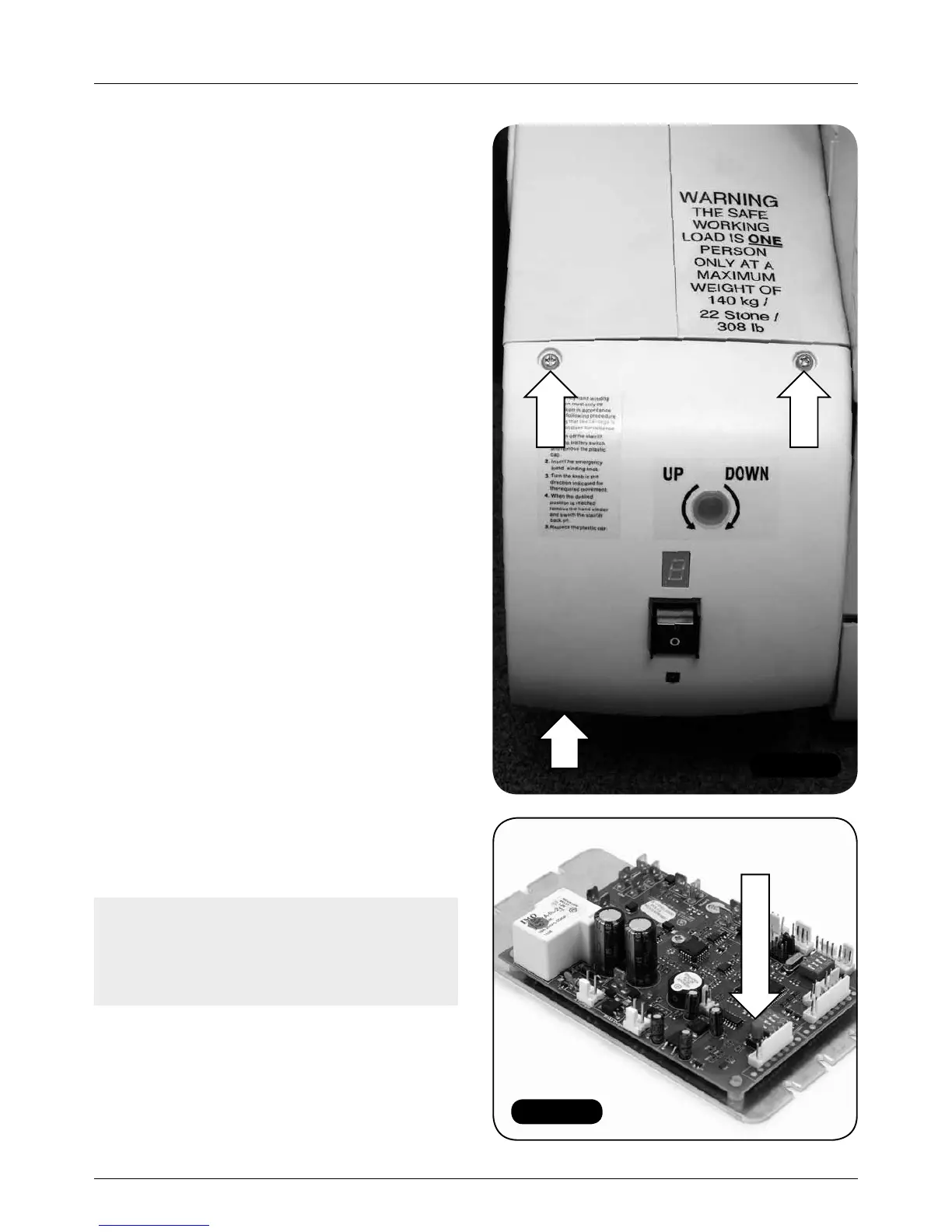
Figure 60
Figure 61
Remote control handsets
22 MINIVATOR SIMPLICITY
+
INSTALLATION MANUAL
Remote control handsets
Items required: Tools required:
• Handsets • No. 2 Pozi-drive
• 5mm Allen key
Programming
The infra-red remote control handsets supplied
with the lift should work out of the box. If the lift
does not travel up and down the stairs when the
corresponding handset buttons are pressed, or
if there are multiple lifts in one area, follow the
procedure set out below.
1 Drive the lift to the third or fourth step so that
it is at a comfortable height to work on.
2 Remove the bottom safety edge by undoing
the two visible cross head screws on the top
edge and the one hidden Allen by the track
(Figure 60).
3 Slide the bottom safety edge down the track
to expose the control board and batteries.
4 Bring both handsets to the lift and then
programme the handset to the board in the
following way.
a For single lift applications:
i Press and hold the red button on the
PCB (Figure 61) – a yellow LED will
illuminate on the PCB.
ii Press any button on the handset
and the yellow light will go out.
iii Programming is complete.
Note: Low energy light bulbs can interfere
with the infrared signal causing the lift to stop
and start. Reprogramming the handsets with
the lights on can resolve this problem.



 To Next Page