Harman EASY Touch Control Owners Manual
17
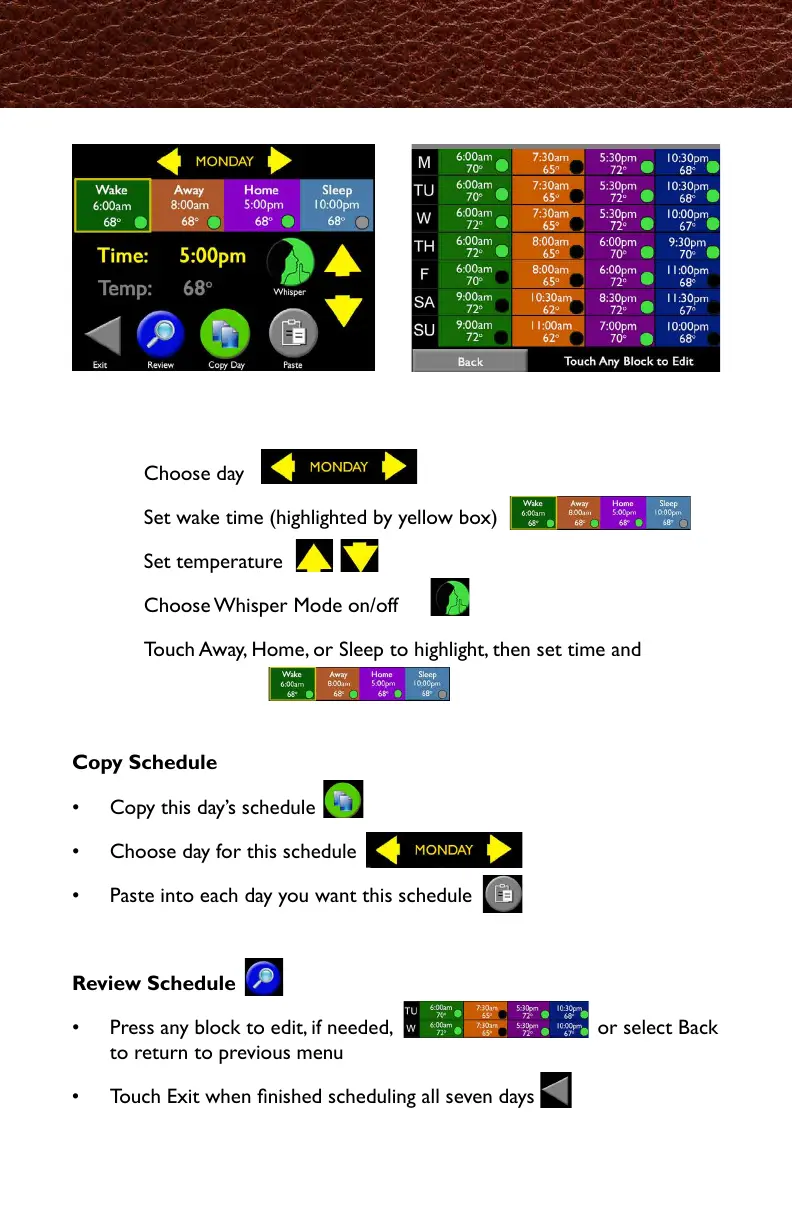
Set Schedule
Step 1: Choose day
Step 2: Set wake time (highlighted by yellow box)
Step 3: Set temperature
Step 4: Choose Whisper Mode on/off
Step 5: Touch Away, Home, or Sleep to highlight, then set time and
temperature
Copy Schedule
• Copy this day’s schedule
• Choose day for this schedule
• Paste into each day you want this schedule
Review Schedule
• Press any block to edit, if needed, or select Back
to return to previous menu
• Touch Exit when nished scheduling all seven days
Schedule
起床時間を選択 Time:を押して矢印で変更
(選択された箇所は黄線で囲まれます。)
次に設定する"Away(外出)"Home(帰宅)""Sleep(就寝)"のどれかを選び、
同様に時間と 温度を設定します。
・選択した曜日が表示されたら"paste"をタッチして
貼り付けます。
・編集したい部分タッチするか、
Backを押して1ページ前に戻ります。
・すべての曜日の設定が終わったら、
Exitを押して終了します。



 To Next Page