Harman EASY Touch Control Owners Manual
3
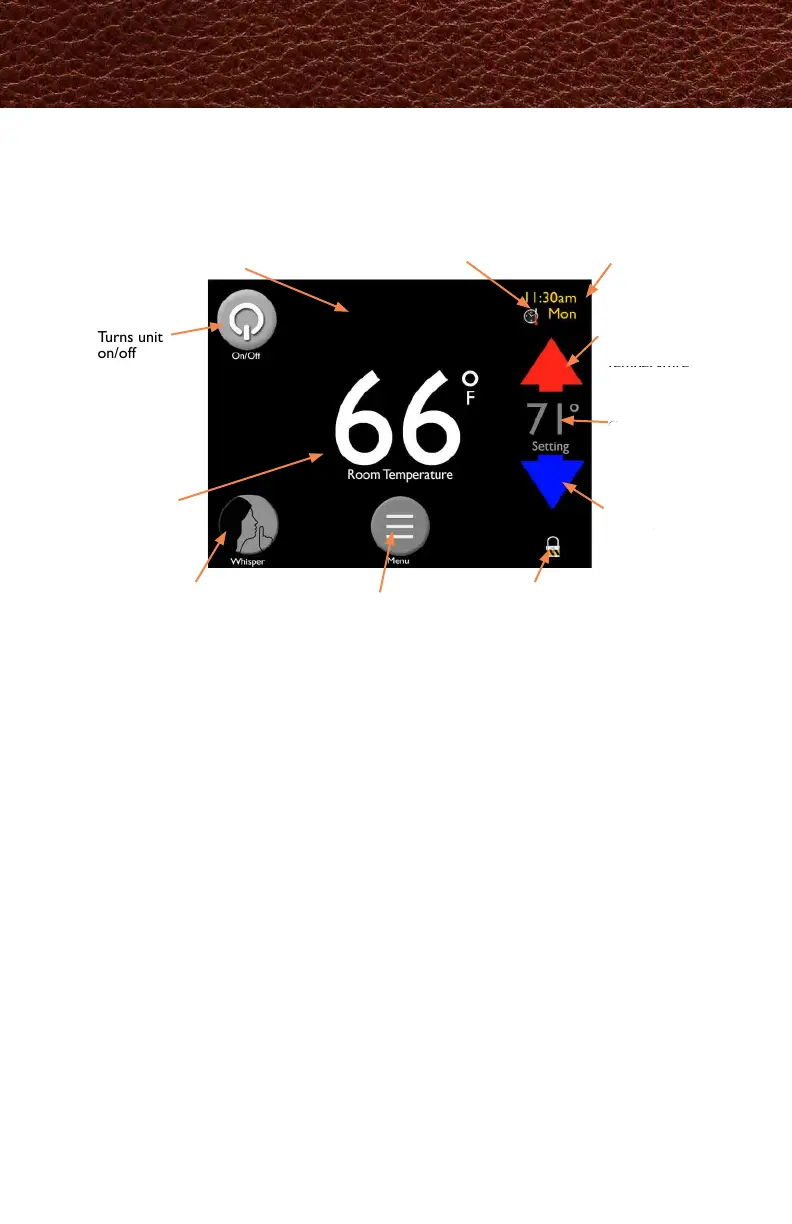
The EASY Touch Control home screen manages the essential functions of your
Harman
pellet stove.
Day/Time
Current day/time
when set
Power Icon
Turns unit
on/off
Whisper Mode
Shows if Whisper
mode is on or off
Blue Arrow
Press to
decrease the
desired room
temperature
Schedule Icon
Appears if Scheduling is
turned on
Lock Icon
Appears if the control
is locked
Setting
Displays
current
temperature
setting
Menu
Allows you to scroll through
3 additional menus
Red Arrow
Press to
increase the
desired room
temperature
Message Area
Prompts and messages will
appear in the top center of
the screen
Actual Room
Temperature
EASY Touch Control Overview
イージータッチコントロールのホーム画面にて、ハーマン
ペレットストーブの基本的な機能を管理します。



 To Next Page