Harman EASY Touch Control Owners Manual
18
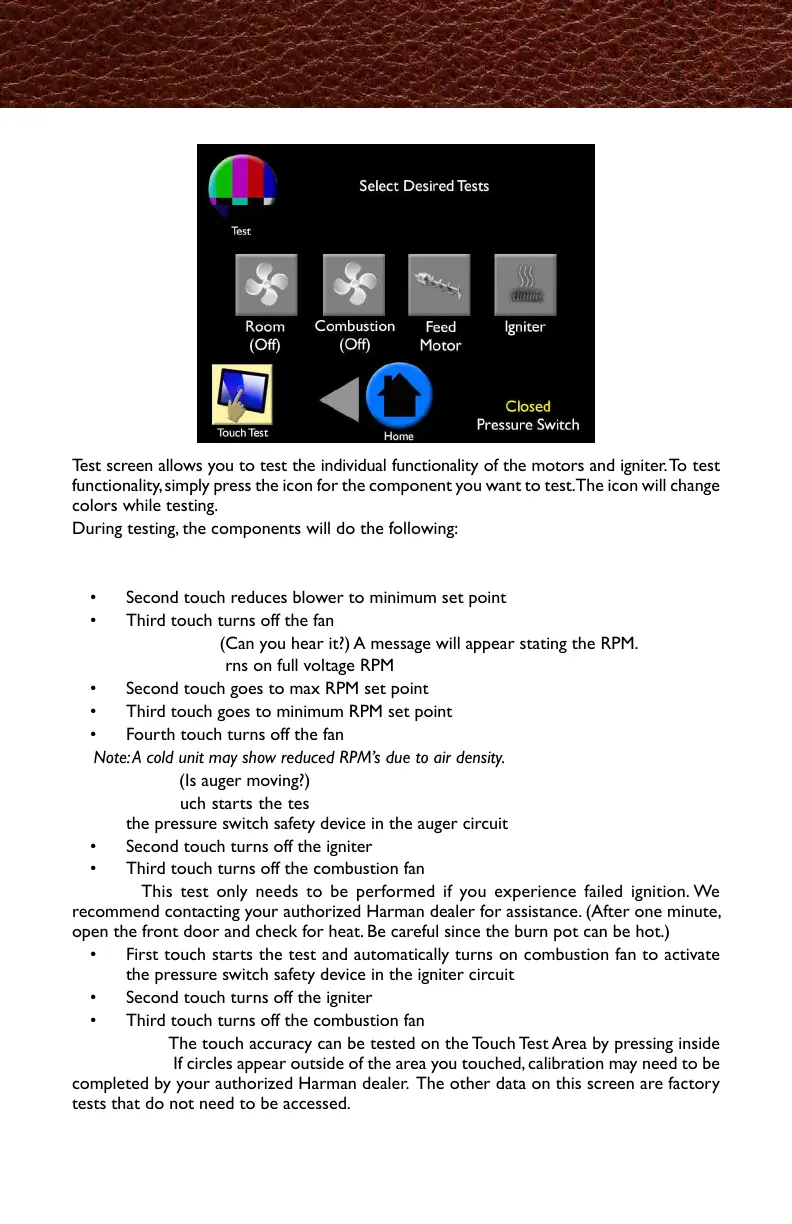
Test screen allows you to test the individual functionality of the motors and igniter. To test
functionality, simply press the icon for the component you want to test. The icon will change
colors while testing.
During testing, the components will do the following:
Room Fan: (Is air moving?)
• First touch turns blower on maximum set point
• Second touch reduces blower to minimum set point
• Third touch turns off the fan
Combustion Fan: (Can you hear it?) A message will appear stating the RPM.
• First touch turns on full voltage RPM
• Second touch goes to max RPM set point
• Third touch goes to minimum RPM set point
• Fourth touch turns off the fan
Note: A cold unit may show reduced RPM’s due to air density.
Feed Motor: (Is auger moving?)
• First touch starts the test, and automatically turns on combustion fan to activate
the pressure switch safety device in the auger circuit
• Second touch turns off the igniter
• Third touch turns off the combustion fan
Igniter: This test only needs to be performed if you experience failed ignition. We
recommend contacting your authorized Harman dealer for assistance. (After one minute,
open the front door and check for heat. Be careful since the burn pot can be hot.)
• First touch starts the test and automatically turns on combustion fan to activate
the pressure switch safety device in the igniter circuit
• Second touch turns off the igniter
• Third touch turns off the combustion fan
Touch Test: The touch accuracy can be tested on the Touch Test Area by pressing inside
the rectangle. If circles appear outside of the area you touched, calibration may need to be
completed by your authorized Harman dealer. The other data on this screen are factory
tests that do not need to be accessed.
Test
テスト画面では、モーターと点火器の個々の機能をテストすることが出来ます。
モーターを実施するには、テストしたい部分のアイコンをクリックすると起動します。
テスト中は選択したアイコンの色が変わります。
テスト中、それぞれの部分は以下の動作をします。
・最初のタッチでファンのブロワーが最大速度まで稼働します。
・次のタッチでブロワーの回転を最小速度まで下げます。
・3度目のタッチでファンは停止します。
燃焼ファン(ファンの回転音は聞こえますか?)RPM回転数が表示されます。
・最初のタッチで最大までRPM(回転数)の電圧を上げます。
・次のタッチで、回転数を最大まで上げます。
・3度目のタッチで回転数を最低まで下げます。
・4度目のタッチでファンをを停止します。
注記:本体が冷えている場合、空気の密度の関係で、回転数が遅くなる可能性があります。
・最初のタッチでテストがスタートし、オーガーの回線内の圧力スイッチを起動させるため、
燃焼ファンが自動的に動きます。
・次のタッチで、点火器への通電が停止します。
・3度目のタッチで燃焼ファンが停止します。
点火器:このテストは、点火器が作動しない不具合が起きた時のみ必要です。
その際は、ご購入先の代理店に連絡してください。(1分後フロントドアを開け燃焼ポット
の温度を確認します。通常高温になっているので注意が必要です)
・最初のタッチでテストがスタートし、点火器の回線内の圧力スイッチを起動させるため、
燃焼ファンが自動的に動きます。
・次のタッチで、点火器への通電が停止します。
・3度目のタッチで燃焼ファンが停止します。
タッチテスト:タッチの正確さは、タッチテストの四角内を押していただく事で
テスト出来ます。もし、〇がタッチした場所の外に表示されたら、ご購入先の代理店にて動
作確認が必要な場合があります。この画面上の他のデータは工場でのテスト内容ですので、
アクセスする必要はありません。



 To Next Page