Harman EASY Touch Control Owners Manual
20
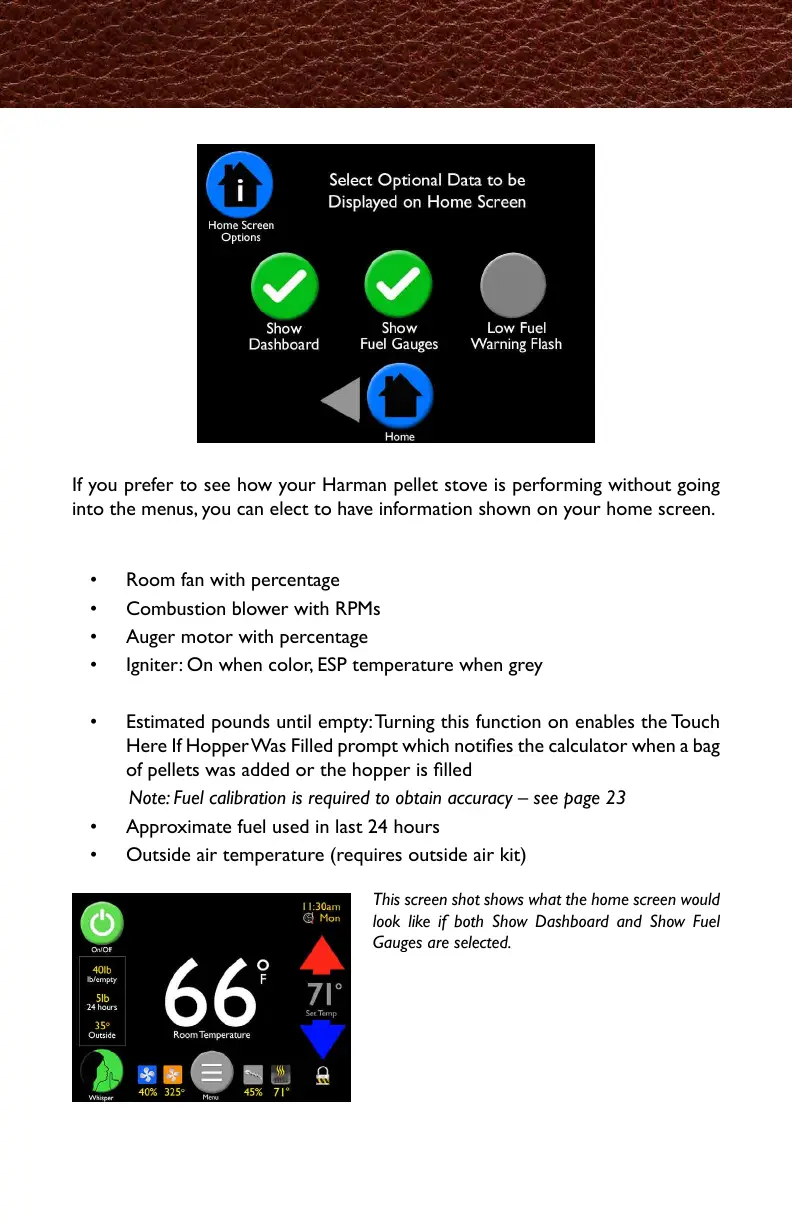
If you prefer to see how your Harman pellet stove is performing without going
into the menus, you can elect to have information shown on your home screen.
Show Dashboard will display status of:
• Room fan with percentage
• Combustion blower with RPMs
• Auger motor with percentage
• Igniter: On when color, ESP temperature when grey
Show Fuel Gauges will display:
• Estimated pounds until empty: Turning this function on enables the Touch
Here If Hopper Was Filled prompt which noties the calculator when a bag
of pellets was added or the hopper is lled
Note: Fuel calibration is required to obtain accuracy – see page 23
• Approximate fuel used in last 24 hours
• Outside air temperature (requires outside air kit)
This screen shot shows what the home screen would
look like if both Show Dashboard and Show Fuel
Gauges are selected.
Home Screen Options
お使いのペレットストーブの運転状況を、メニュー画面を開かずにチェックしたい場合
知りたい情報をまとめてホーム画面に表示することが出来ます。
・ルームファンの稼働率%
・燃焼ファンの回転数(RPM)
・オーガーモーターの稼働率%
・イグナイター(点火器):カラー表示の時はオン、グレー表示の時はESP温度の表示
・燃料が空になるまでの残量(lb.または㎏):この機能をオンにすると、"TouchHereIf
HopperWasFilled"(ホッパーに燃料が追加されたら押してください)が表示されます。
測定器がペレットの袋が追加されたか、ホッパーに燃料が追加された事を感知すると表示
されます。
注記:燃料測定は正確さが重要です、23ページを参照してください。
・直近24時間に使用した燃料のおおよその量
・外気温表示(外気導入キットが取付けられていいる場合)
*左の画面では、ダッシュボードと燃料ゲージの
表示を選択した場合の、ホーム画面の状態を示し
ています。



 To Next Page