Warner Media - XOS Advanced Media Processor
8.
9.
10.
11.
•
•
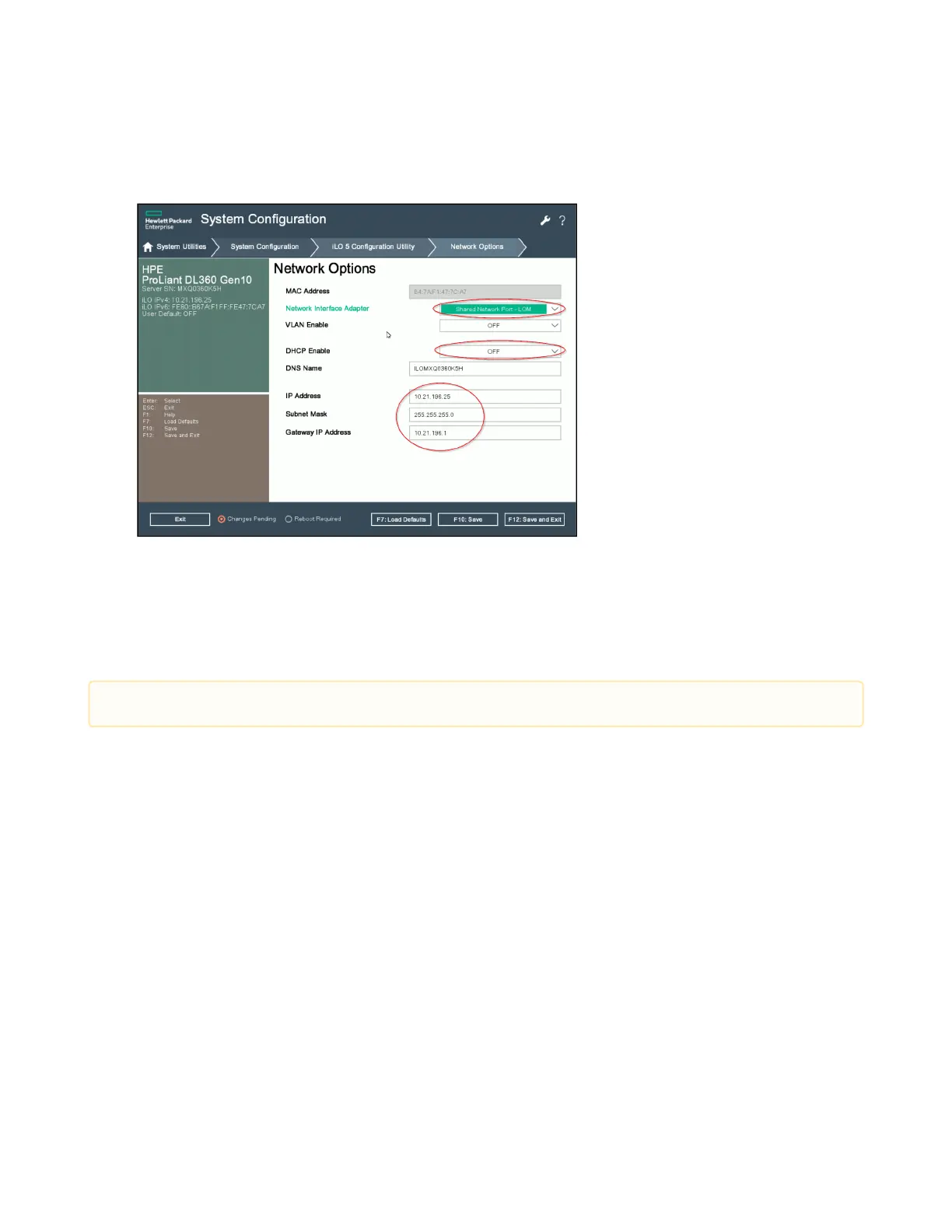
From the Network Interface Adaptermenu, select Shared Network Port-LOM.
From the DHCP Enable menu, select OFF.
Enter the appropriate static network details in the fields.
Select F12: Save and Exit to confirm the changes and to restart the platform.
How to configure SNMP trap destination
The XOS offers aRest API in the UI so you can configure the list of SNMP recipients for the trap destination.
Default SNMP traps
Two types of SNMP traps is sent to the recipient:
Single notification trap
Global synchronization trap
Single notification trap
A trap on each notification appearance or disappearance is sent to the recipient. This trap contains only the
notification.
A counter is incremented for each trap. Any discontinuity detected on receiver side indicates a trap loss.
Global synchronization trap
This global synchronization trap is optional and periodic. The trap contains information about all the active
notifications and the value of the counter when the trap was last sent to the current recipient.
SNMPv2 and SNMPv3 versions are currently supported.



 To Next Page