Disclaimer: 3
rd
party and/or custom firmware providing extra features are not covered in this manual.
4K Integral 2 – User Manual
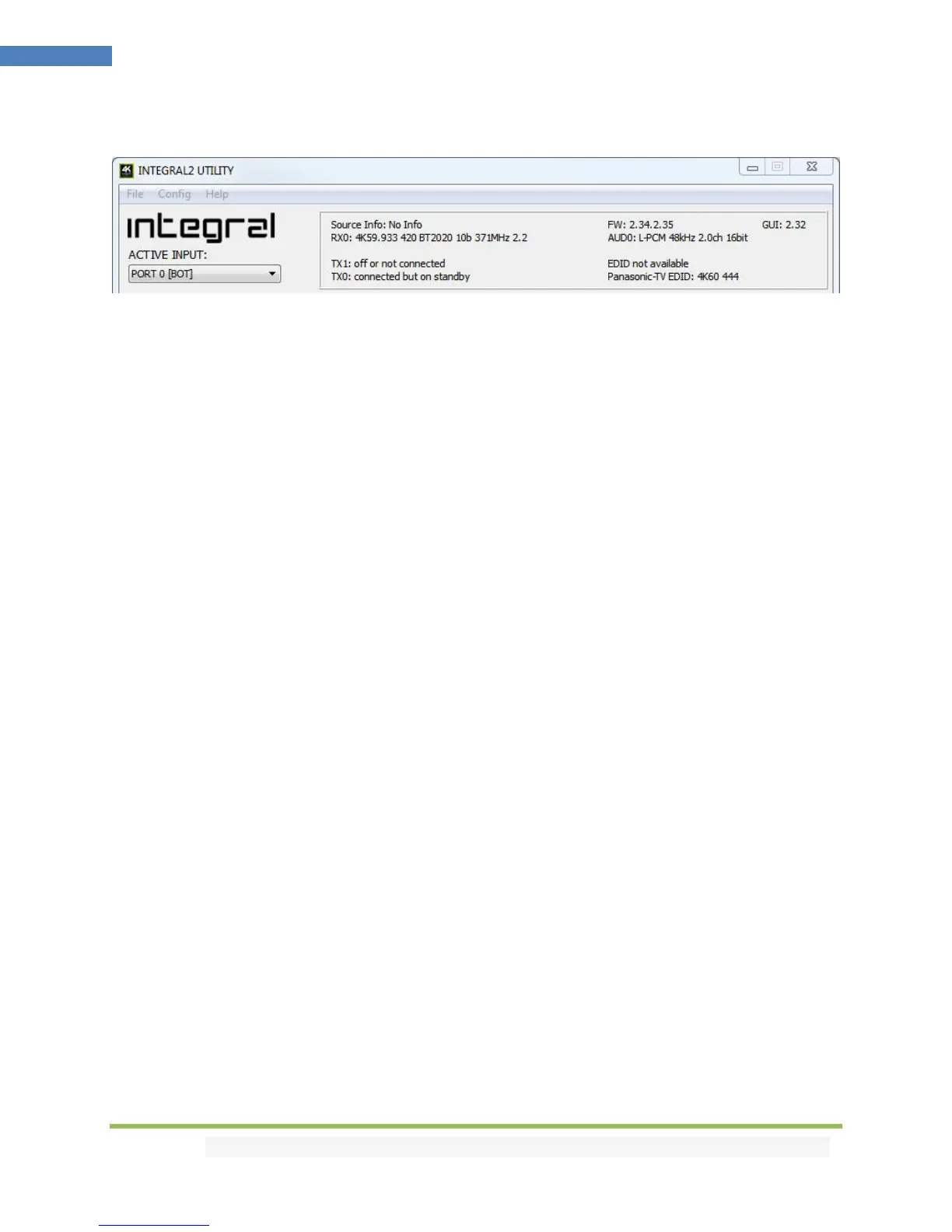
The TOP SECTION of the USB GUI for Windows PC:
The right boxed area will provide you with the following information:
FW: 2.34.2.35 on the top right corner indicates the current FW version of your Integral 2 unit.
GUI: 2.32 on the top right corner indicate the current Windows GUI version in use.
Source Info: When available it will display information about the source device in use.
RX0: Display Input signal resolution at RX0 input; refresh rate, color, bandwidth and HDCP information.
AUD0: Display sound information for the RX0 input.
RX1: Display Input signal resolution at RX1 input; refresh rate, color, bandwidth and HDCP information.
AUD1: Display sound information for the RX1 input.
TX1: Display Status or Output signal resolution at TX1; refresh rate, color, bandwidth, HDCP and EDID
TX0: Display Status or Output signal resolution at TX0; refresh rate, color, bandwidth, HDCP and EDID
On the left, below the Integral 2 logo:
Active Input: Allow you to select the current active input port or enter both Matrix modes available.
Similarly to what you can do from the push button on the unit (see page 9)



 To Next Page