Disclaimer: 3
rd
party and/or custom firmware providing extra features are not covered in this manual.
4K Integral 2 – User Manual
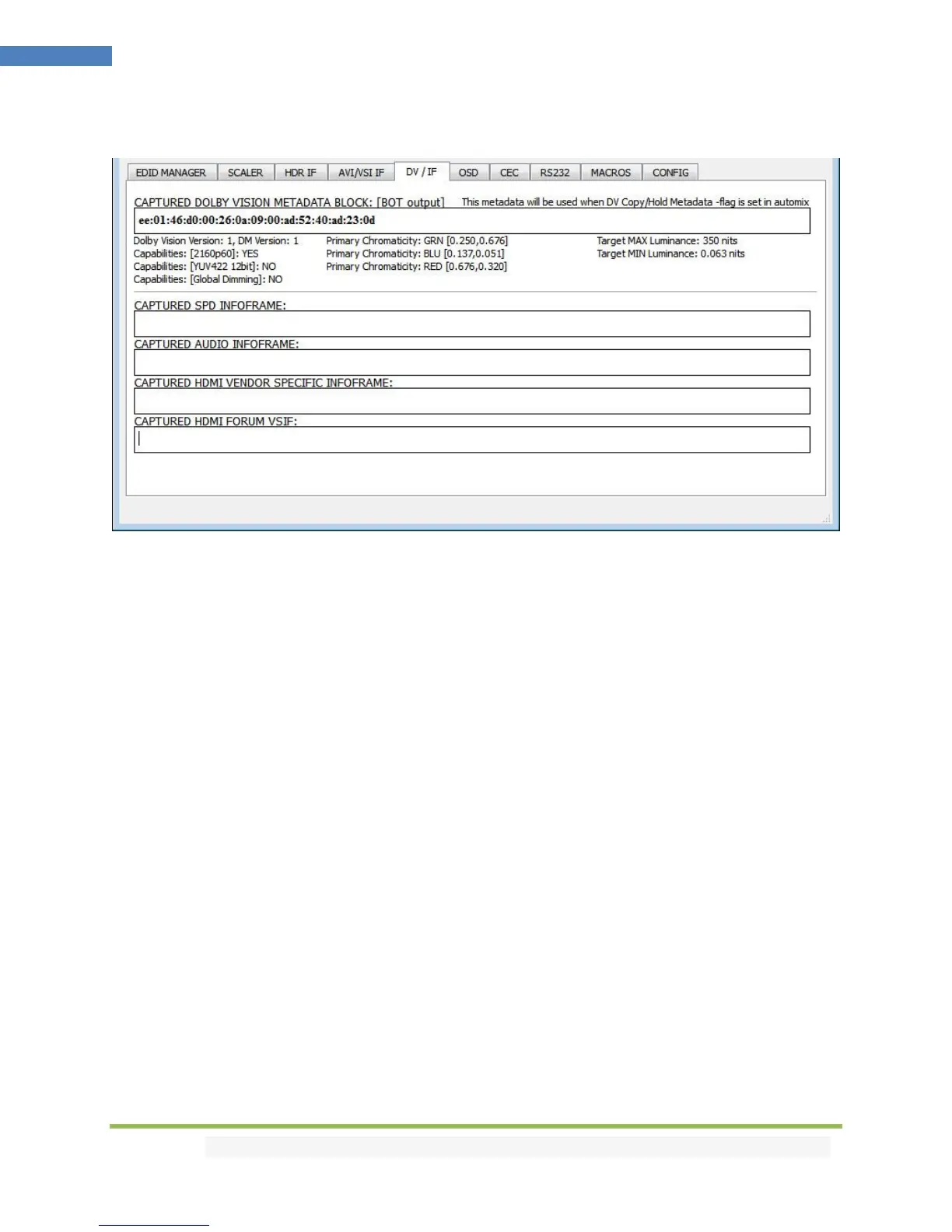
The DV/IF section of the USB GUI for Windows PC:
[CAPTURED DOLBY VISION METADATA BLOCK]: Integral 2 will automatically sniff, display and save any
Dolby Vision mandatory string from a connected sink at BOT output. Once stored, this mandatory string
can be used in Automix to ensure that the DV stream from the source is compatible with the sink. Once
the DV string of a display is saved, you can insert other equipment like an AVR in between in the chain
and still have the right DV signal passthru to the sink. Additionally, the stream is fully deciphered in
human readable format.
[CAPTURED SPD INFOFRAME]: Display Source Product InfoFrame.
[CAPTURED AUDIO INFOFRAME]: Current Audio Format information, if PCM this usually gives the
sample rate and number of speakers, if bitstream then usually this infoframe just inform the default
which is “refer stream header”
[CAPTURED HDMI VENDOR SPECIFIC INFOFRAME]: Display HDMI Vendor Specific InfoFrame.
[CAPTURED HDMI FORUM VSIF]: Display HDMI2.0 version of HDMI VSIF



 To Next Page