Disclaimer: 3
rd
party and/or custom firmware providing extra features are not covered in this manual.
4K Integral 2 – User Manual
[OSD CUSTOM TEXT]: Enable or disable the OSD Custom Text, once activated, the custom text defined
in the text field will be displayed on screen.
[NEVER FADE TEXT]: If you want to keep the OSD Custom text even after OSD info faded away, make
sure this option is enabled.
[LOCATION X,Y]: Set the X and Y value of the OSD Custom Text at 1080p, values are multiplied by 2
when the stream is 4K
[SEND]: For any changes in the above parameters, click SEND to upload them to your Integral 2 unit.
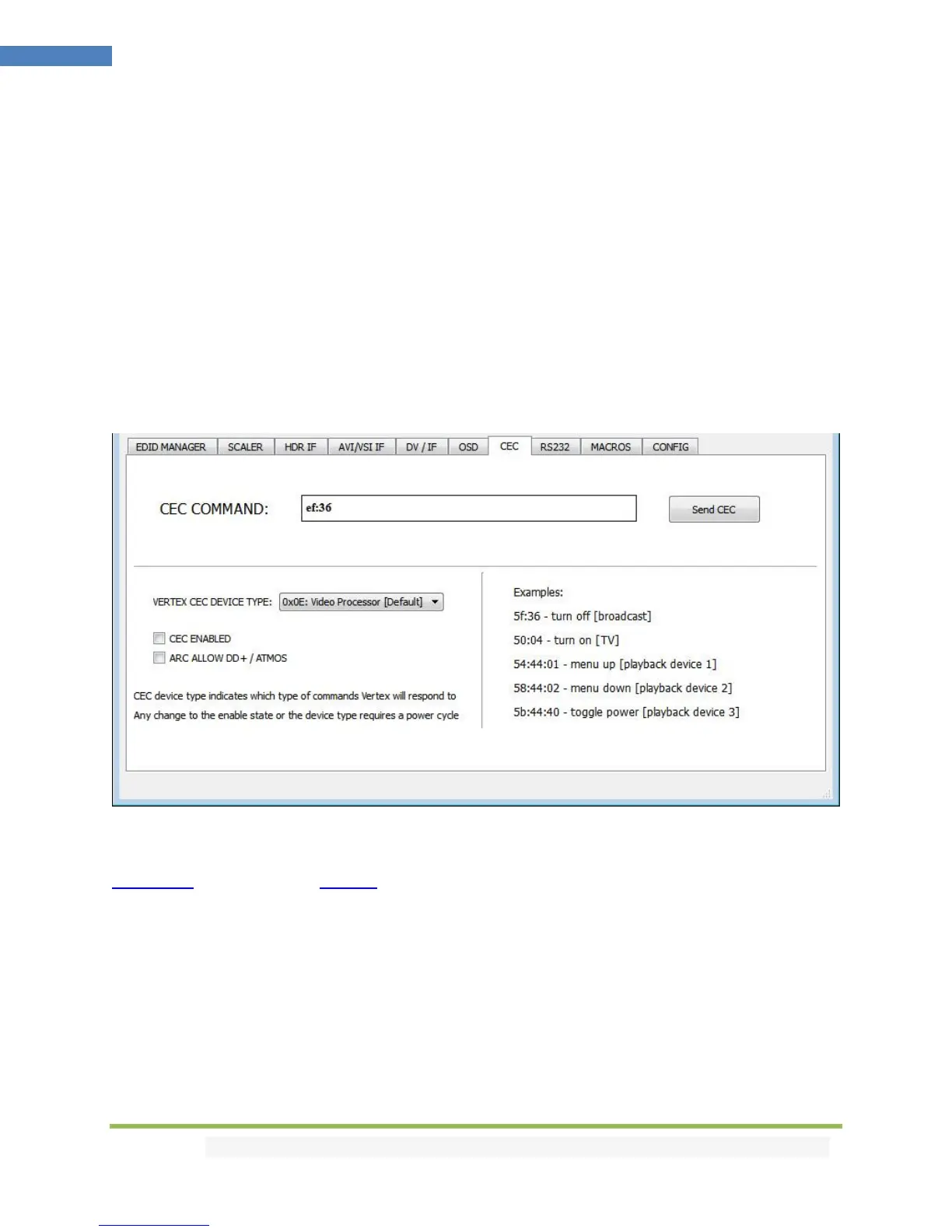
The CEC COMMANDER section of the USB GUI for Windows PC:
[CEC COMMAND]: Enter the CEC command of your choice in this text field in HEX format.
If you are not sure about how to format your command, we recommend you to visit the very well done
cec-o-matic website made by Kwikwai.
[SEND CEC]: By clicking this option, the CEC command you entered in the CEC COMMAND text field will
be sent out by the Integral 2 unit.
[INTEGRAL 2 CEC DEVICE TYPE]: Video Processor by default (ID#5)
CEC ENABLED must be ON in order to apply the selected dropdown options to the Integral 2 unit.
Video Processor (Default) is the device type to choose if you have an AVR in your setup and if you want
to use that AVR for ARC or CEC.



 To Next Page