Disclaimer: 3
rd
party and/or custom firmware providing extra features are not covered in this manual.
4K Integral 2 – User Manual
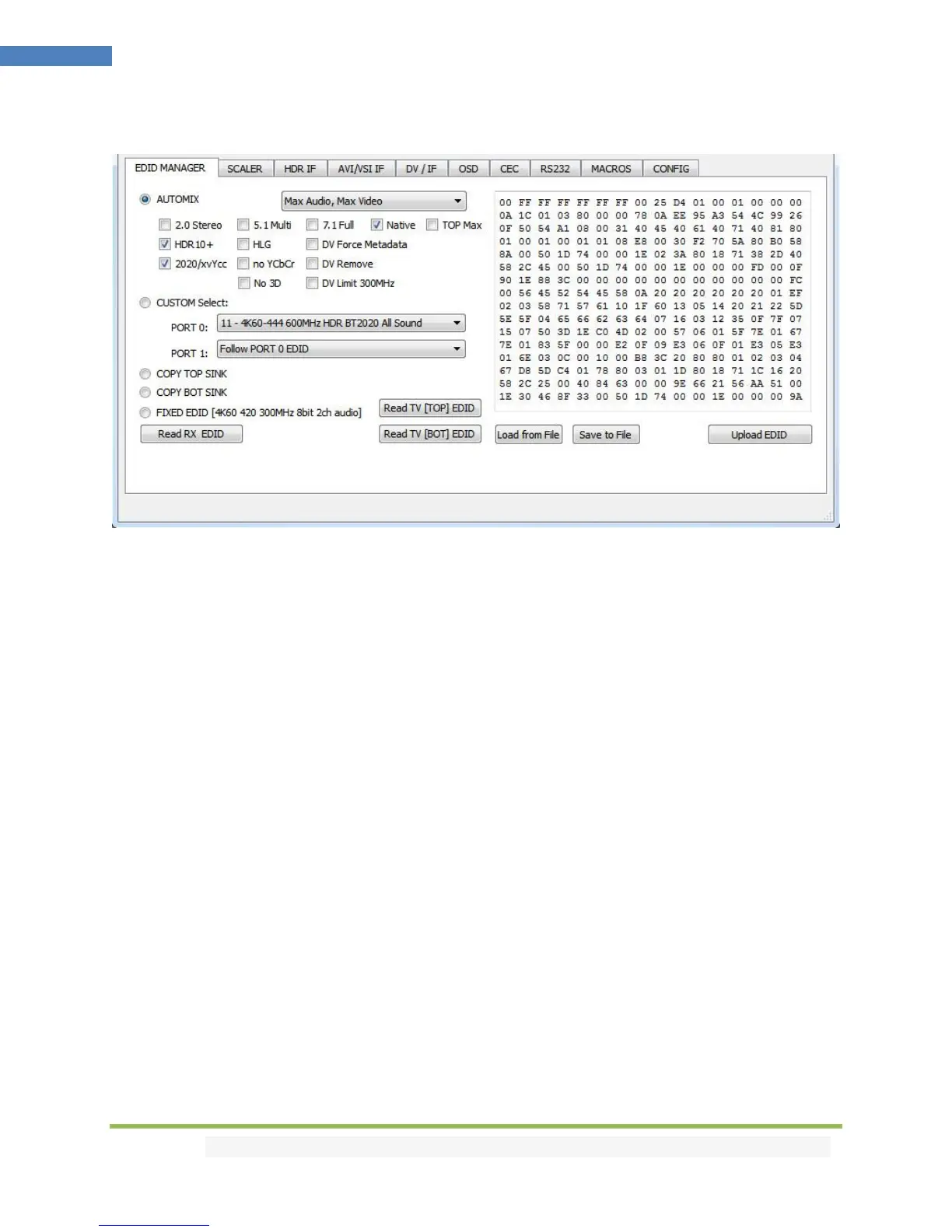
The EDID MANAGER section of the USB GUI for Windows PC:
[Automix Mode]: Create EDID based on mutual capabilities so both sinks will always show a picture and
audio. Some Flags can be checked or unchecked so you can force and override some parameters to
match your needs. Ex: If your TV is stereo and your AVR full sound and both are connected to each
Integral 2 outputs port, then by default, Automix will report Stereo as sound capabilities, by checking
Full Audio flag you will force Automix to always report Full Audio no matter the real sound capabilities of
the connected sink devices.
[Automix Algo]: Select the mixing algo of your choice, available algo are: Min Mixed Capabilities, Max
Audio/Min Video, Top Output Priority, Bot Output Priority, Max Audio/Max Video (default)
[2.0 Stereo]: Force the created automix EDID to present stereo sound capabilities.
[5.1 Multi]: Force the created automix EDID to present 5.1 multi-channel sound capabilities.
[7.1 Full]: Force the created automix EDID to present Full 7.1 sound capabilities.
[Native]: Force the created automix EDID to present the setup native sound capabilities.
[TOP MAX]: Force the automix EDID to present the max audio capabilities from sink at top output.
[HDR 10+]: Force the automix EDID to present HDR10+ support.
[HLG]: Force the automix EDID to present the HLG support.
[2020/xvYCC]: Force the automix EDID to present BT2020 and xvYCC support.
[no YCbCr]: Force the automix EDID to present no support for YCbCr (useful to force RGB).
[no 3D]: Force the automix EDID to present no support for 3D.
[DV Force Metadata]: Force the automix EDID to present Dolby Vision support.
[DV Remove]: Force the automix EDID to present no support for Dolby Vision.
[DV Limit 300MHz]: Force the automix EDID to only present support for Dolby Vision at 300MHz.
[Custom Use / BT]: Pick and use EDID from a selection of preloaded EDID tables or load any EDID bank
of your choice. By default the selected EDID table is a 4K60 4:4:4 600MHz with Full Audio capabilities.
Leave the slide in this position to allow remote control via USB/IR or Android/iOS APP and/or to pick and



 To Next Page