30
3.0 Handling HeartWare
™
HVAD
™
System Components
3.4 Using Battery Power (continued)
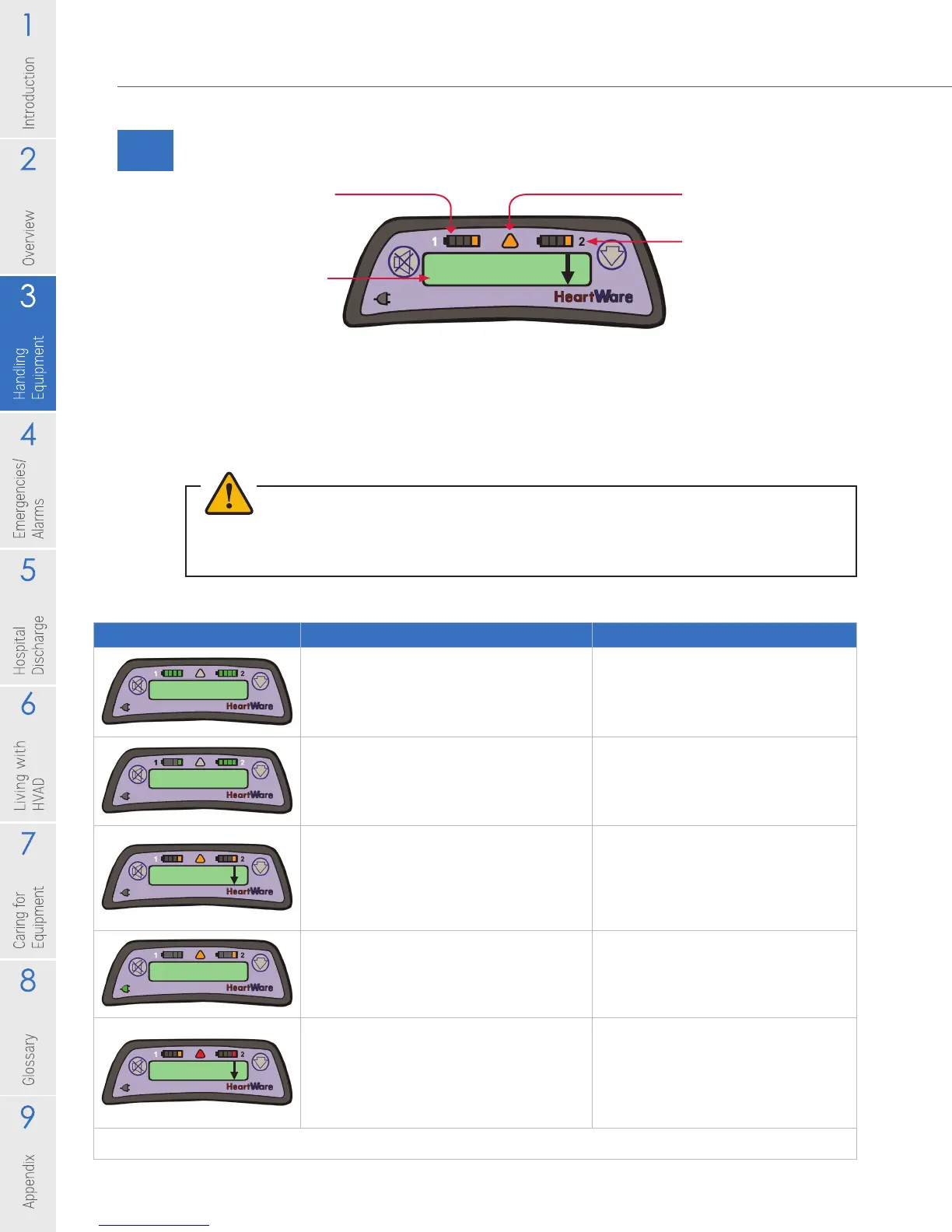
Figure 30: Controller Display with a Low Battery Alarm
When a depleted battery is not exchanged eventually, a high priority alarm will
sound, the Alarm Indicator will be ashing RED and the message on the Controller
Display will read [Critical Battery]. A charged battery or adapter (AC or DC) should
be attached immediately to the power port with the critical battery indication.
Never disconnect both power sources at one time.
WARNING! NEVER disconnect both power sources (batteries, AC adapter, DC adapter) at the
same time since this will stop the pump and activate the [No Power] alarm. At least one power
source must be connected at all times.
Table 4: Controller Battery Indicators
Low Battery 1
Replace Battery 1
Alarm Indicator
Active Battery
Indicator
Battery Indicator 1
Controller Display
If your controller shows: It means: You:
3000 RPM 5.0 L/min
4.8 Watts
You have 2 fully charged batteries
connected to your controller. In this
example, the battery connected to
Power Source 1 is providing primary
power.
Do not need to change either
battery.
3000 RPM 5.0 L/min
4.8 Watts
The battery connected to Power
Source 1 has less than 25% capacity.
In this example, the battery connected
to Power Source 2 is fully charged and
providing primary power.
Do not need to change either
battery.
Low Battery 1
Replace Battery 1
Both batteries connected to your
controller have less than 25% capacity.
In this example, the battery connected
to Power Source 1 is providing primary
power. The down arrow indicates there
is another alarm.
Should attach a full battery or AC
adapter to Power Source 1.
Low Battery 2
Replace Battery 2
The battery connected to Power
Source 2 has less than 25% capacity.
In this example, an AC or DC adapter
is connected to Power Source 1 and is
providing primary power.
Should connect a fully charged
battery to Power Source 2.
Critical Battery
Replace Battery 2
The battery connected to Power Source
2 has limited time remaining. The battery
connected to Power Source 1 has less
than 25% capacity and is providing
primary power.
Should attach a full battery or AC or
DC adapter to Power Source 2. Then,
attach a full battery or AC or DC
adapter to Power Source 1. Never
disconnect both batteries at the
same time. This will stop your pump.
The controllers shown above are meant to be examples of the changes you might see during the day.



 To Next Page