CAUTION: ALWAYS recharge completely depleted batteries within 24 hours to avoid permanent
battery damage.
29
HVAD
®
Patient Manual
3.4 Using Battery Power
It is important to understand how much charge a battery has before connecting to
the controller. There are two ways to know if the battery is fully charged and ready
for use:
1. The battery Test button
2. The battery charger
For information on the battery charger, see Section 3.6.
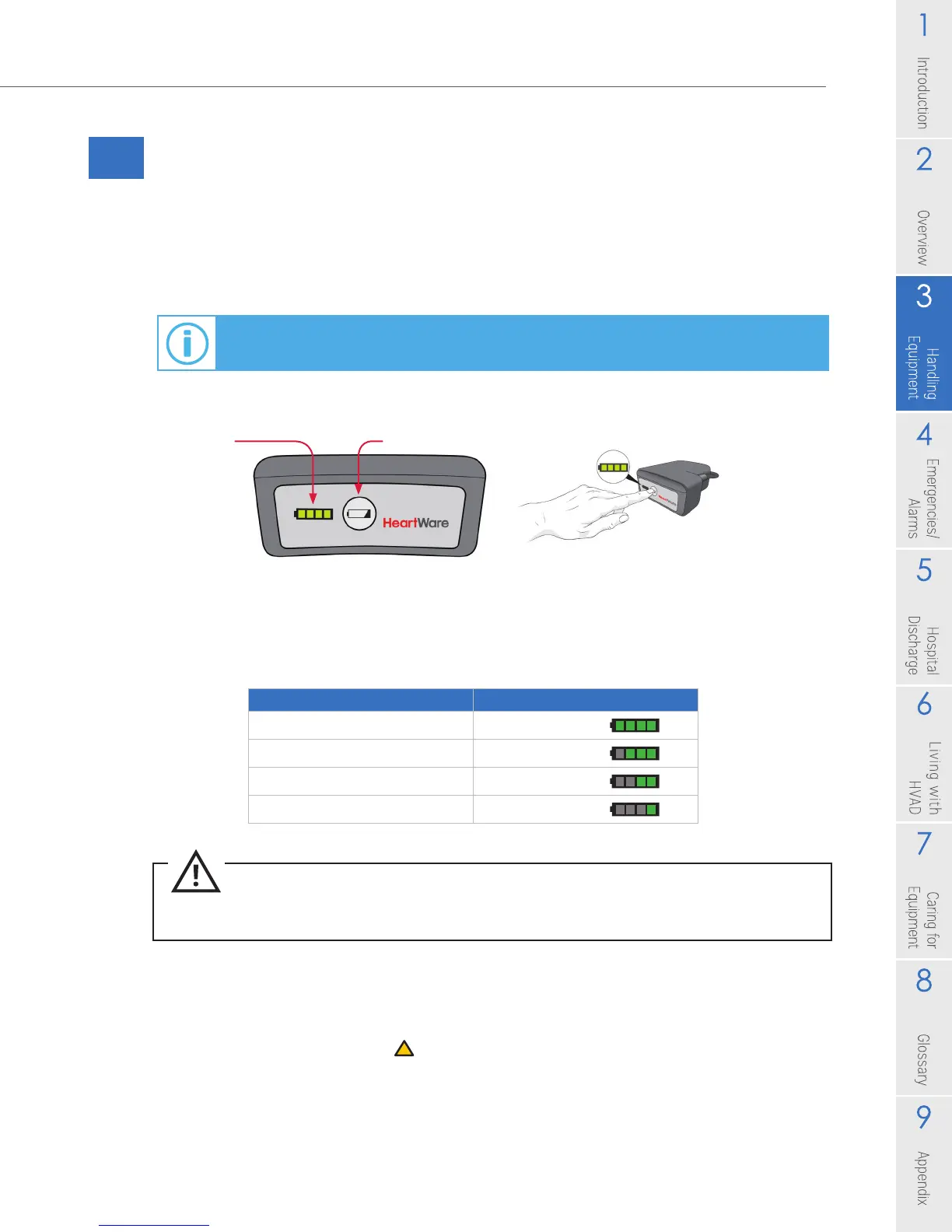
On the battery, press the Test button to light up the battery capacity display.
The battery capacity display (Figure 29) will light up showing how much power is in
each battery. See Table 3.
Table 3: Battery Capacity
When one battery is depleted to less than 25% capacity, the controller will
automatically switch to the other battery. When both batteries are depleted to
less than 25%, both battery indicators will switch to 1 yellow. An intermittent beep
will sound, the Alarm Indicator
will be yellow, and a message will be displayed to
replace Battery 1 (Figure 30). If the battery is NOT changed within 5 minutes, the alarm
volume will escalate until the battery is exchanged with a fully charged battery.
Battery
Capacity
Display
Test Button
Figure 29
Battery Capacity Battery Capacity Display
75-100%
4 GREEN lights
50-74%
3 GREEN lights
25-49%
2 GREEN lights
less than 25%
1 GREEN light



 To Next Page