NOTE
If proper adjustment cannot be obtained by
this method, visit your Authorised
Distributor/Dealer .
42
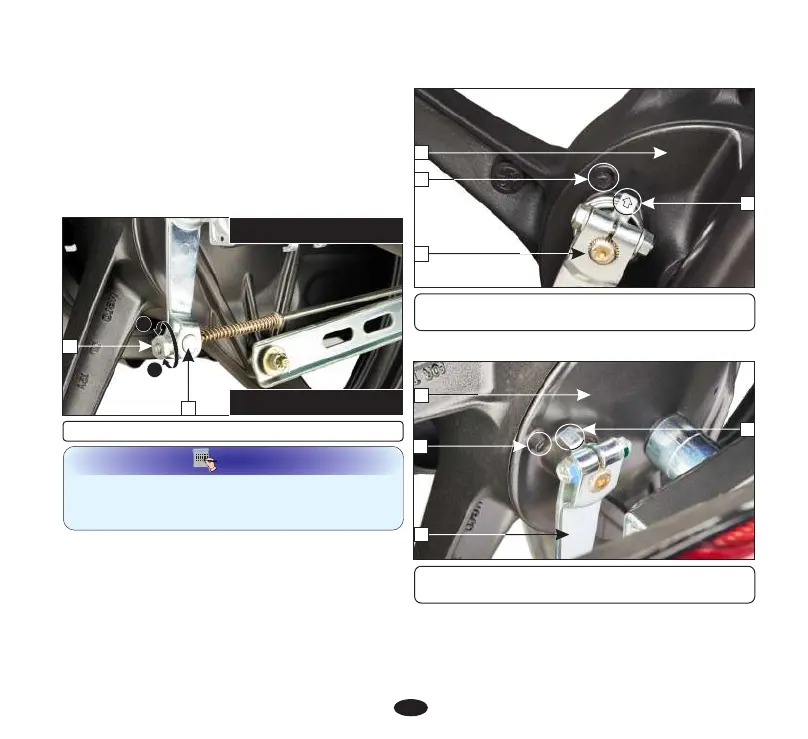
î If adjustment is necessary, turn the rear
brake adjusting nut (3).
î Make sure that the cut-out on the adjusting
nut is seated on the brake arm (4) after
the final adjustment has been made.
î Apply the brake several times and check for
free wheel rotation when released.
A
B
3
(A) Decrease free play (CW)
(B) Increase free play (ACW)
4
(3) Adjusting nut (4) Brake arm pin
BRAKE WEAR INDICATORS
When the brake is applied, an arrow (3), fixed
to the brake arm (4), moves towards a
reference mark (2) on the brake panel (1). If the
arrow aligns with the reference mark on full
application of the brake, the brake shoes must
be replaced.
Rear brake wear indication
(1) Brake panel (2) Reference mark
(3) Arrow (4) Brake arm
3
1
4
2
3
2
1
4
Front brake wear indication
(1) Brake panel (2) Reference mark
(3) Arrow (4) Brake arm


 To Next Page