(a) Fuel gauge
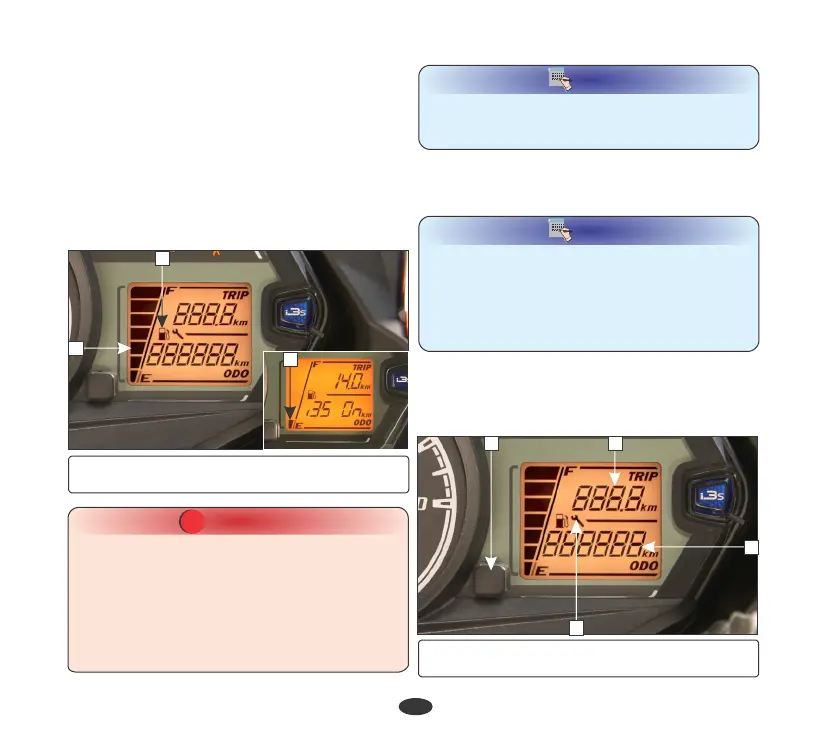
The fuel gauge (1) is of a Liquid Crystal
Display (LCD) type.
The approximate amount of fuel quantity
available in the fuel tank is indicated by the
number of segments (2) in the display.
If only one segment (3) is displayed and
blinks, this indicates that the fuel quantity is
low. The fuel tank should be refilled as soon as
possible.
1
(1) Fuel gauge (2) Segments
21
2
(1) Fuel gauge (2) Segments
(3) One segment
Please ensure the vehicle is not used
continuously when the fuel level indicator
reaches the one segment blinking. It will not
only result in the vehicle running out of fuel, it
may also cause serious damage to the fuel
pump. Please ensure fuel is filled up as soon as
the fuel level indicator reaches one segment
blinking.
CAUTION
!!
NOTE
To check the fuel level indication, the vehicle
should be on levelled surface and in stationary
condition.
15
(b) Odometer
The odometer (4) shows accumulated
distance travelled.
(c) Tripmeter
The tripmeter (5) shows distance travelled per
trip. The tripmeter can be reset to zero by
pressing the RESET button (6).
5
6
4
7
(4) Odometer (5) Tripmeter
(6) Reset button (7) Service reminder indicator
3
NOTE
•
When ignition key is turned “ON” i3s mode
will appears in the display for 5 seconds at
odometer place and turn “OFF” and
odometer mode will display in the LCD.
•
For sudden change from i3s mode to
odometer mode press the set button.












 To Next Page