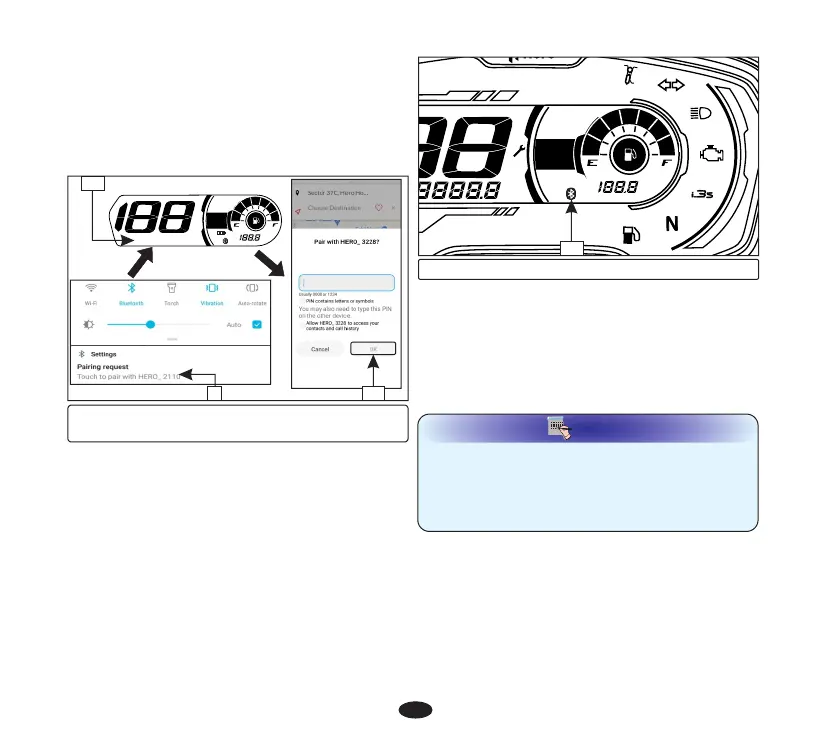
(9) Pairing request notification
(10) Pin (11) “OK”
11
•
Now meter console will display paring pin
(10) in place of odometer reading.
•
Enter the pin in application screen and
select “OK” (11).
•
Now application will send paring request
notification (9). Click on the notification.
10
9
(12) Bluetooth symbol
•
On pairing, meter console displays
bluetooth symbol (12) which indicates that
bluetooth is connected .
• If any error occurs during the course of
pairing process, then meter console will not
display bluetooth symbol. Repeat the above
steps and keep your smartphone closer to
the vehicle to reconnect.
Your vehicle is equipped with autopairing
feature by which if you turn ''OFF'' vehicle's
ignition switch after successful pairing with
hero ride guide application, it will reconnect
automatically once ignition switch is turned
''ON''.
Autopairing
NOTE
NOTE
•
Always keep your smartphone close to your
vehicle during the course of pairing,
autopairing.
•
Application need to be running in the
background.
12
20
Incoming call alert
If your smartphone is paired with the meter
console of your vehicle via bluetooth (page
18), then you will get all the incoming calls
alerts on the meter console.
XXXXXX
km/l
AV
km/h





 To Next Page