15
LCD PANEL
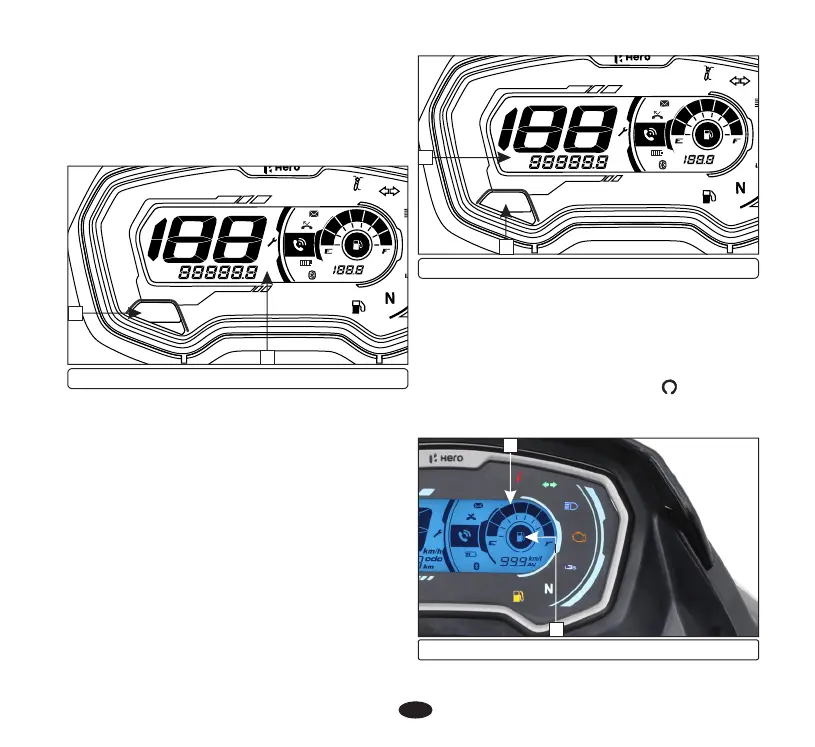
The odometer (1) shows accumulated
distance travelled. The odometer can be
selected by pressing the mode button (2).
(a) Odometer
(b) Tripmeter
The tripmeter (1) shows distance travelled
per trip. The tripmeter can be reset to zero by
pressing the mode button (2) for more than 2
seconds. The tripmeter can be selected by
pressing the mode button.
km/l
AV
km/h
km
odo
TRIP
AB
MODE
(1) Odometer (2) Mode button
The tripmeter (1) shows distance travelled
since trip meter was reset last time. There are
two tripmeters, “Trip-A” and “Trip-B”.
Push the mode button (2) to select “Trip-A”
and “Trip-B”. “Trip-A” and “Trip-B” can be
displayed upto "999.9" km.
If the tripmeter exceeds "999.9" km it will
return to "0.0" km automatically.
1
km/l
AV
km/h
km
odo
TRIP
AB
MODE
(1) Tripmeter (2) Mode button
2
1
2
(c) Fuel gauge
The fuel gauge (1) indicates approximate fuel
available in the form of digital segments.
The digital segments (2) will swing to
maximum scale on the meter console once the
ignition switch is turned “ON” ( ). If all the
segments are displayed it means fuel quantity
in the fuel tank is 10 litres.
(1) Fuel gauge (2) Segments
1
2





 To Next Page