22
I NOTE .
If the memory is erased from the keyboard of the device, all previous settings
are deleted except for flow equivalent and trigger. If the memory data is
erased from a PC (with the software OXYMO-SW), then all previous settings
can be saved.
6.7. KEYBOARD LOCKING
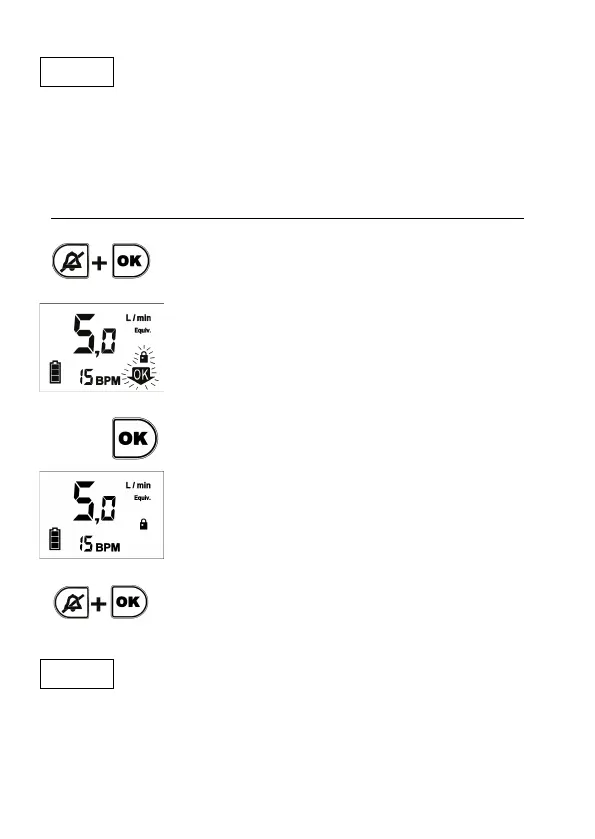
In order to avoid any accidental pushing of the
keyboard, it is recommended to lock it, by pushing
simultaneously Silence alarm and OK keys.
To lock the keyboard, the order must be confirmed
pushing OK
before 5 seconds (during that time the
symbols “OK” and “padlock” blinks on the display). If
in 5 seconds the OK key is not pushed, the device
return to Conserver Mode.
When the keyboard is locked, a padlock appears on
the display and
you can only silence alarms and
turn-on or turn-off the device.
To unlock the keyboard, just it must be pushed
simultaneously Silence alarm and OK keys (the
symbol of a padlock disappears). After unlocking, the
keyboard can be used in a normal way.
I NOTE .
This device can also be locked from the PC software OXYMO-SW. In this
case the device can´t be unlocked from the keyboard.


 To Next Page