34
6.9. OPERATING MODES
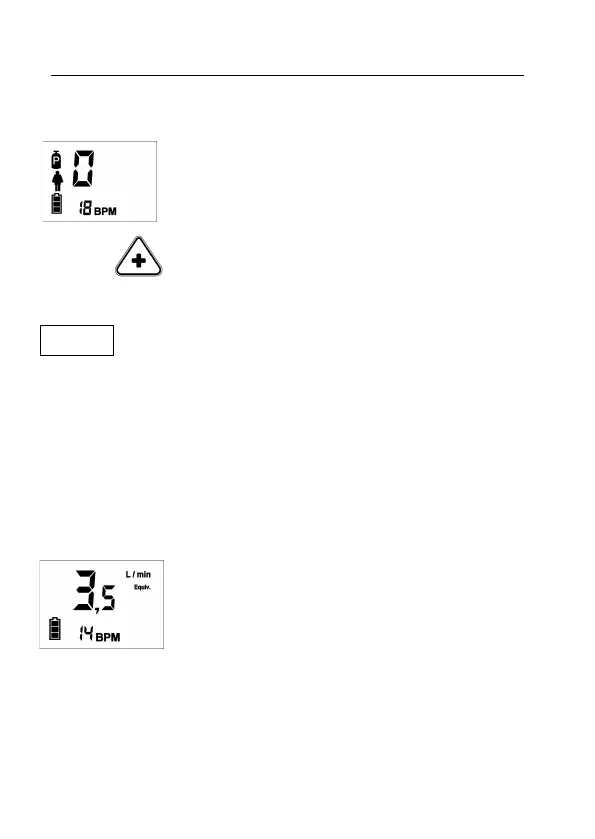
6.9.1. Respiratory Monitor Mode
In this operating mode, OXYMO only performs
monitor tasks. It does not release oxygen nor require
be connected to the oxygen supply. User get access
to this mode by the software OXYMO-SW or by the
keyboard, taking the equivalent flow to zero (0)
To change to Conserver Mode simply increase the
equivalent flow pressing the Plus button.
I NOTE .
In Respiratory Monitor Mode: 1.- The alarms are visible but their sound is
deactivated 2.- During an alarm of disconnection/apnea the Safety Flow and
Automated power-off does not work, although these options are configured as
active
6.9.2. Conserver Mode
After powering on, if within 3 seconds of switch-on test and not getting access
to the Configuration Mode, the device enters to usual operational mode, that
is Conserver Mode. In the example it is showed the Conserver Mode screen.
3,5 L/min
Equiv
. means that is being provided an
oxygen bolus whose physiological effect is similar to
the one achieved with 3,5 L/min of continuous flow.
With each inspiration, the device calculates and
updates the respiratory frequency of the patient,
showing it on lower part of screen. In the example it
is showed 14 breaths per minute (BPM).


 To Next Page