23
6.8. CONFIGURATION
The simplest way to configure the unit is using a PC and the software
OXYMO-SW, via USB (See Chapter
11). Anyway it is also possible to
configure the unit directly using the keyboard, following these instructions
.
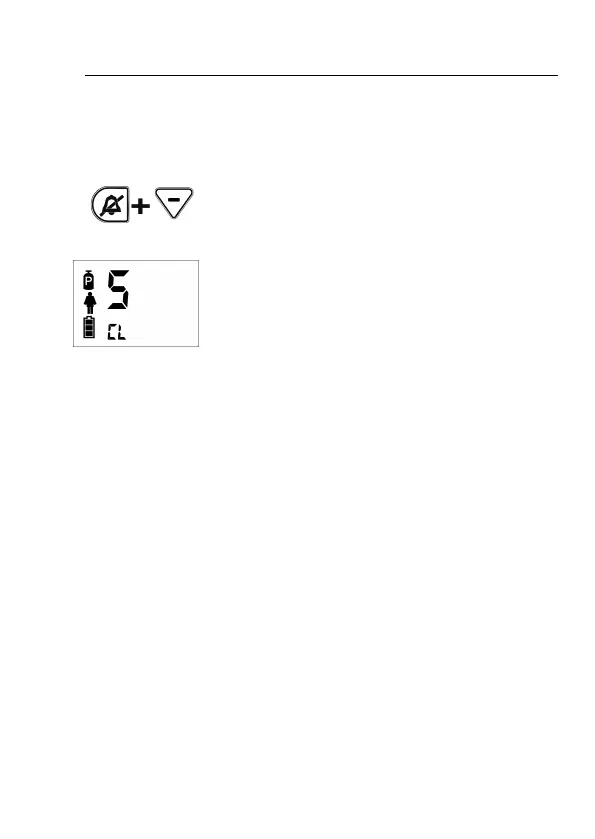
After switching on the unit (See Chapter 6.4) all the
symbols on screen blink for the 3 seconds. If during
this time you press simultaneously Silence alarm
and Minus keys, you access to the Configuration
Mode.
When entering Configuration Mode,
symbols for “disconnection/apnea” and “low O
2
pressure supply” will blink on screen. A big S (for
Setup) will be showed and, bellow that S letter, two
other small letters with the following meaning:
CL (Clock) to enter date/time configuration.
SF (Smart Flow) to activate/deactivate the Smart
Flow system. If activated, it is needed to set up 2
parameters:
• bF (basal Frequency) to establish the
breathing frequency rate at rest or basal.
• IP (Incremental Percentage) to establish
the incremental percentage of equivalent
flow.
SA (Smart Assist) to activate/deactivate the Smart
Assist system.
At (Apnea Time) to establish the time lasting before
the alarm for disconnection/apnea is activated.
AF (Apnea Flow) to activate/deactivate the Safety
Flow in the event of disconnection/apnea.
AO (Auto Off) to activate/deactivate the automatic
switch off of unit.


 To Next Page