26
STEP 4
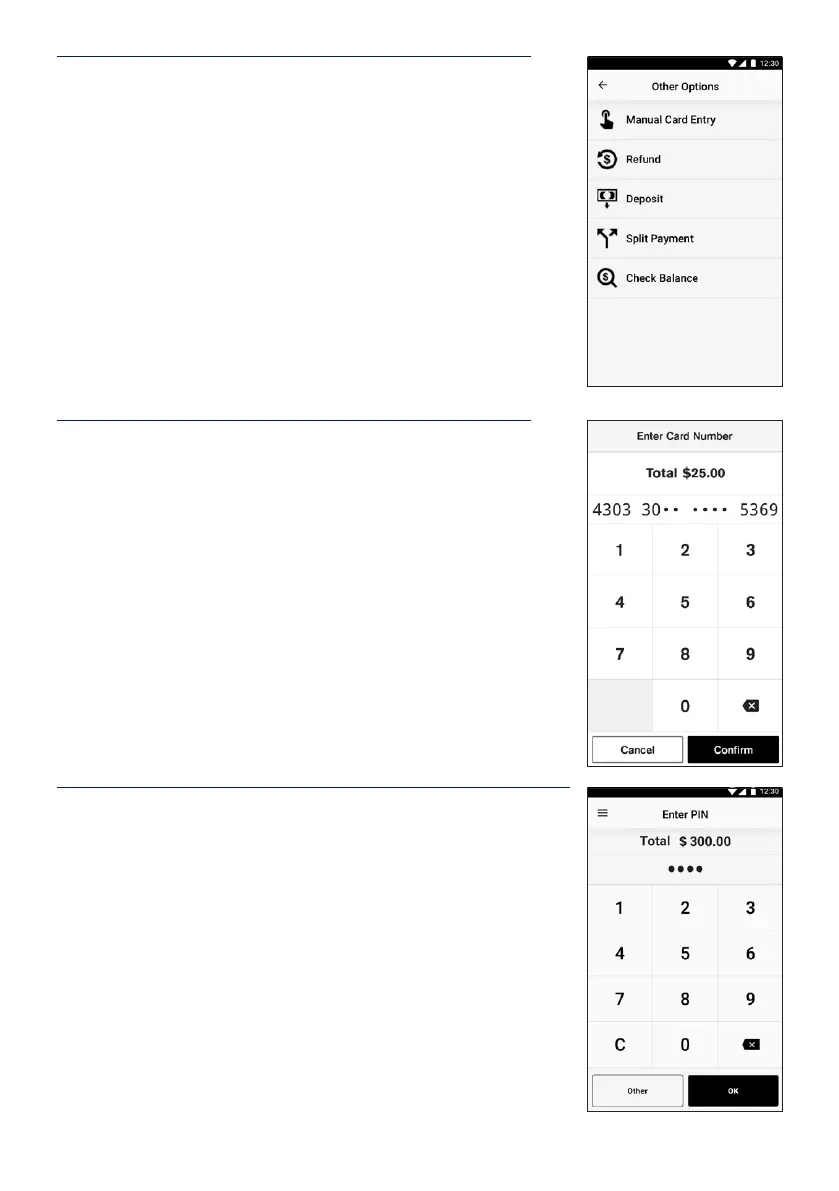
Select Manual Card Entry from the Other Options screen.
If prompted for Payment Options, select Manual.
STEP 5
Enter the card number using the on-screen keypad and
select Enter. The rst 6 and the last 4 digits of the card will
be displayed. Tap Conrm if the details match the payment
card.
Note: Merchant may be prompted to enter in the expiry
date of the card, followed by CVV (which is generally found
on the back of the card. Note: AMEX CVVs are on the front
of the card).
STEP 6
If a PIN is required to complete the transaction, a keypad
willbedisplayed for a customer to enter their PIN and tap
Enterto complete the transaction.
Note: In some cases the card will not require a PIN and
therefore a signature will be required to complete the
transaction.


 To Next Page