38
5. TERMINAL FUNCTIONS
5.1 Accessibility
5.1.1 About the Terminal Accessibility Features
HICAPS Trinity terminals have accessibility features to support users by making it easier to
process transactions. Features include:
• Tactile dots surrounding the screen to orient the telephone keypad for PIN entry.
Horizontal dots represent columns and vertical dots represent rows.
• Contactless card reader at the top of the terminal.
• Volume control buttons are next to the second vertical dot from the top, on the left
hand side of the terminal.
• Headphone jack is next to the rst vertical dot from the top, on the left hand side.
5.1.2 Enabling Voice to Text
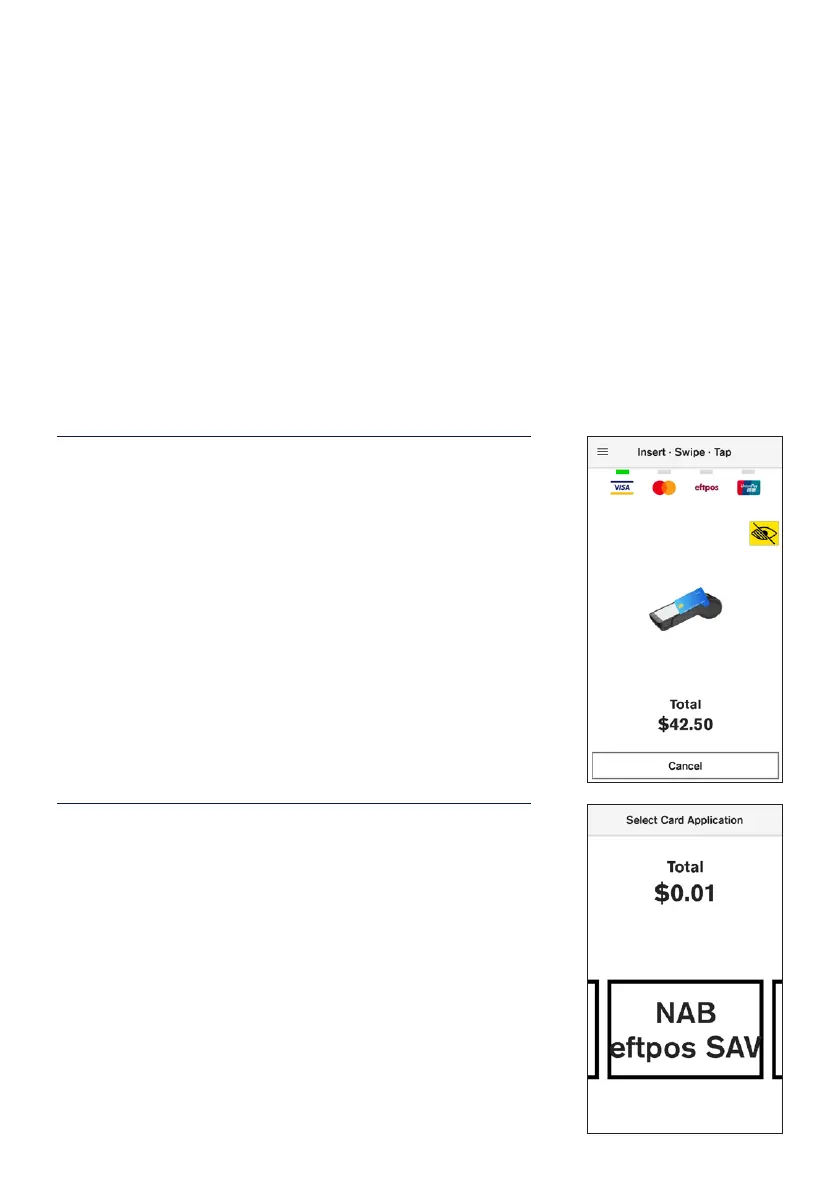
STEP 1
On the card presentation screen, the terminal will sound a
chime on the location of the terminal.
Double tap on the screen to enable voice reading,
including the amount due and instructions to complete the
transaction.
Payment cards can be tapped on top, inserted at the
bottom or swiped on the right-hand side of the terminal.
STEP 2
Once a card has been presented, a voice will prompt to
swipe left or right on the screen to choose an account.
A voice prompt will read out the accounts available and
prompt the customer to conrm the account to process the
payment. Double tap to conrm selection.


 To Next Page