© 2012 HID Global Corporation. All rights reserved.
65
HDP8500 Industrial Card Printer/Encoder User Guide L001617 rev 1.1
Printing a Test Print Image
Install a HDP8500 compatible ribbon in the Printer for the Test Print.
The ribbon installed determines the Test Print PRN file sent to the printer.
Open the Driver settings.
a. From your computer‟s startup menu, select Settings > Printers and Faxes.
b. Double click on the HDP8500 Card Printer under the Printer‟s window.
c. Select Printing Preferences under the Printer drop-down menu. (Note: This
will bring up the HDP8500 Printing Preferences window.)
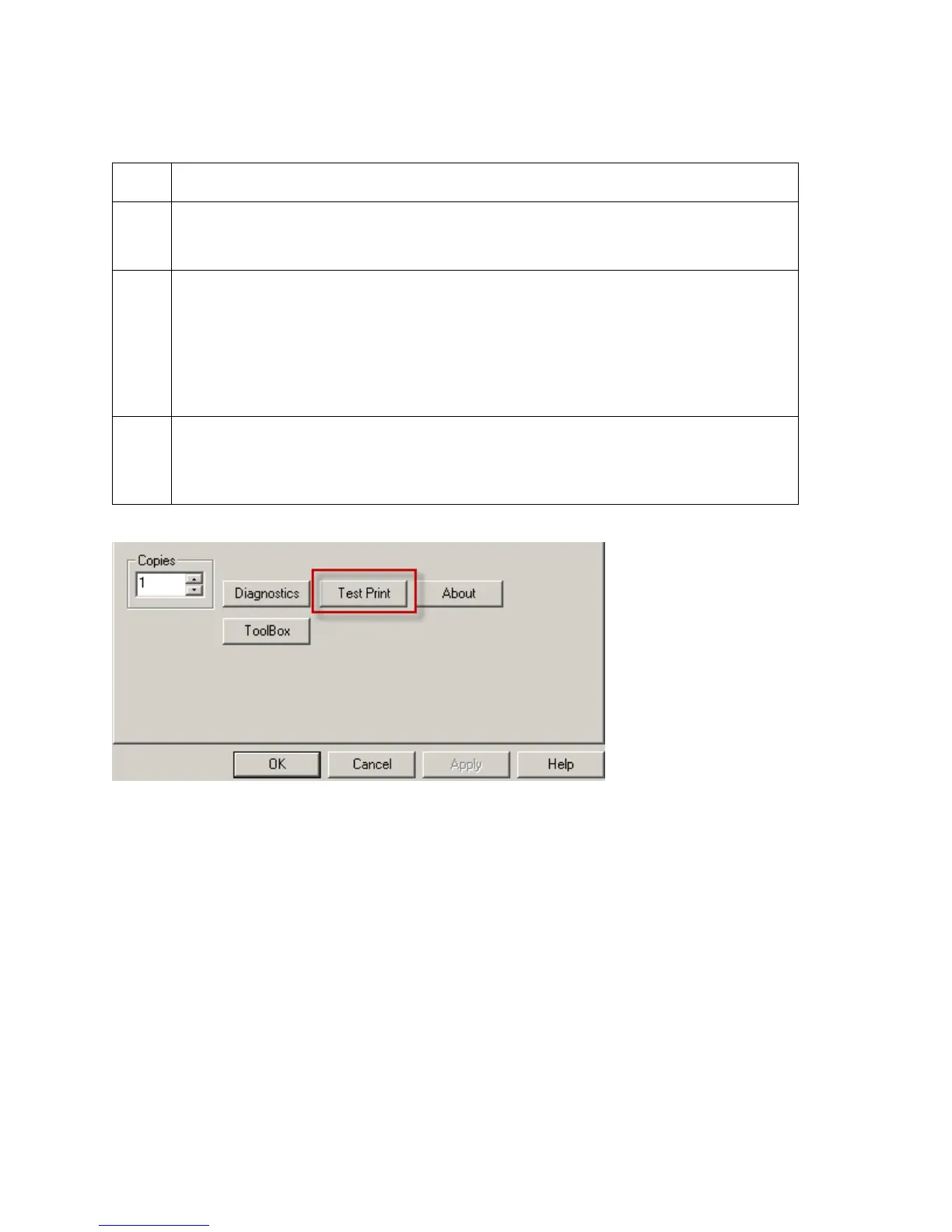
a. Select the Card tab, and then click on the Test Print button, as shown in
Display A on the next page.
b. When the Test Print button is selected, an image is copied to the Printer.




 To Next Page