28
©2017 Hill-Rom Services, Inc. ALL RIGHTS RESERVED.
205278 rev 2 13-SEP-2017 ENG – US
Zeroing the Scale
There are two ways to zero the scale:
New Patient Zero:
• Clears previous patient weight history
• Zeros the scale
• Resets bed to facility’s default settings (i.e., siderail protocol, comfort adjust
on Centrella™ MAX surface)
Same Patient Re-Zero:
• Keeps patient weight history and bed settings customized for that patient.
• Zeros the scale
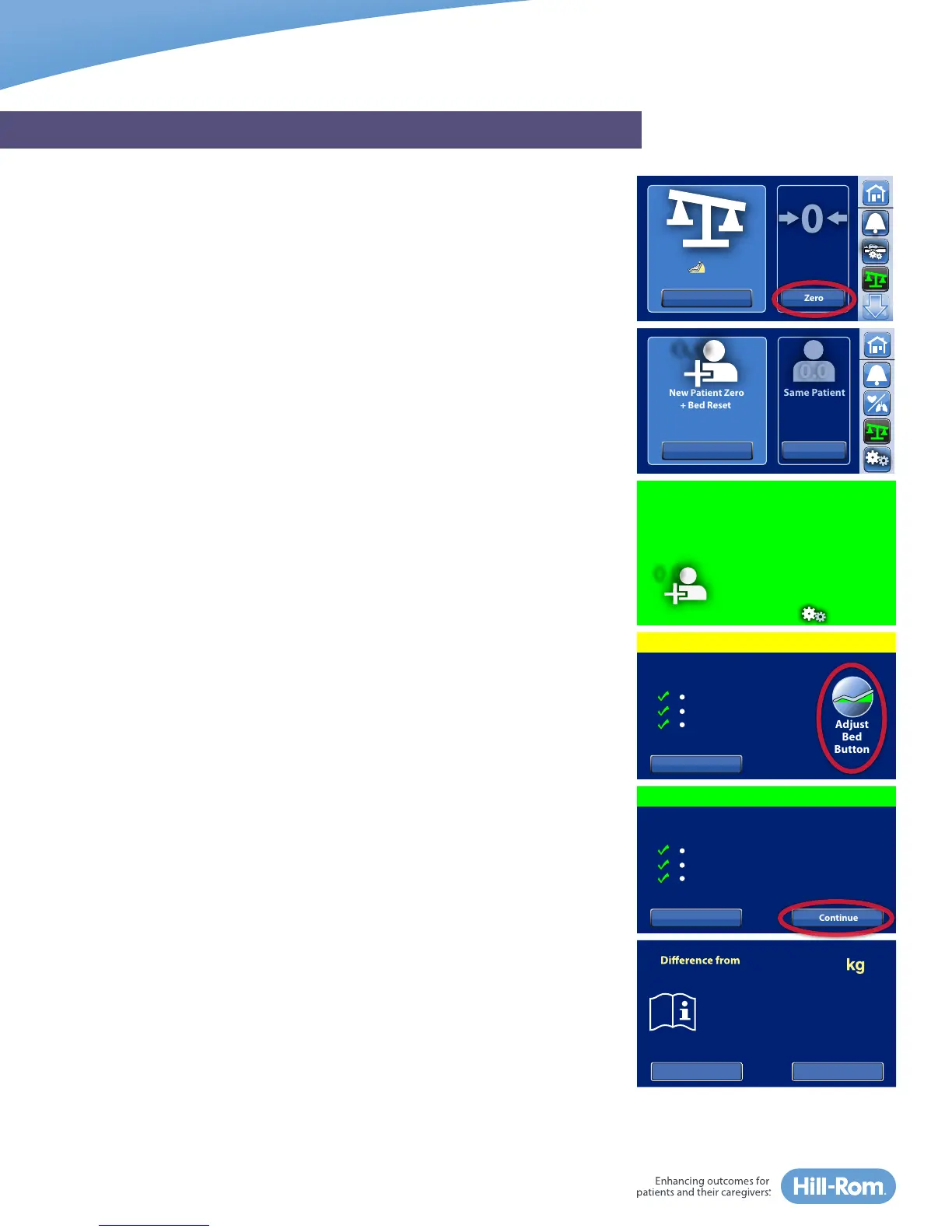
For demonstration purposes, we will select Zero for New Patient. The steps
are the same for Same Patient Re-Zero.
1. Select the Scale icon in the Navigation Menu.
2. Place all standard linens and items, including patient pendant control, on
the bed
3. Select Zero and let go.
NOTE: When zero is complete, you will hear a single beep and the
message “Ready for New Patient” appears on the touchscreen until the
screen is touched.
If during the zeroing process, the bed is not in the “Required Bed Position,”
you will hear a triple beep and additional directions appear on the
touchscreen.
Required Bed Position:
• HOB is <35°
• Knees are <25°
• Foot angle is <10°
Press and hold the Adjust Bed Button on the touchscreen to automatically
place the bed into the correct position until you hear the single beep
confirming the bed is in the required position. Select Continue.
NOTES:
• To check when the scale was last zeroed, select the Scale icon. There will be
a date for last New Patient Zero and for the last Same Patient Re-Zero.
• Bed will not zero if it detects >2kgs of weight difference to prevent zeroing
the scale with excess equipment.
• Bed will not zero if it detects >45 kilograms to prevent zeroing the scale
with the patient in the bed.
GRAPHICAL CAREGIVER INTERFACE (GCI)® TOUCHSCREEN
Last Weight:
147.5 kg
06/03/2015 6:35 AM
Weigh
Weigh
Zero
Last Zero :
10/26/2015
8:04 AM
New Patient Re-Zero
New Patient Zero
+ Bed Reset
0.0
Same Patient
Re-Zero
Last :
10/26/2015 8:04 AM
Last:
10/28/2015
0.0
Ready for New Patient.
Bed zeroed and reset.
To maintain Foley-to-floor
clearance, set Foley
Position Limit in Settings.
Continue
To Home Screen
Not in Required Position
Level Bed
Straighten Legs
Lower Head
Hold “Adjust Bed Button” or
use side rail controls to:
Cancel
Adjust
Bed
Button
In Required Position
ContinueCancel
Level Bed
Straighten Legs
Lower Head
Help
+26.0
OK
last zero:
Cannot Zero!
Remove Patient or excess
weight from bed and zero.















 To Next Page