26
©2017 Hill-Rom Services, Inc. ALL RIGHTS RESERVED.
205278 rev 2 13-SEP-2017 ENG – US
Centrella™ MAX Controls (Optional Feature)
Contraindication: The use of a powered air surface with patients with
unstabilized spinal cord injury could cause serious injury to the patient.
The surface automatically adjusts the air system to accommodate changes in
weight distribution such as when the head is elevated or a patient turns from
their side to their back.
Pressure redistribution therapy is always active unless:
• Max Inflate is active
• Power is not available
• An error has occurred with the surface
Surface Modes
Normal mode provides continuous full-body pressure redistribution for
patients.
Max Inflate mode maximizes the firmness of the surface to assist in patient
handling such as surface-to-surface transfers and/or patient repositioning.
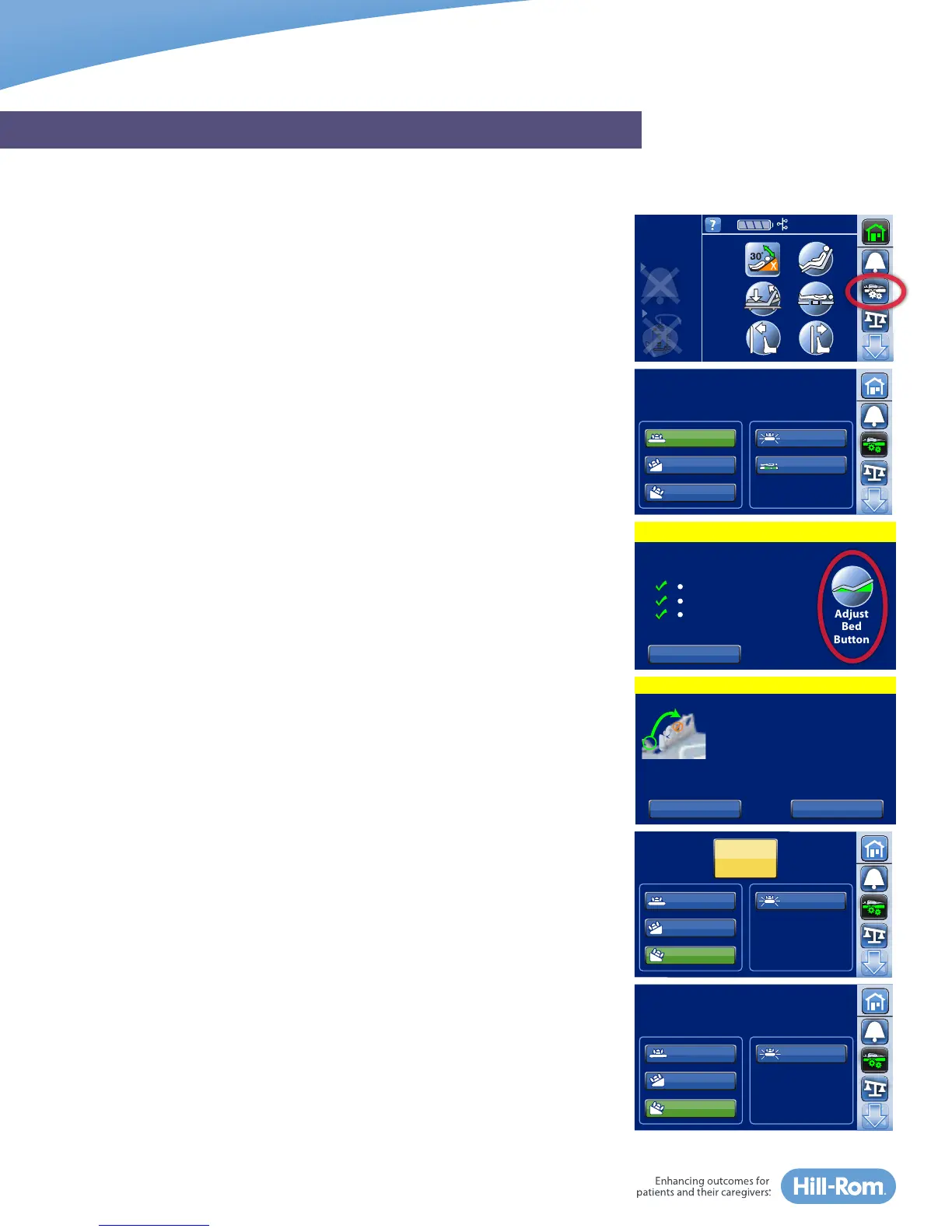
1. Press the Surface Menu control located in the Navigation Menu of the
home screen. It will stay in Max Inflate for 15-minutes unless deactivated.
When 2-minutes remain, the bed will triple beep and a message appears
on the touchscreen reminding you Max Inflate is ending.
2. Press Reset if you need more time or let it return to Normal mode.
Turn Assist helps the caregiver turn the patient to the left or right. This can
be used for procedures such as patient positioning and linen changes.
NOTE: Right Turn control turns the patient to the patient’s right side.
1. Press the Surface Menu control in the Navigation Menu of the home
screen.
2. Select Right Turn or Left Turn. A triple beep sounds and a message
appears as a reminder to remove USB charge cable from the port and to
place patient pendant on outside headrail.
3. Select Continue.
If the bed is not in the correct position to activate Turn Assist, such as if the
head-of-bed is greater than 25°, press and hold the Adjust Bed Button to
correct the bed’s position, then select Continue.
The siderail that the patient is turning towards MUST be in the up position to
activate Turn Assist. If the siderail is down, a message will appear, reminding
you to raise the rail. Raise the rail, press Close then press Turn Assist again.
NOTES:
• For proper operation, there must be a minimum of 32 kgs (70 lbs) on the
surface.
• Use loose, fitted sheets, preferably knitted, for maximum pressure
redistribution.
GRAPHICAL CAREGIVER INTERFACE (GCI)® TOUCHSCREEN
Head Angle
32˚
<30˚
Limit
Stand
Assist
Air Mattress Controls
Max Inflate
Comfort
Right Turn
Left Turn
Normal
Continue
Unplug USB cord from headrail.
Move bed remote
to outside of headrail.
Cancel
Continue
Max Inflate
Normal
Right Turn
Hold
Stop
Turn
Left Turn
Full Turn Achieved
Max Inflate
Normal
Right Turn
15:00
Left Turn
Continue
To Home Screen
Not in Required Position
Level Bed
Straighten Legs
Lower Head
Hold “Adjust Bed Button” or
use side rail controls to:
Cancel
Adjust
Bed
Button















 To Next Page