9
©2017 Hill-Rom Services, Inc. ALL RIGHTS RESERVED.
205278 rev 2 13-SEP-2017 ENG – US
SafeView®+ System (Optional Feature)
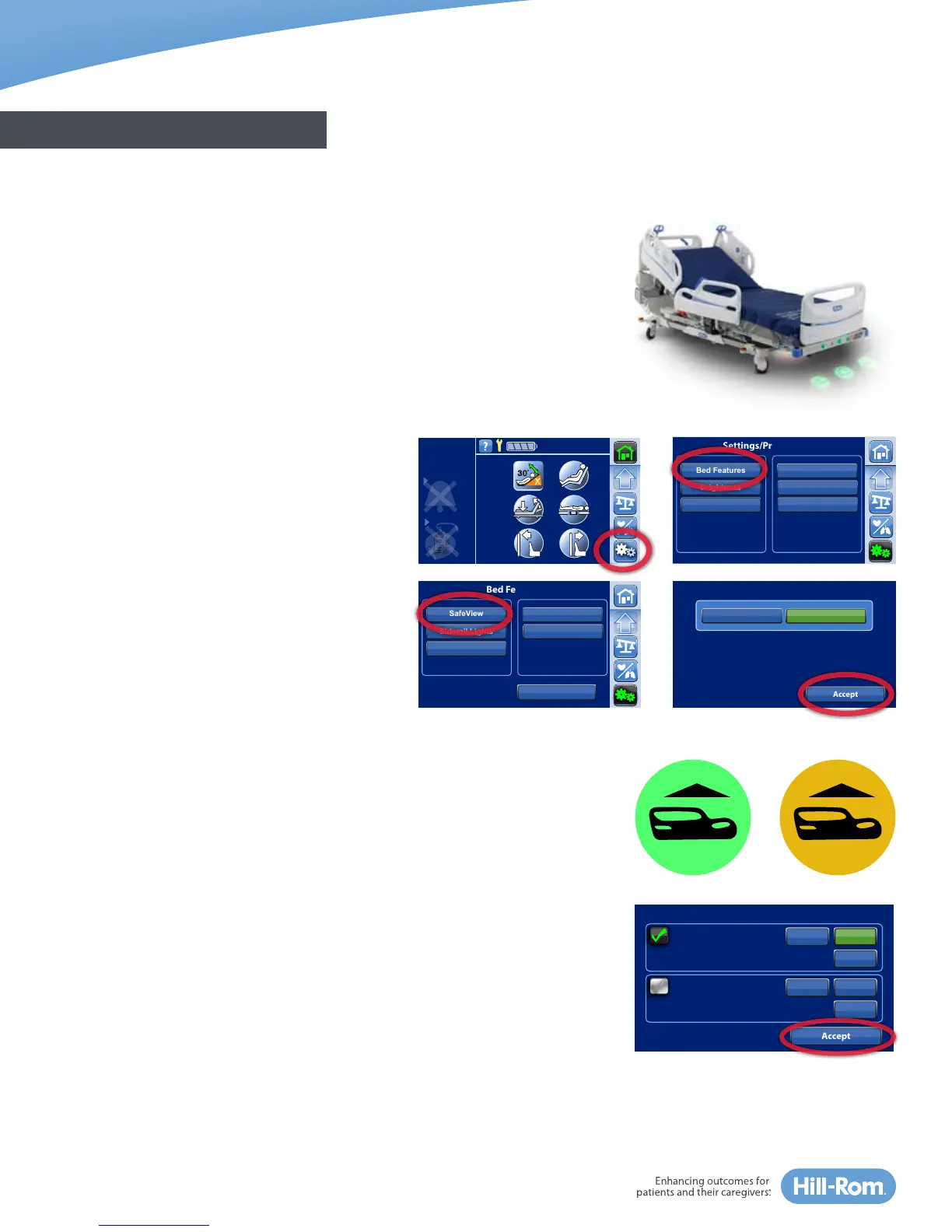
Beds equipped with SafeView®+ System display bed safety status icons on
the foot-end of the bed and projections on the floor. It notifies you when:
• Siderails are not set to facility protocol,
• Bed exit is On or Off, and
• Bed is not in the lowest position.
As you conduct patient rounds or as you leave a patient’s room, you can
quickly identify that the bed is in the safest position by glancing at the
projections on the floor. This is especially helpful at night, and when privacy
curtains are used. Responding to flashing, amber lights can be incorporated
in your facility’s “No Pass Zone” for all hospital staff to ensure patient safety.
To turn floor projections on or off: select the
Settings Menu control in the Navigation Menu
of the home screen. Press Bed Features, then
press SafeView. Select On or Off and confirm by
pressing Accept.
NOTE:
• SafeView®+ System floor projections can be
turned off, but the icons on the foot-end
cannot be turned off.
• The SafeView®+ System is customizable to
your facility’s falls protocol.
SafeView®+ System: Siderail Protocol Status (Optional Feature)
The SafeView®+ System siderail icon notifies you when the siderails are set in
or out of facility protocol.
• Green: the minimum or greater number of siderails are up as set in the
siderail protocol.
• Flashing amber: fewer siderails are raised than the set protocol.
To adjust the siderail protocol for an individual patient, select the
Settings Menu control. Press Bed Features then press Rail Protocol. Select the
patient siderail protocol. Press Accept.
NOTES:
• The siderail protocol is set based on your facility’s policy.
• When the bed is Zeroed for a New Patient, the siderail protocol will reset
back to your facility’s default settings.
• Some rail combination settings may be unsafe for some patients. Follow
your facility’s protocol.
GENERAL BED OVERVIEW
Alert for
Restraint
UpDown
Up
Foot Rails
Accept
UpDown
Up
1 Rail
2 Rails
1 Rail
2 Rails
Head Rails
Current Patient Siderail Protocol
Brightness
Service Connect
Back
Bed Features
USB
Voice Alerts
SafeView
Rail Protocol
Siderail Lights
Off
SafeView Floor Projections
On
Accept
Head Angle
32˚
<30˚
Limit
Stand
Assist
Brightness
Siderail Lights
Bed Features Bed Info
Settings/Preferences
Brightness Bed Service
Service Connect
Foley Limit















 To Next Page