4.24 Siderail Wire Cover
Chapter 4: Removal, Replacement, and Adjustment Procedures
4
Hill-Rom® Basic Care™ Bed, Hill-Rom® 305 Manual Bed, Page 4 - 53
Hill-Rom® 405 Electric Bed Service Manual (MAN336 REV 2)
4.24 Siderail Wire Cover
Tools required: Phillips head screwdriver
Removal
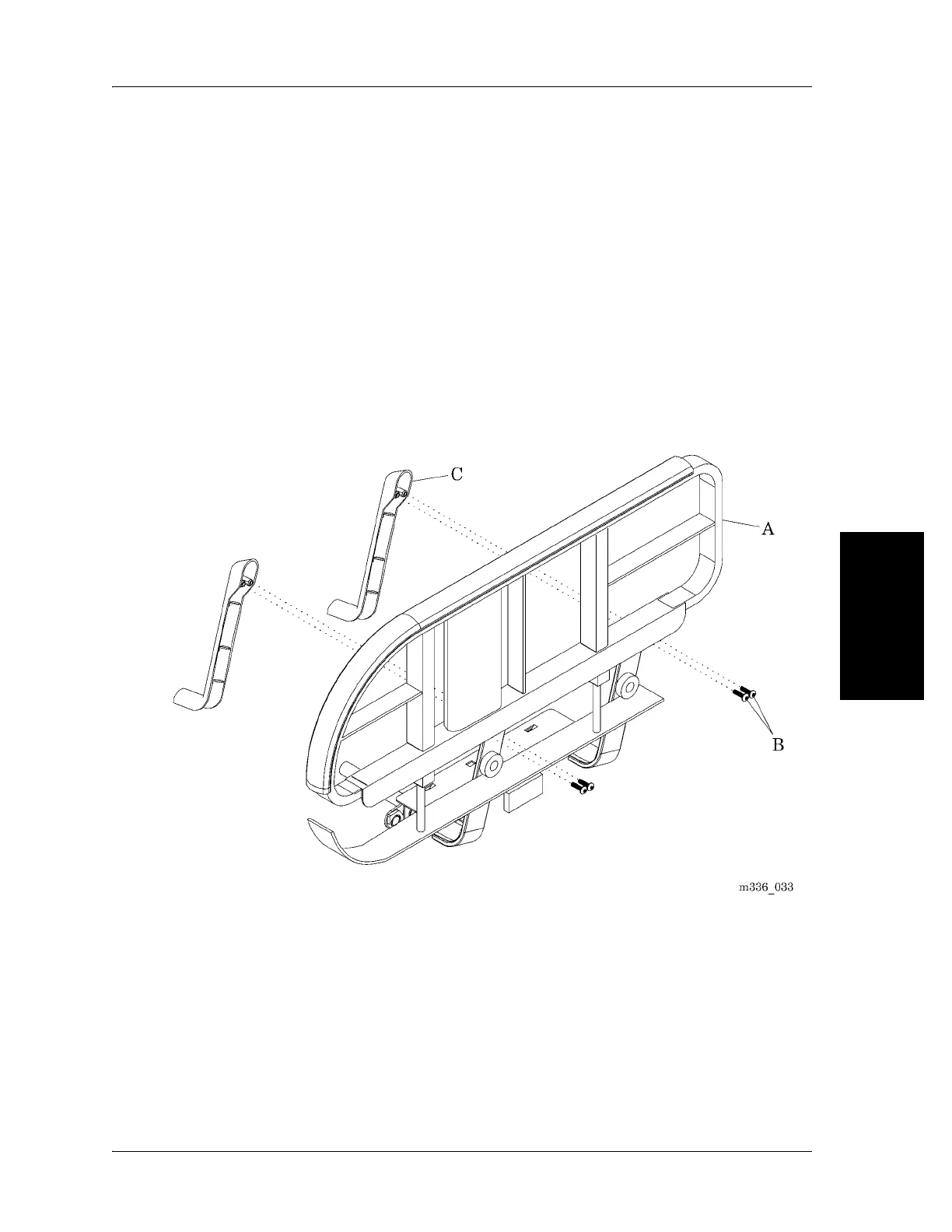
1. Raise the siderail (A) to its up and locked position.
2. Remove the two screws (B) that attach the siderail wire cover (C) to the
siderail (A).
3. Remove and discard the siderail wire cover (C) (see figure 4-24 on page 4-
53).
Figure 4-24. Siderail Wire Cover
Replacement
1. Do the removal procedure in the reverse order.
2. Do the “Function Checks” on page 2-2.









 To Next Page