4.30 Sleep Surface Panels
Chapter 4: Removal, Replacement, and Adjustment Procedures
Page 4 - 66 Hill-Rom® Basic Care™ Bed, Hill-Rom® 305 Manual Bed,
Hill-Rom® 405 Electric Bed Service Manual (MAN336 REV 2)
4.30 Sleep Surface Panels
Tools required: Screwdriver
Removal
1. Raise the bed to the highest position.
2. Lower the head and knee sections to their lowest positions.
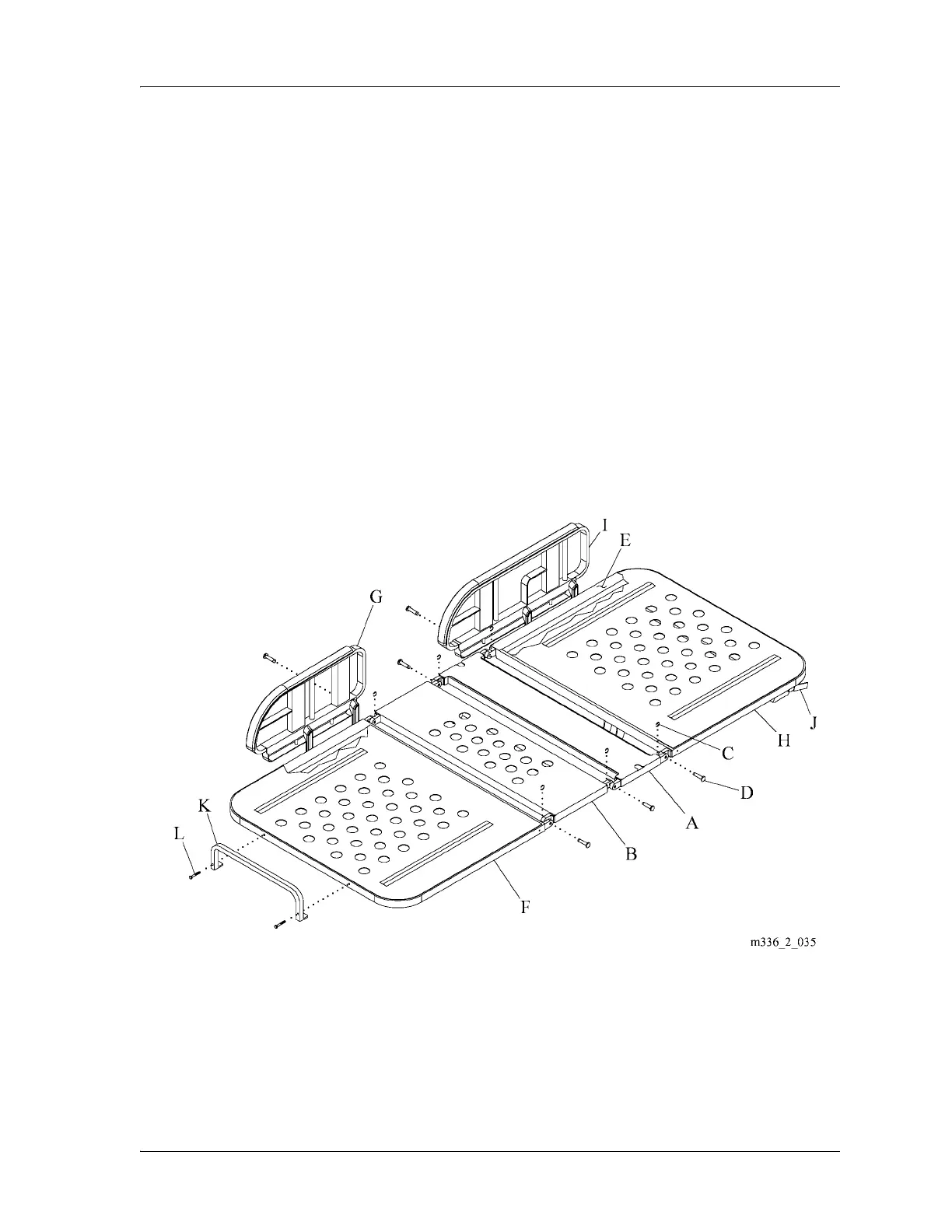
3. If you are to replace a seat panel (A) or thigh panel (B), do as follows (see
figure 4-31 on page 4-66):
a. Remove the four retaining rings (C) and four pins (D) that attach the
panel (A) or (B) to the bed frame (E).
b. Remove the panel (A) or (B) from the bed frame (E).
Figure 4-31. Sleep Panels
4. If you replace a foot panel (F), do as follows:
a. Remove the two footrails (G) from the bed frame (E) (refer to
procedure 4.16 on page 4-37).









 To Next Page