4.5 Trendelenburg and Reverse Trendelenburg Indicators
Chapter 4: Removal, Replacement, and Adjustment Procedures
Page 4 - 12 Hill-Rom® Basic Care™ Bed, Hill-Rom® 305 Manual Bed,
Hill-Rom® 405 Electric Bed Service Manual (MAN336 REV 2)
4.5 Trendelenburg and Reverse Trendelenburg Indicators
Tools required: Screwdriver
Rubber mallet
Whenever one of the Trendelenburg indicators needs replaced or reset, adjust
the indicator caps.
Removal
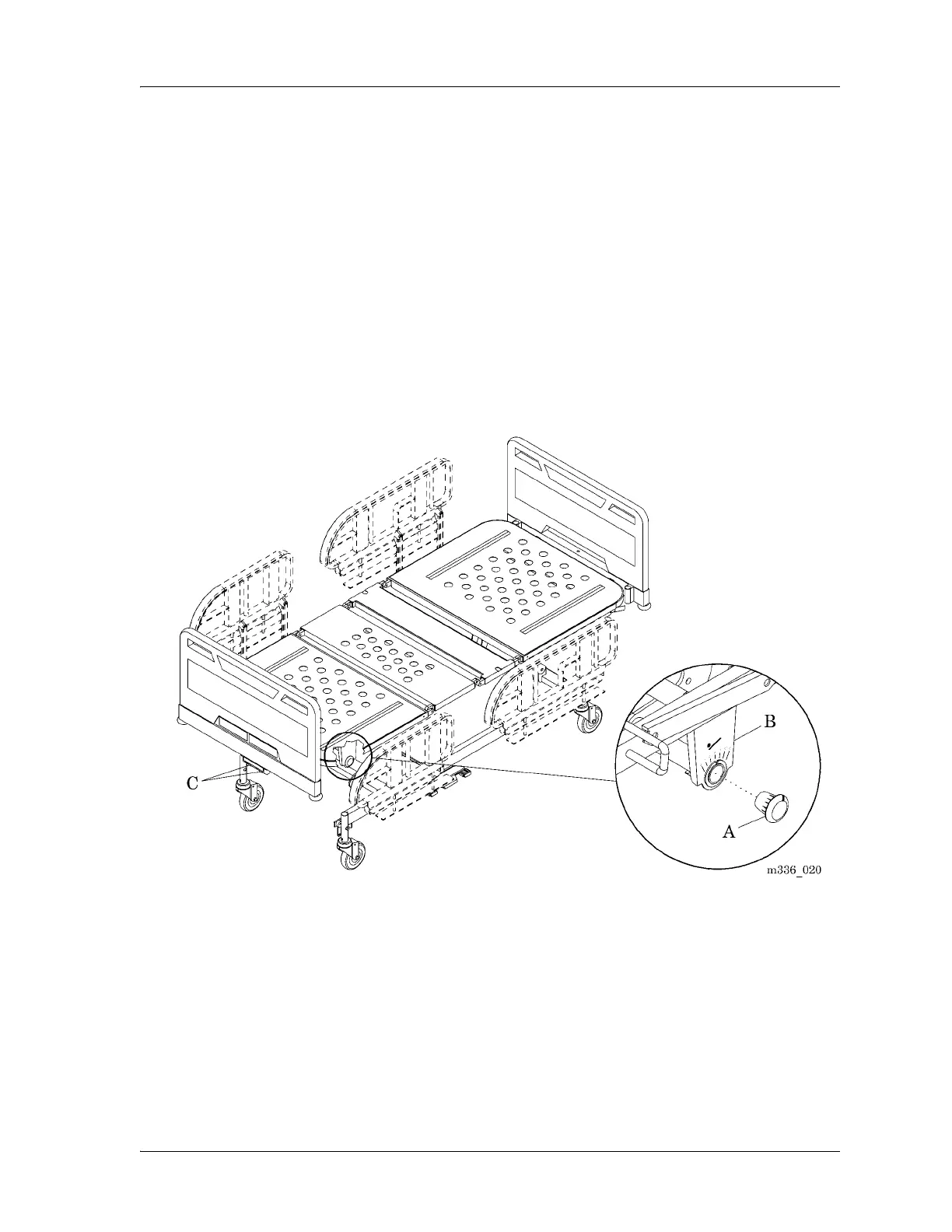
Carefully pry the indicator cap (A) from the lift arm (B) (see figure 4-5 on page
4-12).
Figure 4-5. Trendelenburg and Reverse Trendelenburg Indicator
Replacement and Adjustment
1. Raise the bed to the highest position.
2. Pull out both the Trendelenburg and the Reverse Trendelenburg handles
(C).










 To Next Page