WIRELESS
Version 1.0, 02/2015. Copyright 2012 Hitron Technologies
91
Version 1.0, 02/2015. Copyright 2014 Hitron Technologies
91
Hitron CGNVM User’s Guide
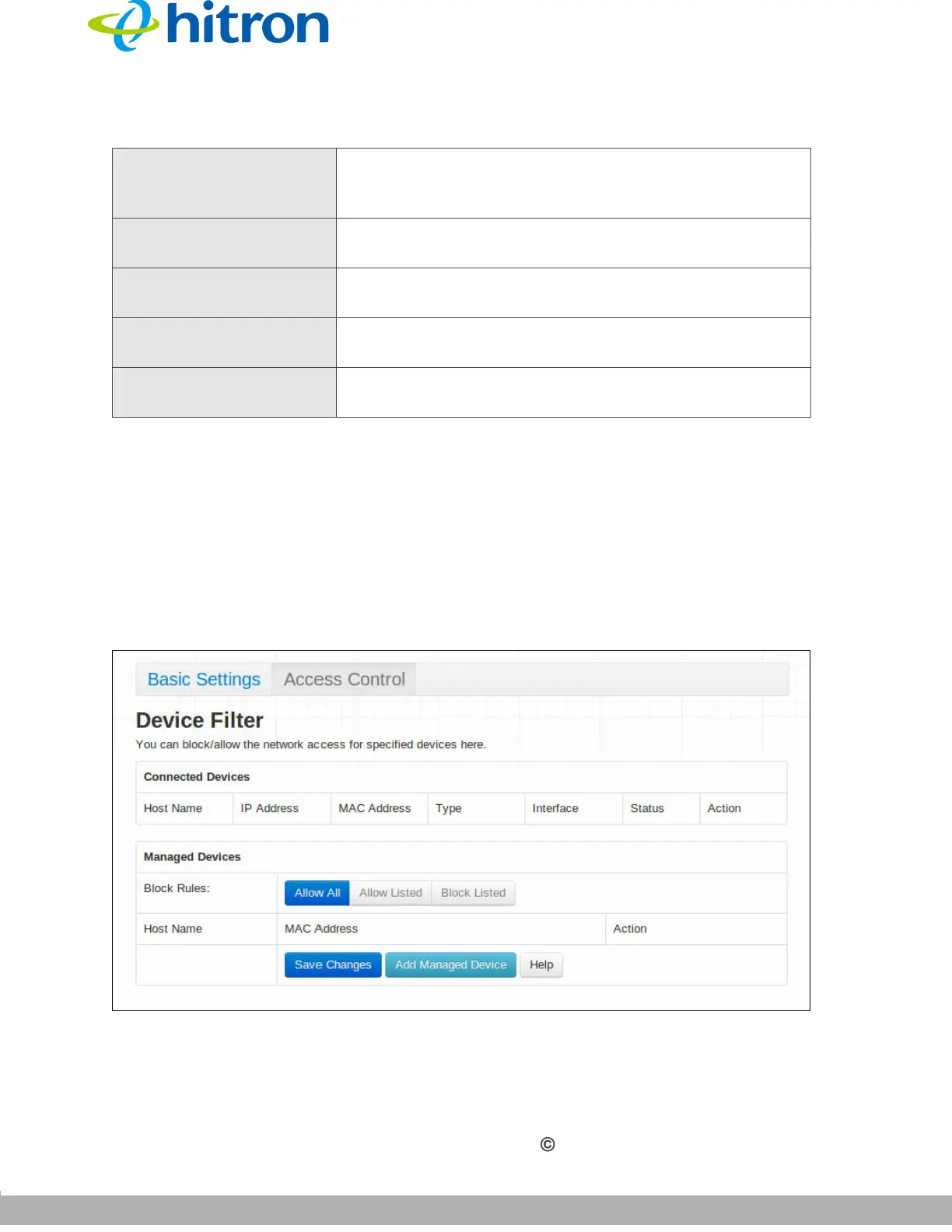
4.3 The Wireless: Access Control Screen
Use this screen to modify the CGNVM’s wireless networks’ Service Set Identifiers
(SSIDs) and manage the devices that connect to the wireless network.
Click Wireless > Access Control. The following screen displays.
Figure 36: The Wireless: Access Control Screen
Guest Network Password Enter the password that wireless clients must be
configured to use to connect to either the 2.4GHz or the
5GHz wireless guest network.
Max Guest Allowed Select the maximum number of wireless clients that may
concurrently connect to the wireless guest network.
Save Changes Click this to save your changes to the fields in this
screen.
Cancel Click this to return the fields in this screen to their last-
saved values without saving your changes.
Help Click this to see information about the fields in this
screen.
Table 26: The Wireless: Basic Settings: Guest Screen (continued)



 To Next Page