Chapter 4: Commissioning 47
Using an SD card
To be able to pass on therapy data to a doctor, you can copy the data to an SD card.
You can use SD and SDHC cards up to 32 GB. You can format the SD card on LAVI and
delete any existing data. This method is described under “Copy data”.
Please note: We recommend using SD cards with a minimum of 8 GB memory.
Copy the data as follows:
Please note: We only recommended copying data when therapy is not in progress.
If therapy is active, the data cannot be copied in full.
1.
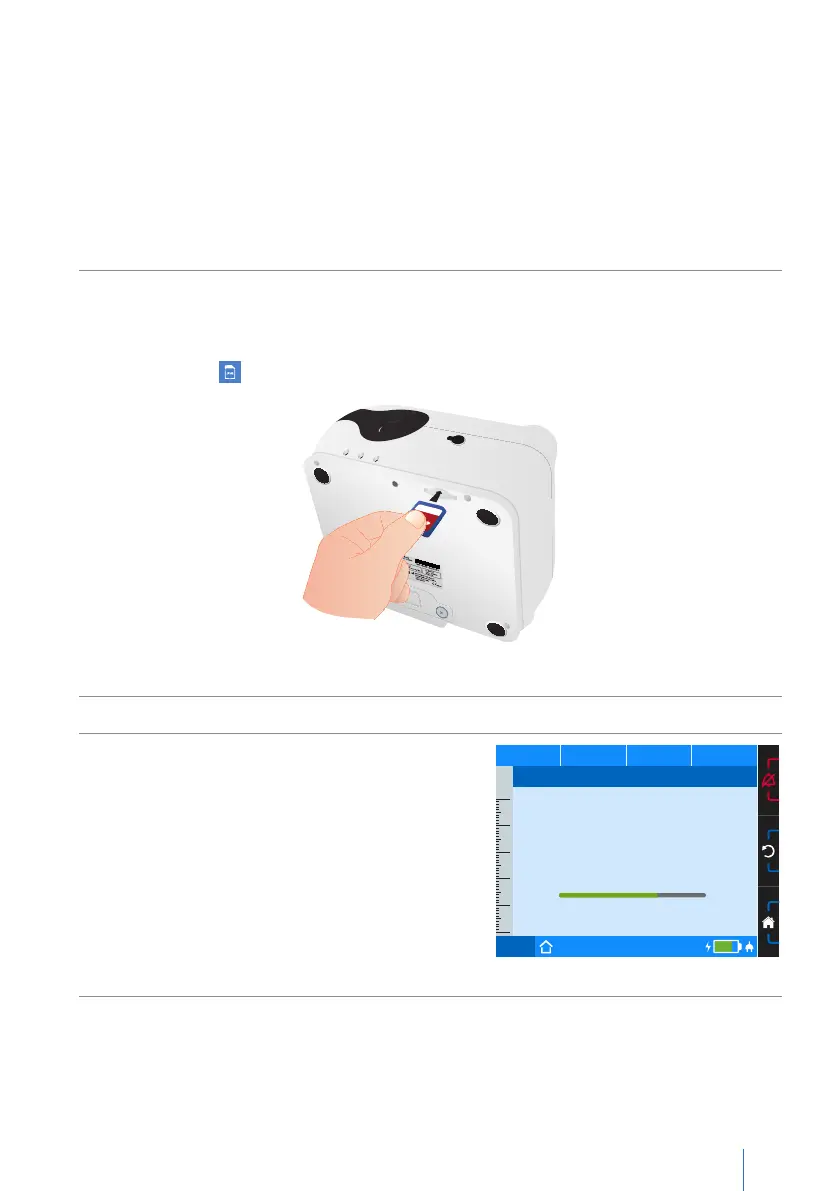
Insert the SD card into the SD card slot until it clicks into place as shown in the
illustration. then appears on the toolbar.
Figure 15: Inserting the SD card
2. On the home screen, navigate to “System” and press the MFK.
3.
Navigate to “Copy data” and press the MFK.
PCV
Set 1
75%
50
40
30
20
10
0
p
hPa f
bpm V
I
lI:E
Copy Data
Run...
Possible messages during the copying process:
“Run...”
Ö The copying process is being performed
“SD card full” or “Finished...error”
Ö
Format the SD card and copy again.
Please note: This will delete all data on the
SD card.
Ö Use another SD card.


 To Next Page