56 Chapter 5: Device operation
Home screen
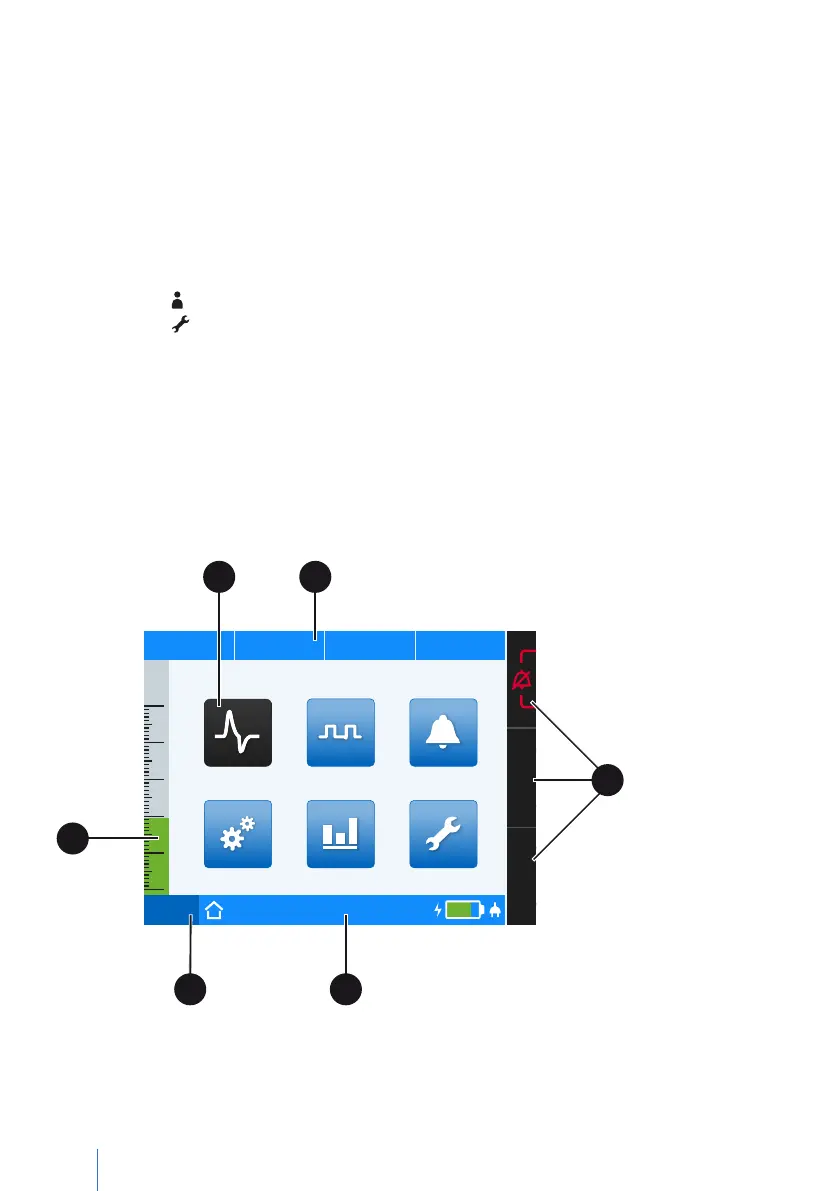
You can enable individual screens from the home screen:
• Monitoring screen
– Measurements: Monitoring measurements (numerical)
– Graphs: Monitoring measurements (graphs)
• Parameter screen
• Selecting the ventilation set, setting the ventilation and alarm parameters
• Event log screen
– Alarms : Displays physiologically-dependent alarms
– Alarms :Displays technically-dependent alarms
– Events: Displays events
• System screen
• System settings, calibrations, counters and device information
• Statistics screen
• Statistical evaluation reports
• Service screen
• System calibration and tests for service work (PIN code protected)
PCV
Set 1
75%
50
40
30
20
10
0
p
hPa f
bpm V
I
lI:E
Statistics
Parameter Event Log
Service
Monitoring
Thursday I 19.05.2016 I 23:10
System
A B
E
D
F
C
A Selected screen symbol B Measurement display C Softkeys D Toolbar
E Active ventilation mode and active set F Pressure bar
Figure 18: Home screen


 To Next Page