Chapter 5: Device operation 61
Event log screen
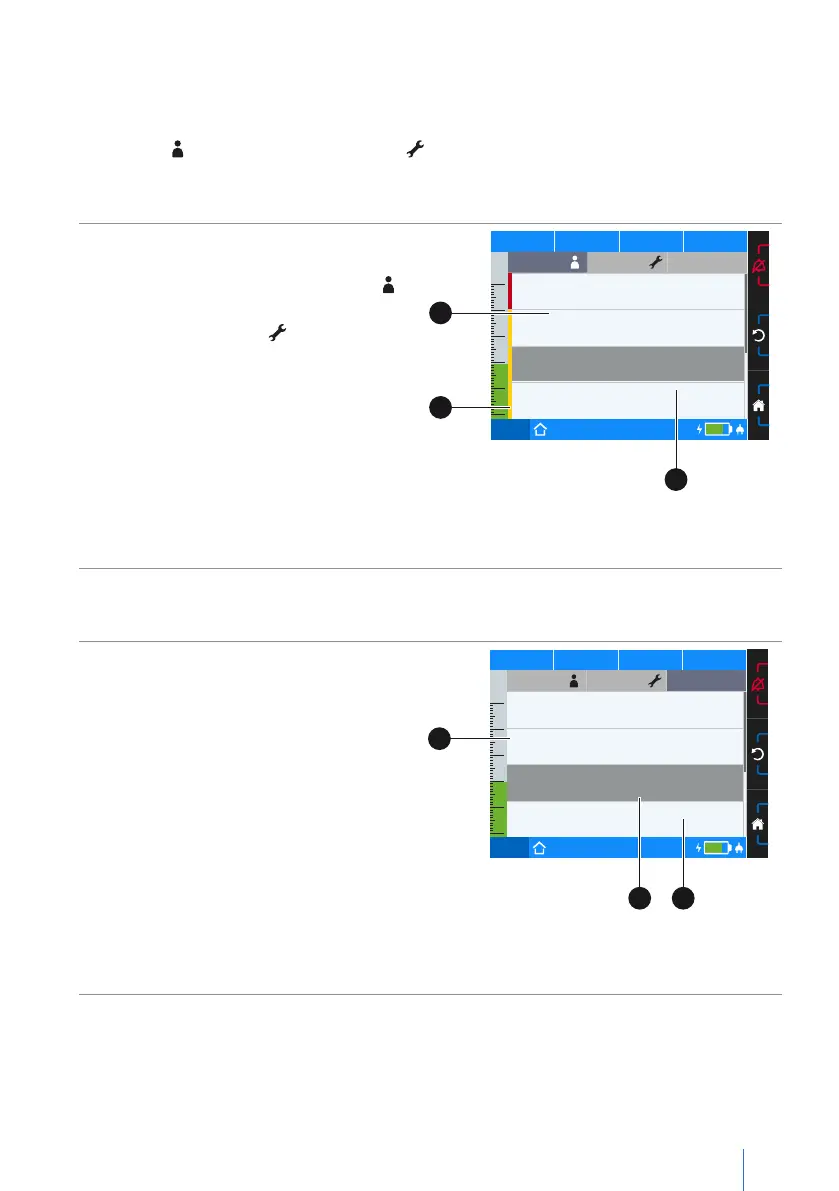
The event log screen is divided into three areas:
• Alarms
• Alarms
• Events
Alarms
Physiologically-dependant alarms whose
alarm limits have been set in the param-
eter screen are stored under “Alarms ”.
The only technically-dependent alarms
saved under “Alarms ”, by contrast,
are those whose alarm conditions are
implemented and built into the device.
You can view the last 50 alarm events.
For more information on the alarms,
refer to chapter “Alarms and Messages”
starting on page 65.
PCV
75%
50
40
30
20
10
0
p
hPa f
bpm V
I
lI:E
AlarmsAlarms Events
15.07.2016, 23:41 l Set 1
Apnoea
09.07.2016, 22:02 l Set 3
Low Volume
16.06.2016 l 21:33 l Set 3
Low Frequency
24.05.2016 l 18:03 l Set 3
Leakage
C
A
B
A Timestamp (date, time and set)
B Alarm priority C Selected alarm
Figure 22: Event log screen (alarms)
Events
Under “Events” you can see the last 50
parameter changes and events.
PCV
75%
50
40
30
20
10
0
p
hPa f
bpm V
I
lI:E
AlarmsAlarms Events
10.07.2016, 00:56 l Set 1
Therapy on
10.07.2016, 00:06 l Set 1
Therapy started
03.07.2016 l 22:08 l Set 1 2,5 → 3,0 hPa
High Press. Tolerance
26.06.2016 l 05:12 l Set 1 4,5 → 6,5 hPa
PEEP
B
A
C
A Timestamp (date and time)
B Selected event C Parameter change
Figure 23: Event log screen (events)


 To Next Page