Chapter 5: Device operation 55
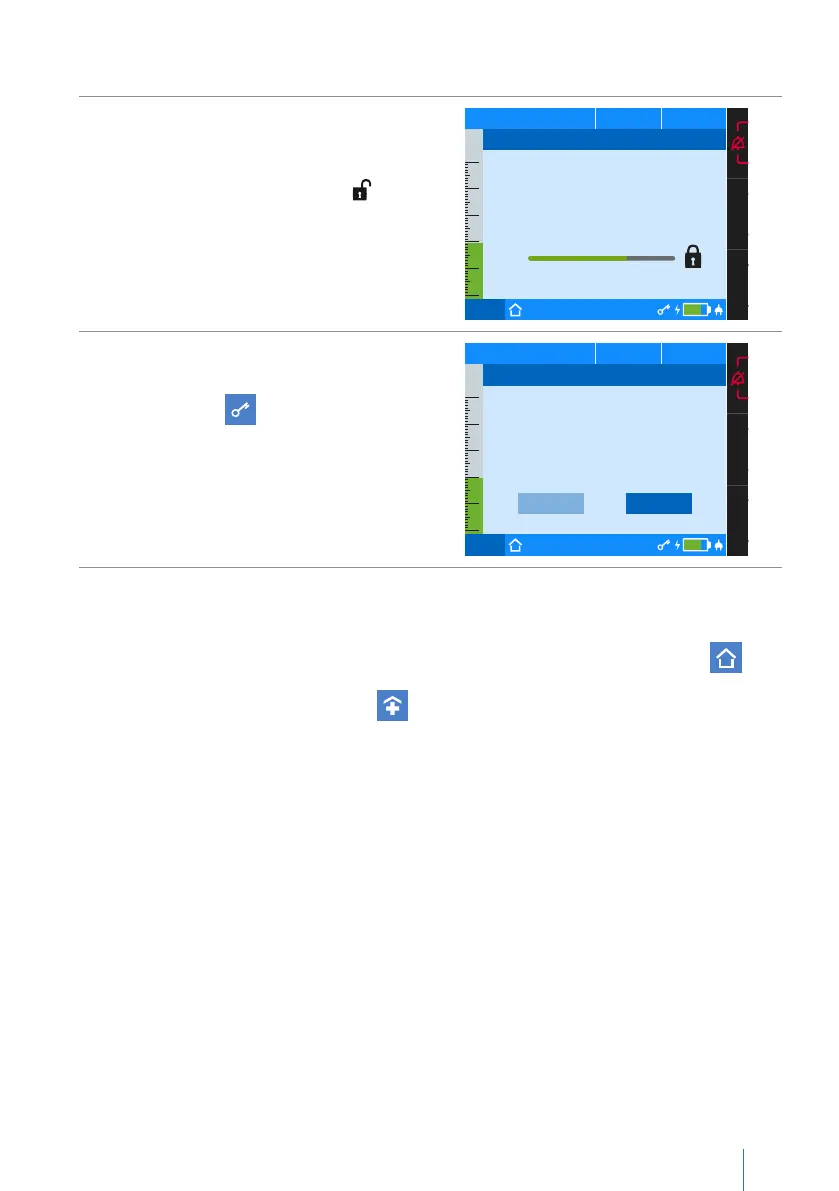
To deactivate the menu lock:
1.
Hold the MFK for more than 1 second
until the window appears at the side.
Keep the MFK pressed until the prog-
ress bar has completed and is dis-
played.
Then release the MFK.
PCV
75%
50
40
30
20
10
0
p
hPa f
bpm V
I
lI:E
Disable Menu Lock
To disable the menu lock keep
pressing the MFK.
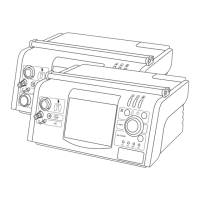
2. Select “Yes” and then press the MFK.
The symbol will be hidden from
the toolbar.
PCV
75%
50
40
30
20
10
0
p
hPa f
bpm V
I
lI:E
Yes No
Disable Menu Lock
Disable menu lock?
User profiles
For ventilation outside a clinic, the device must be operated in the “Home” user
mode.
If the device is in the “clinic” mode” , contact your responsible physician or dealer.


 To Next Page