Continued
261
uuDisplay AudiouBasic Operation
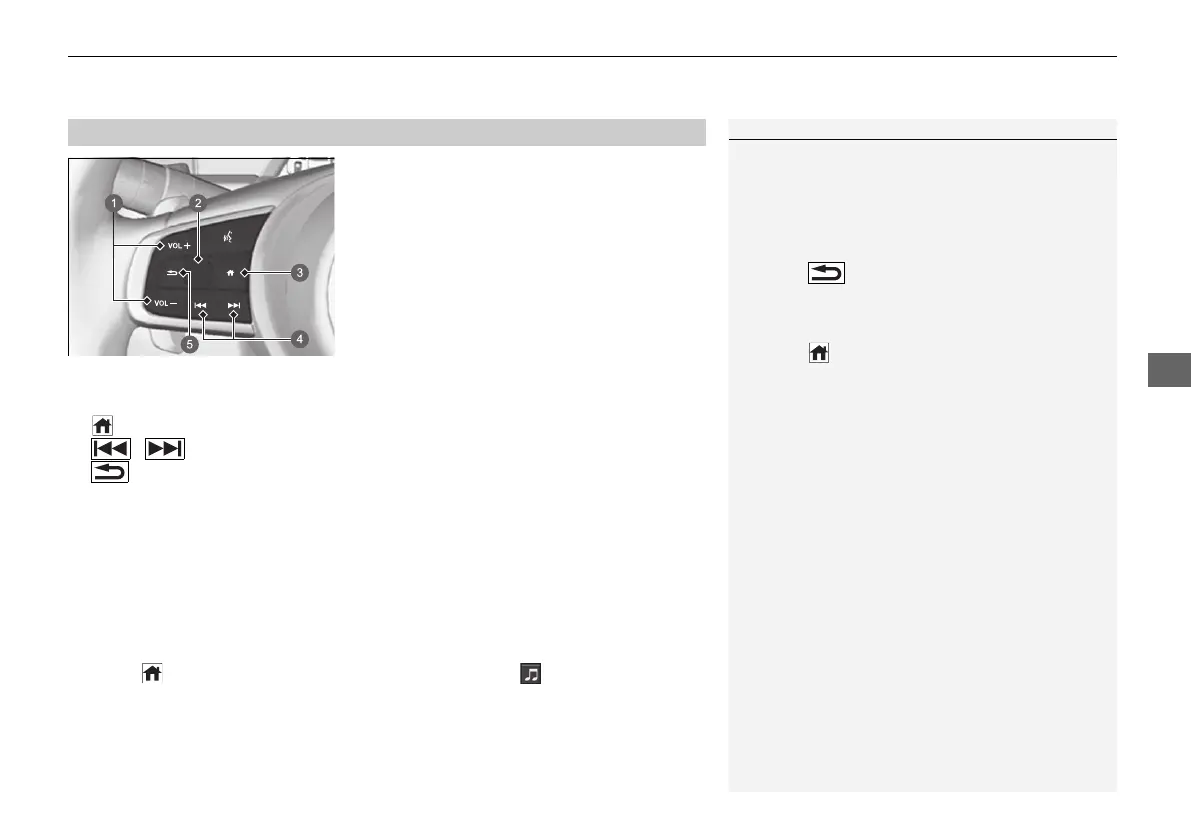
Allow you to operate the audio system while
driving. The information is shown on the
driver information interface.
VOL (+/VOL (- (Volume) Buttons
Press VOL (+: To increase the volume.
Press VOL
(-: To decrease the volume.
Left Selector Wheel
• When selecting the audio mode
Press the (home) button, then roll up or down to select (audio) on the driver
information interface, and then press the left selector wheel.
■
Audio Remote Controls
1Audio Remote Controls
Some modes appear only when an appropriate
device or medium is used.
Depending on the Bluetooth® device you connect,
some functions may not be available.
Press the (back) button for the driver
information interface to go back to the previous
screen or cancel a command.
Press the (home) button to go back to the home
screen of the driver information interface.
a VOL (+/VOL (- (Volume) Buttons
b Left Selector Wheel
c (Home) Button
d / (Seek/Skip) Buttons
e (Back) Button
20 2EX JSS (KE KG)-32TYF6000.book 261 ページ 2020年3月6日 金曜日 午後6時58分













 To Next Page