Continued
353
uuDisplay AudiouHands-Free Telephone System
■
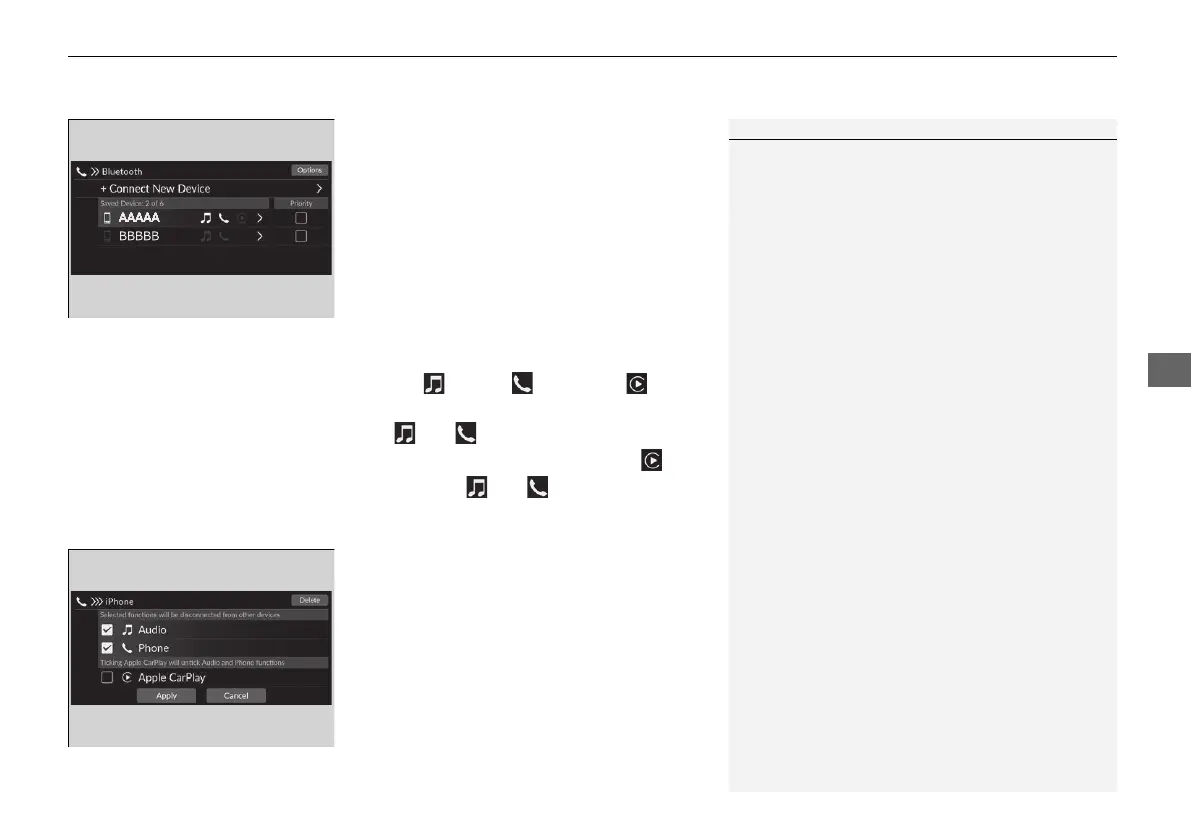
To change the currently paired phone
1. Select Phone.
2. Select Settings.
3. Select Change Devices.
4. Select a phone to connect.
u HFT disconnects the connected phone
and starts searching for another paired
phone.
u You can set the connected phone
priority. Select the box checked on the
phone you want to prioritize.
5. Select (audio), (phone), or (Apple
CarPlay).
u and can be selected
simultaneously, however, when is
selected, and cannot be selected.
6. Select Apply.
■
To delete a paired phone
1. Select Phone.
2. Select Settings.
3. Select Change Devices.
4. Select a phone you want to delete.
5. Select Delete.
6. A confirmation message appears on the
screen. Select Delete.
1To change the currently paired phone
If no other phones are found or paired when trying to
switch to another phone, HFT will inform you that the
original phone is connected again.
To pair other phones, select + Connect New Device
from the Bluetooth screen.
20 2EX JSS (KE KG)-32TYF6000.book 353 ページ 2020年3月6日 金曜日 午後6時58分











 To Next Page