Continued
583
uuService Reminder System
*
u
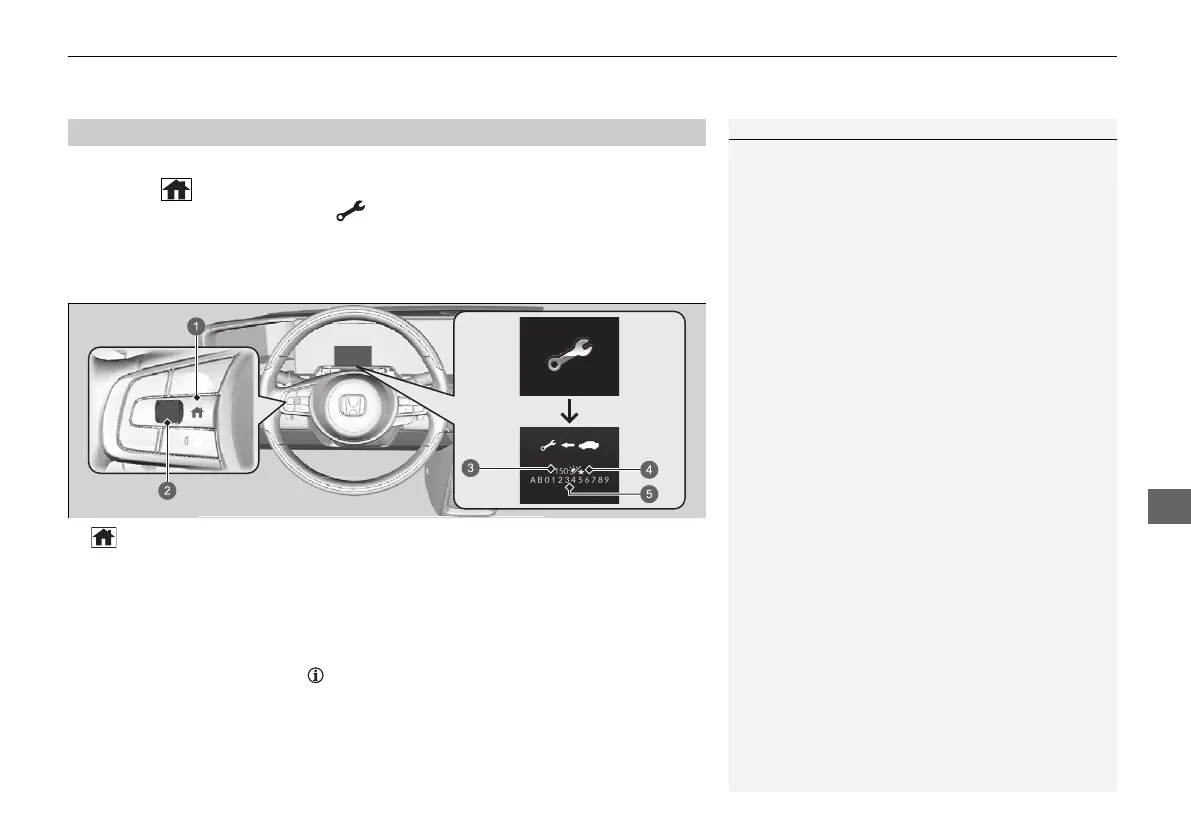
1. Set the power mode to ON.
2. Press the (home) button.
3. Roll the left selector wheel until is displayed.
4. Press the left selector wheel to go to the service reminder information screen. The
maintenance item(s) appears on the driver information interface along with
maintenance items due soon.
The system message indicator ( ) comes on along with the service reminder
information.
■
Displaying the Service Reminder Information
1Displaying the Service Reminder Information
Based on motor operating conditions, the system
calculates the remaining days before the next service
is to be performed.
If the system calculates that the indicated time for the
next maintenance service comes earlier than the
indicated distance, the service reminder information
display changes to show the remaining days.
a (home) Button
b Left Selector Wheel
c Remaining Days
d Day Icon
e Maintenance Item Code(s)
20 2EX JSS (KE KG)-32TYF6000.book 583 ページ 2020年3月6日 金曜日 午後6時58分











 To Next Page