uuService Reminder System
*
u
586
Reset the service reminder information display if you have performed the
maintenance service.
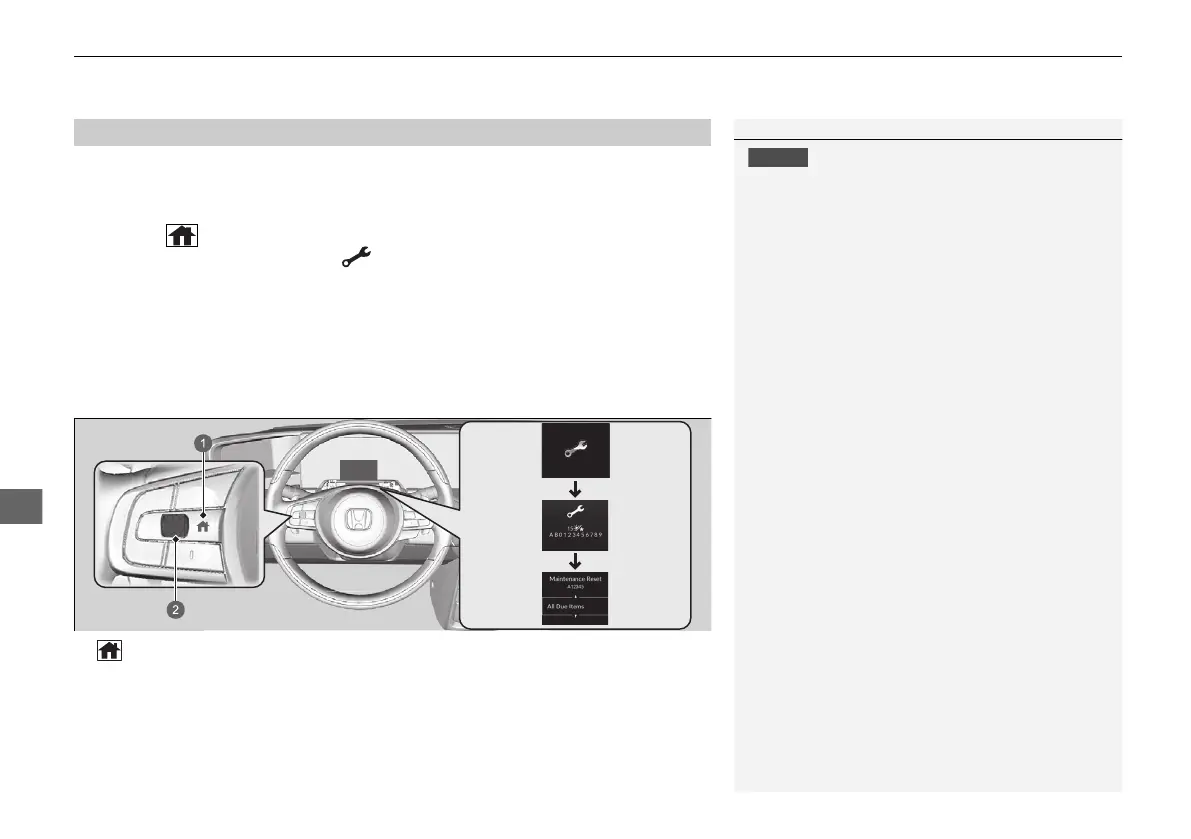
1. Set the power mode to ON.
2. Press the (home) button.
3. Roll the left selector wheel until is displayed.
4. Press the left selector wheel to go to the service reminder information screen.
5. Press and hold the left selector wheel for about 10 seconds.
6. Roll the left selector wheel select Reset (You can also select Cancel to end the
process).
7. Press the left selector wheel to reset the selected item.
8. Repeat from step 5 for other items you wish to reset.
■
Resetting the Display
Failure to reset the service reminder information after
a maintenance service results in the system showing
incorrect maintenance intervals, which can lead to
serious mechanical problems.
You can reset also the service reminder system
information display using the audio/information
screen.
2 Customized Features P. 327
The dealer will reset the service reminder information
display after completing the required maintenance
service. If someone other than a dealer performs
maintenance service, reset the service reminder
information display yourself.
a (home) Button
b Left Selector Wheel
20 2EX JSS (KE KG)-32TYF6000.book 586 ページ 2020年3月6日 金曜日 午後6時58分













 To Next Page