Honeywell | 41
8 Configuring CloudLink 5G Modem
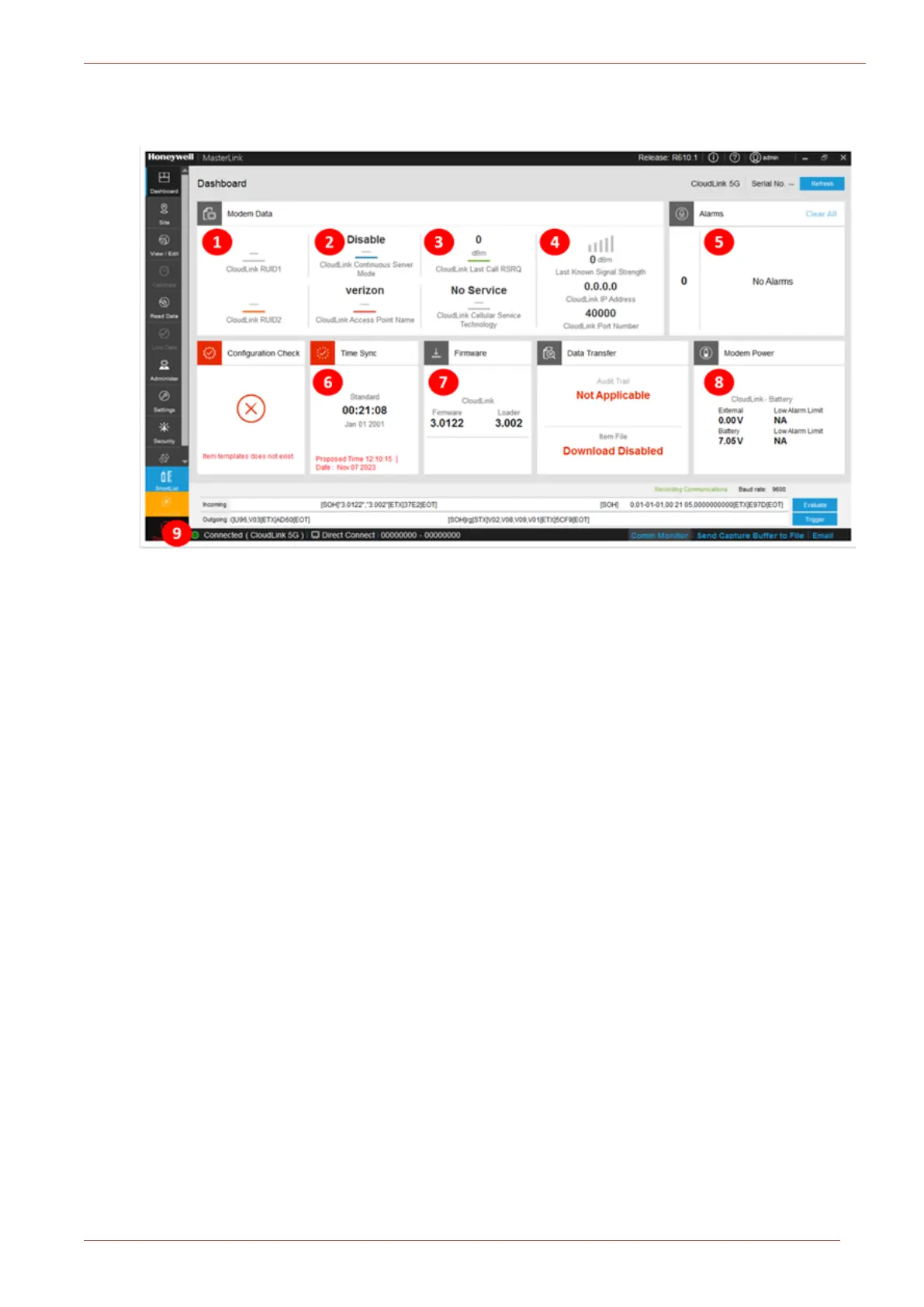
5. After successful connection of MasterLink through Serial/Internet port connection, the fol-
lowing screen appears:
The numbers in the above image mentions about the standalone connection:
1. Mentions about the Device ID. 6.
Time sync: Date and time in the
device.
2. APN used in the device. 7.
Firmware versions running in the
device (Application and Bootloader).
3.
Signal strength of the modem and cellular ser-
vice technology used in the modem.
8.
Modem Power (source of the power
connected to the modem).
4. IP address and port number of modem. 9.
If it is a Standalone connection, it dis-
plays as “Cloudlink” only.
5.
Dashboard alarms (if any errors are displayed
like a low battery which needs immediate atten-
tion from the user. For example: No SIM).
8.3.4.2 Integrated Mode of Connection
1. Click on the Site tab.
2. Configured sites can be connected using the Site/Site Management screen of MasterLink.
When using the Integrated Mode of connection, select the device type which has EVC+CloudLink as
shown in the below image:



 To Next Page