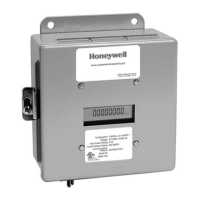
E-MON CLASS 3200 METER
62-0397—02 24
6.8 RS-232 Communications
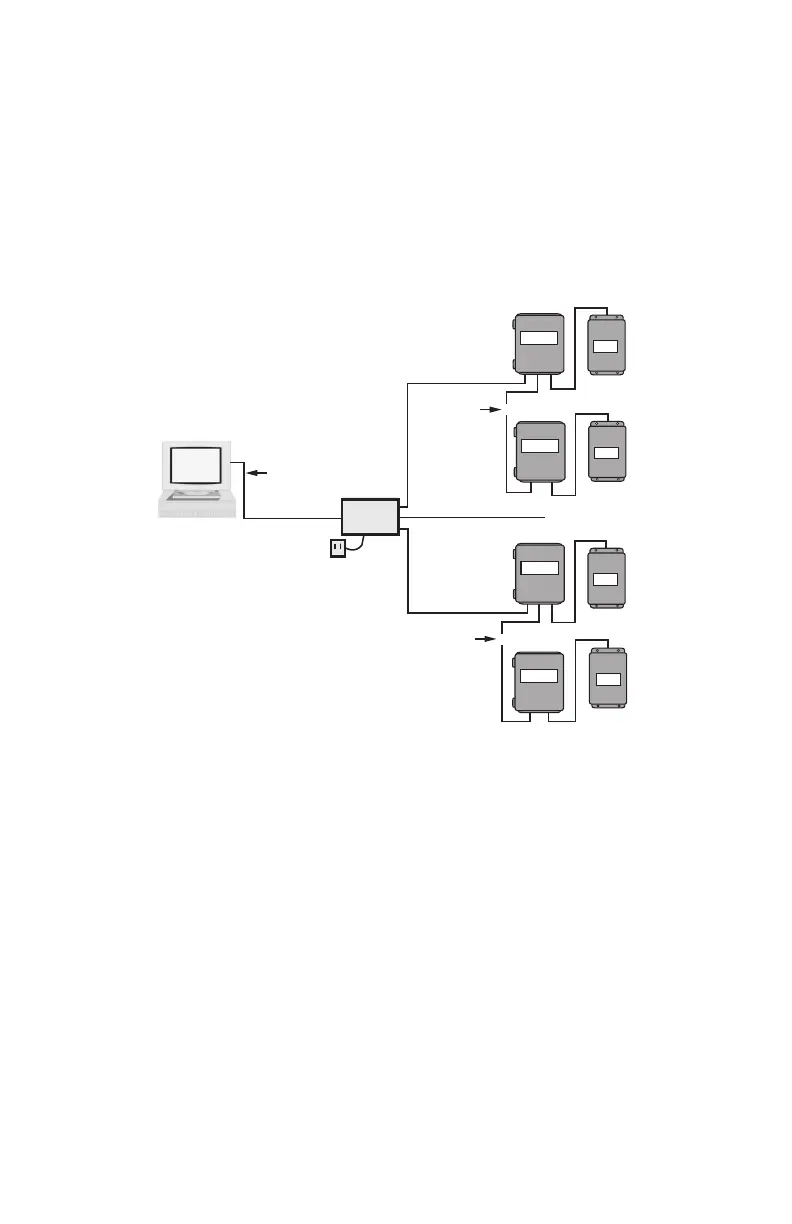
6.8.1 Hardwired System using the RS-232 Communication
Key
The RS-232 communications key allows you to connect E-Mon Class 3200
meters to a personal computer that has the Honeywell Energy™ software
installed. The computer communicates with the meters through the RS-232 key.
The RS-232 key must be located within 15 feet of the host computer.
Fig. 15. RS-232 Configuration.
6.8.2 Connecting the RS-232 Key to the Computer
The RS-232 key is supplied with:
a. (1) 8-conductor cable fitted with RJ-45 plugs
b. (1) DB-9 serial COM port adapter
c. (1) AC adapter that converts 120VAC to 9VDC for powering the RS-232
key
Connection Steps:
1. Connect the 8-conductor cable to the left-side jack (labeled “RS232”) on
the rear panel of the RS-232 key.
2. Connect the appropriate COM port adapter (DB-9) to the serial port on the
back of the computer. Plug the 8-conductor cable from the RS-232 key into
the COM port adapter.
CHANNEL 2
~
~
~
~
CHANNEL 3
UP TO 4000
FEET TOTAL
RS-232
KEY*
RS-232 SERIAL
PORT COM1
OR COM2
UP TO 52
CLASS 3200
METERS
M33309
UP TO 4000
FEET TOTAL
UP TO 52
CLASS 3200
METERS
CHANNEL 1
AC ADAPTER
PC
15 FEET MAX
62-0397_C.fm Page 24 Wednesday, May 9, 2018 9:28 AM


 To Next Page
 Loading...