44 | Performance Series DVR User Guide
www.honeywellvideo.com
Operating Live View
In Live View mode, you can select the following options:
Using the Mouse in Live View
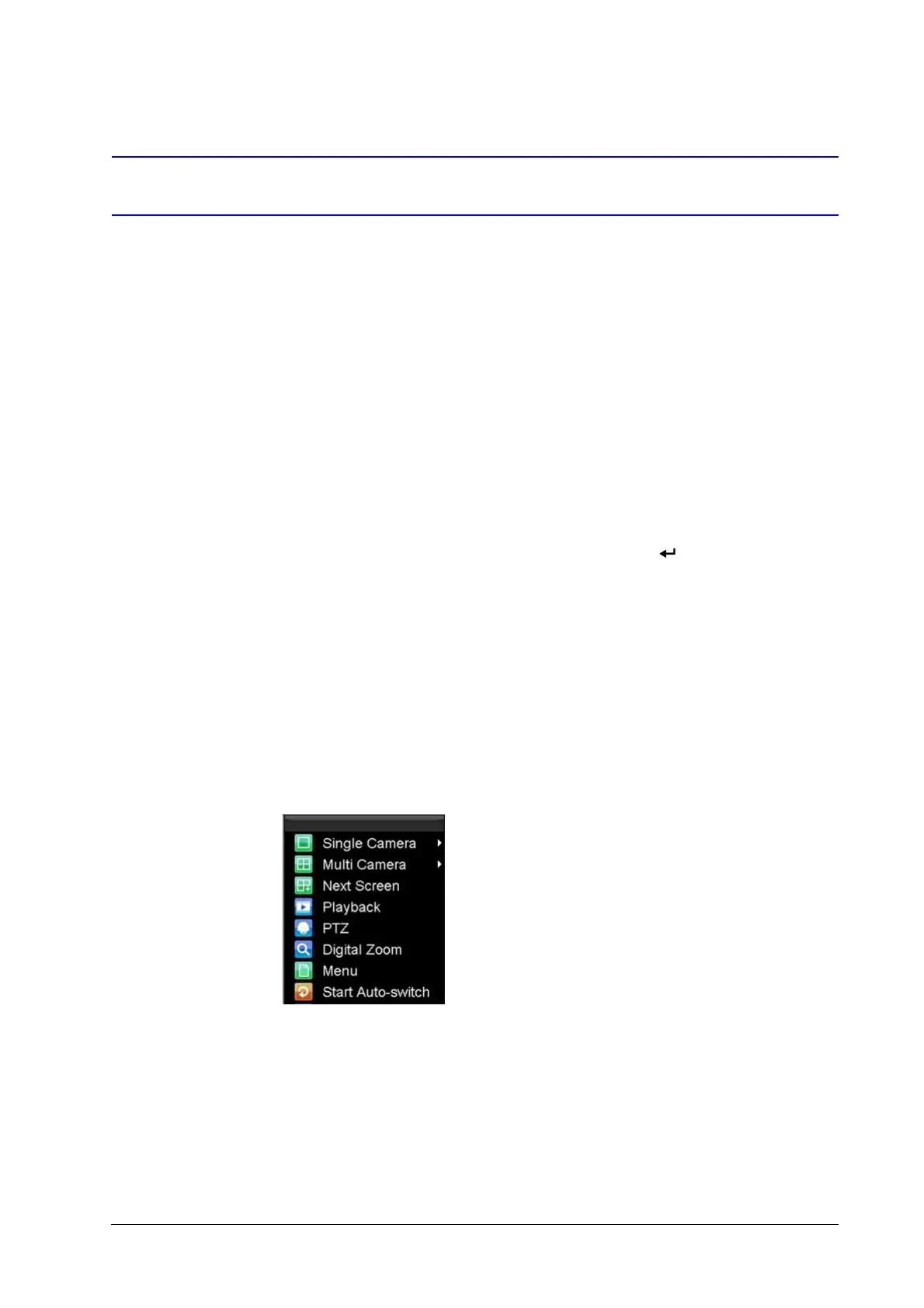
Some functions of the Live View can be quickly accessed by clicking the right mouse button
(see Figure 3-1).
Figure 3-1 Live View Shortcut Menu
Display Single Camera • Front Panel/Remote: Use the alphanumeric buttons.
• Mouse: Right-click anywhere in the window, and then
click Single Camera.
Multi-camera Live View • Front Panel/Remote: Press the PREV button.
• Mouse: Right-click anywhere in the window, and then
click Multi Camera.
Manual Switch • Front Panel/ Remote: Press the left arrow button to
access the previous screen. Press the right arrow button
to access next screen.
• Mouse: Right-click anywhere in the window, and then
click Next Screen.
Auto Sequence • Front Panel/Remote: Press the (Enter) button.
• Mouse: Right-click anywhere in the window, and then
click Start Auto-switch.
Digital Zoom • Mouse: Right-click anywhere in the window, and then
click Digital Zoom.



 To Next Page
 Loading...







